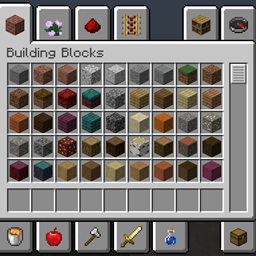
The Creative inventory is an interface in Creative mode that contains unlimited amounts of all blocks and items in the game, some of which are not available in Survival mode. Players can search for the items they want to use with the search bar at the top or in several tabs.
Java Edition

A single item can be grabbed using left-click, increasing with continued left-clicks on that item. Left or right-clicking with an item or stack of items while hovering over any item other than the one held gets rid of the held item. Right-clicking an item also picks up one item, but the second click then puts it back down as opposed to picking up more. Shift-clicking an item grabs a full stack of items. Pressing a number key while hovering over an item instantly places one full stack of that item into the hotbar slot that corresponds with the number.
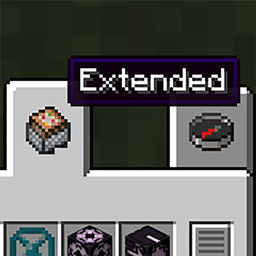
The Creative inventory screen is sorted into 11 sections: Building Blocks, Colored Blocks, Natural Blocks, Functional Blocks, Redstone Blocks, Tools & Utilities, Combat, Food & Drinks, Ingredients, Spawn Eggs, and Operator Utilities. The latter tab is available only if cheats are enabled and the "Operator Items Tab" option in the controls menu is turned on. Blocks are grouped by material and the same item can appear in multiple tabs, which the latter are indicated with an asterisk (*) below. In the case of the search tab, those that appear in multiple tabs are listed only once in the first section. There are also  Search Items,
  Saved Hotbars and
  Survival Inventory tabs. Wither and ender dragon spawn eggs, petrified oak slab, knowledge book, uncraftable potions and uncraftable tipped arrow are not obtainable in the Creative inventory.
Using the search tab, one can access enchanted books of any level, whereas only books of the maximum levels can be found in the Ingredients section.
 Building Blocks
 Log/Stem, all types*
 Stripped Log/Stem, all types
 Wood/Hyphae, all types
 Stripped Wood/Hyphae, all types
 Planks, all types
 Wooden Stairs, all types
 Wooden Slab, all types
 Wooden Fence, all types
 Fence Gate, all types
 Wooden Door, all types
 Wooden Trapdoor, all types
 Wooden Pressure Plate, all types
 Wooden Button, all types
 Block of Bamboo
 Block of Stripped Bamboo
 Bamboo Mosaic, all types
 Stairs, all stone types
 Slab, all stone types
 Wall, all types
 Stone, all types
 Stone Pressure Plate*
 Stone Button*
 Cobblestone, all types
 Mossy Cobblestone, all types
 Smooth Stone, all types
 Stone Bricks, all types
 Cracked Stone Bricks
 Chiseled Stone Bricks
 Mossy Stone Bricks, all types
 Granite, all types
 Polished Granite, all types
 Diorite, all types
 Polished Diorite, all types
 Andesite, all types
 Polished Andesite, all types
 Deepslate*
 Cobbled Deepslate, all types
 Chiseled Deepslate
 Polished Deepslate, all types
 Deepslate Bricks, all types
 Cracked Deepslate Bricks
 Deepslate Tiles, all types
 Cracked Deepslate Tiles
 Reinforced Deepslate
 Tuff, all types
 Chiseled Tuff
 Polished Tuff, all types
 Tuff Bricks, all types
 Chiseled Tuff Bricks
 Bricks, all types
 Packed Mud
 Mud Bricks, all types
 Resin Bricks, all types
 Chiseled Resin Bricks
 Sandstone, all types
 Chiseled Sandstone
 Smooth Sandstone, all types
 Cut Sandstone, all types
 Red Sandstone, all types
 Chiseled Red Sandstone
 Smooth Red Sandstone, all types
 Cut Red Sandstone, all types
 Cinnabar, all types
 Chiseled Cinnabar
 Polished Cinnabar, all types
 Cinnabar Bricks, all types
 Sulfur, all types
 Chiseled Sulfur
 Polished Sulfur, all types
 Sulfur Bricks, all types
 Sea Lantern*
 Prismarine, all types
 Prismarine Bricks, all types
 Dark Prismarine, all types
 Netherrack*
 Nether Bricks, all types
 Cracked Nether Bricks
 Nether Brick Fence
 Chiseled Nether Bricks
 Red Nether Bricks, all types
 Basalt*
 Smooth Basalt*
 Polished Basalt
 Blackstone, all types
 Gilded Blackstone
 Chiseled Polished Blackstone
 Polished Blackstone, all types
 Polished Blackstone Pressure Plate
 Polished Blackstone Button
 Polished Blackstone Bricks, all types
 Cracked Polished Blackstone Bricks
 End Stone*
 End Stone Bricks, all types
 Purpur Block, all types
 Purpur Pillar
 Block of Coal
 Block of Emerald
 Block of Lapis Lazuli
 Block of Amethyst*
 Block of Redstone*
 Block of Quartz, all types
 Chiseled Quartz Block
 Quartz Bricks
 Quartz Pillar
 Smooth Quartz Block, all types
 Block of Iron
 Iron Bars
 Iron Door*
 Iron Trapdoor*
 Heavy Weighted Pressure Plate*
 Iron Chain*
 Block of Gold
 Light Weighted Pressure Plate*
 Block of Diamond
 Block of Netherite
 Block of Copper, all types
 Chiseled Copper, all types
 Copper Grate, all types
 Cut Copper, all types
 Cut Copper Stairs, all types
 Cut Copper Slab, all types
 Copper Bars, all types
 Copper Door, all types
 Copper Trapdoor, all types
 Copper Bulb, all types*
 Copper Chain, all types*
 Colored Blocks
 Wool, all colors
 Wool Stairs, all colors
 Wool Slab, all colors
 Carpet, all colors
 Terracotta
 Stained Terracotta, all colors
 Concrete, all colors
 Concrete Stairs, all colors
 Concrete Slab, all colors
 Concrete Powder, all colors
 Glazed Terracotta, all colors
 Glass
Glass Tinted Glass*
 Stained Glass, all colors
 Glass Pane
 Stained Glass Pane, all colors
 Shulker Box*
 Dyed Shulker Box, all colors*
 Bed, all colors*
 Cushion, all colors
 Candle*
 Dyed Candle, all colors*
 Banner, all colors*
 Natural Blocks
 Grass Block
 Podzol
 Mycelium
 Dirt Path
 Dirt
Dirt Coarse Dirt
 Rooted Dirt
 Farmland
 Mud
Mud Clay
Clay Gravel
 Sand
Sand- Sandstone*
 Red Sand
- Red Sandstone*
 Ice
Ice Packed Ice
 Blue Ice
 Snow Block
 Snow
Snow Moss Block
 Moss Carpet
 Pale Moss Block
 Pale Moss Carpet
 Pale Hanging Moss
- Stone*
- Deepslate*
- Granite*
- Diorite*
- Andesite*
 Calcite
- Tuff*
 Dripstone Block
 Pointed Dripstone
- Prismarine*
- Cinnabar*
- Sulfur*
 Sulfur Spike
 Potent Sulfur
 Magma Block*
 Obsidian
 Crying Obsidian*
- Netherrack*
 Crimson Nylium
 Warped Nylium
 Soul Sand
 Soul Soil
 Bone Block
- Blackstone*
- Basalt*
- Smooth Basalt*
- End Stone*
 Coal Ore, both types
 Emerald Ore, both types
 Lapis Lazuli Ore, both types
 Redstone Ore, both types
 Iron Ore, both types
 Copper Ore, both types
 Gold Ore, both types
 Diamond Ore, both types
 Nether Gold Ore
 Nether Quartz Ore
 Ancient Debris*
 Block of Raw Iron
 Block of Raw Copper
 Block of Raw Gold
 Glowstone*
- Block of Amethyst*
 Budding Amethyst
 Amethyst Cluster/Amethyst Bud, all types
 Log, all types*
 Mangrove Roots
 Muddy Mangrove Roots
 Mushroom Stem
 Stem, both types*
 Leaves, all types
 Mushroom Blocks, both types
 Nether Wart Block/Warped Wart Block
 Shroomlight*
 Sapling, all types
 Mangrove Propagule
 Azalea
 Flowering Azalea
 Brown Mushroom/Red Mushroom
 Shelf Mushroom
 Crimson Fungus/Warped Fungus
 Short Grass
 Fern
Fern Short Dry Grass
 Bush
Bush Red Shrub
 Dead Bush
 Dandelion
 Poppy
Poppy Blue Orchid
 Allium
 Azure Bluet
 Tulips, all types
 Oxeye Daisy
 Cornflower
 Lily of the Valley
 Torchflower
 Cactus Flower
 Closed Eyeblossom
 Open Eyeblossom
 Wither Rose
 Pink Petals
 Wildflowers
 Leaf Litter
 Spore Blossom
 Firefly Bush
 Bamboo
 Sugar Cane
 Cactus
 Vines
Vines Glow Lichen*
 Hanging Roots
 Tall Grass
 Large Fern
 Tall Dry Grass
 Sunflower
 Lilac
Lilac Rose Bush
 Peony
Peony Pitcher Plant
 Big Dripleaf*
 Small Dripleaf
 Crimson Roots
 Warped Roots
 Nether Sprouts
 Weeping Vines
 Twisting Vines
 Chorus Flower
 Chorus Plant
 Frogspawn
 Turtle Egg
 Sniffer Egg
 Dried Ghast
 Wheat Seeds
 Cocoa Beans
 Pumpkin Seeds
 Melon Seeds
 Beetroot Seeds
 Torchflower Seeds
 Pitcher Pod
 Glow Berries*
 Sweet Berries*
 Nether Wart*
 Lily Pad
 Seagrass
 Sea Pickle
 Kelp
Kelp Dried Kelp Block
 Coral Blocks, all types
 Dead Coral Blocks, all types
 Coral, all types
 Dead Coral, all types
 Coral Fans, all types
 Dead Coral Fans, all types
 Sponge
 Wet Sponge
 Melon
Melon Pumpkin
 Carved Pumpkin
 Jack o'Lantern
 Hay Bale
 Bee Nest*
 Honeycomb Block
 Slime Block*
 Honey Block*
 Block of Resin
 Froglights, all types*
 Sculk
Sculk Sculk Vein
 Sculk Catalyst*
 Sculk Shrieker
 Sculk Sensor*
 Cobweb
 Bedrock
 Functional Blocks
  Torch
Torch Soul Torch
 Copper Torch
 Redstone Torch*
 Lantern
 Soul Lantern
 Copper Lantern, all types
 Iron Chain*
- Copper Chain, all types*
 End Rod
- Sea Lantern*
 Redstone Lamp*
- Copper Bulb, all types*
- Glowstone*
- Shroomlight*
- Froglights, all types*
- Crying Obsidian*
- Glow Lichen*
- Magma Block*
 Crafting Table
 Stonecutter
 Cartography Table
 Fletching Table
 Smithing Table
 Grindstone
 Loom
Loom Furnace*
 Smoker
 Blast Furnace
 Campfire
 Soul Campfire
 Anvils, all types
 Composter*
 Note Block*
 Jukebox*
 Enchanting Table
 End Crystal*
 Brewing Stand
 Cauldron*
 Bell*
Bell* Beacon
 Conduit
 Lodestone
 Ladder
 Scaffolding
- Bee Nest*
 Beehive
 Suspicious Sand
 Suspicious Gravel
 Lightning Rod, all types
 Flower Pot
 Decorated Pot*
 Armor Stand*
 Item Frame
 Glow Item Frame
 Painting, all types
 Bookshelf
 Chiseled Bookshelf*
 Shelf, all types*
 Lectern*
- Tinted Glass*
 Sign, all types
 Hanging Sign, all types
 Chest*
 Copper Chest, all types
 Barrel*
 Ender Chest
- Shulker Box*
- Dyed Shulker Box, all colors*
 Respawn Anchor
- Bed, all colors*
 Straw Bed
- Candle*
- Dyed Candle, all colors*
- Banner, all colors*
 Ominous Banner
 Skeleton Skull
 Wither Skeleton Skull
 Player Head
 Zombie Head
 Creeper Head
 Piglin Head
 Dragon Head
 Dragon Egg
 End Portal Frame
 Vault[Functional Blocks 1]
 Eye of Ender*
 Copper Golem Statue, all types
 Infested Blocks, all types
 Redstone Dust*
- Redstone Torch*
- Block of Redstone*
 Redstone Repeater
 Redstone Comparator
 Target
- Waxed Copper Bulb, all types*
 Lever
Lever Oak Button*
- Stone Button*
 Oak Pressure Plate*
- Stone Pressure Plate*
- Light Weighted Pressure Plate*
- Heavy Weighted Pressure Plate*
- Sculk Sensor*
 Calibrated Sculk Sensor
- Sculk Catalyst*
- Block of Amethyst*
 White Wool*
 Tripwire Hook
 String*
- Lectern*
 Daylight Detector
 Waxed Lightning Rod
 Piston
 Sticky Piston
- Slime Block*
- Honey Block*
 Dispenser
 Dropper
 Crafter
 Hopper
- Chest*
 Waxed Copper Chest*
- Barrel*
- Chiseled Bookshelf*
 Oak Shelf*
- Furnace*
 Trapped Chest
- Jukebox*
- Decorated Pot*
 Observer
- Note Block*
- Composter*
- Cauldron*
 Rail*
Rail* Powered Rail*
 Detector Rail*
 Activator Rail*
 Minecart*
 Minecart with Hopper*
 Minecart with Chest*
 Minecart with Furnace*
 Minecart with TNT*
 Oak Boat with Chest*
 Bamboo Raft with Chest*
 Oak Door*
- Iron Door*
 Oak Fence Gate*
 Oak Trapdoor*
- Iron Trapdoor*
 TNT*
TNT*- Redstone Lamp*
- Bell*
- Big Dripleaf*
- Armor Stand*
 Redstone Ore*


 Wooden tools


 Stone tools


 Copper Tools


 Iron tools


 Golden tools


 Diamond tools


 Netherite tools
 Bucket
 Water Bucket
 Bucket of Cod
 Bucket of Salmon
 Bucket of Tropical Fish
 Bucket of Pufferfish
 Bucket of Axolotl
 Bucket of Tadpole
 Bucket of Sulfur Cube
 Lava Bucket
 Powder Snow Bucket
 Milk Bucket*
 Fishing Rod
 Flint and Steel
 Fire Charge*
 Bone Meal*
 Shears
 Brush
Brush Name Tag
 Lead
Lead Bundle
 Dyed Bundle, all colors
 Compass
 Recovery Compass
 Clock
Clock Spyglass
 Empty Map
 Book and Quill
 Wind Charge*
 Ender Pearl*
- Eye of Ender*
 Elytra
 Firework Rocket, all 3 durations*
 Saddle
 Harness, all colors
 Carrot on a Stick
 Warped Fungus on a Stick
 Boat, all types
 Boat with Chest, all types
- Rail*
- Powered Rail*
- Detector Rail*
- Activator Rail*
- Minecart*
- Minecart with Hopper*
- Minecart with Chest*
- Minecart with Furnace*
- Minecart with TNT*
 Goat Horn, all types
 Music Disc, all types
 Combat


 Sword, all types


 Spear, all types
- Axe, all types*
 Trident
 Mace
Mace Shield


 Leather Armor


 Copper Armor


 Chainmail Armor


 Iron Armor


 Golden Armor


 Diamond Armor


 Netherite Armor
 Turtle Shell*
 Horse Armor, all types
 Wolf Armor
 Nautilus Armor, all types
 Totem of Undying
- TNT*
- End Crystal*
 Snowball*
 Egg*
Egg* Brown Egg*
 Blue Egg*
- Wind Charge*
 Bow
Bow Crossbow
- Firework Rocket, all 3 durations*
 Arrow
Arrow Spectral Arrow
 Tipped Arrow, all types
 Apple
Apple Golden Apple
 Enchanted Golden Apple
 Melon Slice
- Sweet Berries*
- Glow Berries*
 Chorus Fruit
 Carrot
 Golden Carrot*
 Potato
 Baked Potato
 Poisonous Potato
 Beetroot
 Golden Dandelion
 Dried Kelp
 Raw Beef
 Steak
Steak Raw Porkchop
 Cooked Porkchop
 Raw Mutton
 Cooked Mutton
 Raw Chicken
 Cooked Chicken
 Raw Rabbit
 Cooked Rabbit
 Raw Cod
 Cooked Cod
 Raw Salmon
 Cooked Salmon
 Tropical Fish
 Pufferfish*
 Bread
Bread Cookie
 Cake
Cake Pumpkin Pie
 Rotten Flesh
 Spider Eye*
 Mushroom Stew
 Beetroot Soup
 Rabbit Stew
 Suspicious Stew, all types
- Milk Bucket*
 Honey Bottle
 Ominous Bottle, all types
 Potion, all types
 Splash Potion, all types
 Lingering Potion, all types
 Coal
Coal Charcoal
 Emerald
 Lapis Lazuli
 Amethyst Shard
 Nether Quartz
 Raw Copper
 Raw Iron
 Raw Gold
 Diamond
- Ancient Debris*
 Copper Nugget
 Iron Nugget
 Gold Nugget
 Iron Ingot
 Copper Ingot
 Gold Ingot
 Netherite Scrap
 Netherite Ingot
 Stick
Stick Flint
Flint Wheat
Wheat Bone
Bone- Bone Meal*
- String*
 Feather
- Snowball*
- Egg*
- Brown Egg*
- Blue Egg*
 Leather
 Rabbit Hide
 Honeycomb
 Resin Clump
 Ink Sac
 Glow Ink Sac
 Turtle Scute
 Armadillo Scute
 Slimeball
 Clay Ball
 Prismarine Shard
 Prismarine Crystals
 Nautilus Shell
 Heart of the Sea
- Fire Charge*
 Blaze Rod
 Breeze Rod
 Heavy Core
 Nether Star
- Ender Pearl*
- Eye of Ender*
 Shulker Shell
 Popped Chorus Fruit
 Echo Shard
 Disc Fragment
 Dye, all colors
 Bowl
Bowl Brick
Brick Nether Brick
 Resin Brick
 Paper
Paper Book
Book Firework Star
 Glass Bottle
- Nether Wart*
- Redstone Dust*
 Glowstone Dust
 Gunpowder
 Dragon's Breath
 Fermented Spider Eye
 Blaze Powder
 Sugar
Sugar Rabbit's Foot
 Glistering Melon Slice
- Spider Eye*
- Pufferfish*
 Magma Cream
- Golden Carrot*
 Ghast Tear
- Turtle Shell*
 Phantom Membrane
 Banner Pattern, all types
 Pottery Sherd, all types
 Smithing Template, all types
 Bottle o' Enchanting
 Trial Key
 Ominous Trial Key
 Enchanted Book, all types, max level only
 Operator Utilities
 Command Block
 Chain Command Block
 Repeating Command Block
 Minecart with Command Block
 Jigsaw Block
 Structure Block
 Structure Void
 Barrier
 Debug Stick
 Test Instance Block
 Test Block, all types
 Lights, all light levels
- Painting, four types
Exclusive features in Java Edition
Bedrock Edition


 "Nature" redirects here. For some of the features associated with nature, see Plant. "Construction" redirects here. For naturally generated buildings, see Structure. For the guide on building, see Tutorial:Construction.
The Creative inventory screen in Bedrock Edition includes three buttons at the top of the screen (along the left with Pocket UI enabled) that can be used to show the regular Creative inventory, the regular Survival inventory, or both, with the Survival inventory on the right and the Creative inventory on the left. The Survival inventory contains the same features as the regular inventory in Survival, with the armor slots, crafting grid, and player doll. The recipe book is absent in Creative mode.
Taking items from the Creative inventory will always take a stack of items. Shift-clicking an item or tapping an item on mobile devices will send a stack of items to the first free slot in the hotbar or the Survival inventory when it is opened. Right-clicking an item will take only one item. Pressing a hotbar key while hovering over an item sends a stack to the respective hotbar slot, replacing any items inside.
When using a controller, all items in the hotbar can be instantly cleared by pressing  /
/ in the Creative inventory. This feature can be disabled in the "Controller" settings tab.
The Creative inventory screen is sorted into 4 sections: Construction, Equipment, Items, and Nature. These 4 tabs appear along the top right of the inventory (along the right side with Pocket UI enabled).
There is also an All tab, which shows all of the items and blocks in the game and an input box that allows filtering them. Sorted items added through add-ons are always listed at the end of the page, they're also available as well at the end of the All tab.
Some items in the Creative inventory are grouped together in sub-sections with other similar items. These sub-sections can be opened by selecting the item with a + icon next to it. Selecting the sub-section with a - icon closes the subsection. These sub-sections exclusively appear in the individual 4 categories and do not appear in the All tab.
 Construction
 Planks
- Planks, all types
- Bamboo Mosaic
 Walls
Walls
- Wall, all types
 Fences
- Wooden Fence, all types
- Nether Brick Fence
- Fence Gates
- Fence Gate, all types
 Stairs
- Stairs, all types
 Doors
Doors
- Wooden Door, all types
- Iron Door
 Copper Door, all types
- Trapdoors
- Wooden Trapdoor, all types
- Iron Trapdoor
- Copper Trapdoor, all types
- Bars
- Iron Bars
- Copper Bars, all types
- Glass
- Glass
- Stained Glass, all colors
- Tinted Glass
- Glass Panes
- Glass Pane
- Stained Glass Pane, all colors
- Ladder
- Scaffolding
- Bricks
 Slabs
Slabs
- Slab, all types
- Decorative Stone
- Stone Bricks
- Mossy Stone Bricks
- Cracked Stone Bricks
- Chiseled Stone Bricks
- Smooth Stone
- End Stone Bricks
- Polished Blackstone Bricks
- Cracked Polished Blackstone Bricks
- Gilded Blackstone
- Chiseled Polished Blackstone
- Deepslate Tiles
- Cracked Deepslate Tiles
- Deepslate Bricks
- Tuff Bricks
- Cracked Deepslate Bricks
- Chiseled Deepslate
- Chiseled Tuff
- Chiseled Tuff Bricks
- Cinnabar Bricks
- Chiseled Cinnabar
- Sulfur Bricks
- Chiseled Sulfur
- Cobblestone
- Mossy Cobblestone
- Cobbled Deepslate
- Sandstone
- Block of Coal
- Dried Kelp Block
 Copper
- Block of Copper, all types
- Copper Grate, all types
- Cut Copper, all types
- Chiseled Copper, all types
- Copper Bulb, all types
- Block of Iron
- Block of Gold
- Block of Emerald
- Block of Diamond
- Block of Lapis Lazuli
- Block of Raw Copper
- Block of Raw Iron
- Block of Raw Gold
- Block of Quartz
- Quartz Bricks
- Quartz Pillar
- Chiseled Quartz Block
- Smooth Quartz Block
- Prismarine
- Prismarine Bricks
- Dark Prismarine
- Slime Block
- Honey Block
- Honeycomb Block
- Block of Resin
- Hay Bale
- Bone Block
- Resin Bricks
- Chiseled Resin Bricks
- Nether Bricks
- Red Nether Bricks
- Chiseled Nether Bricks
- Cracked Nether Bricks
- Block of Netherite
- Lodestone
- Wool
- Wool, all colors
 Wool Carpet
- Carpet, all colors
 Concrete Powder
- Concrete Powder, all colors
 Concrete
- Concrete, all colors
- Terracotta
- Terracotta
- Stained Terracotta, all colors
 Glazed Terracotta
- Glazed Terracotta, all colors
- Purpur Block
- Purpur Pillar
- Packed Mud
- Mud Bricks
 Permission Blocks[edu only]
 Elements[edu only]
- Elements, all types
 Equipment
- Helmets
- Helmet, all types
- Chestplates
- Chestplate, all types
- Leggings
- Leggings, all types
- Boots
- Boots, all types
- Swords
- Sword, all types
- Spears
- Spear, all types
- Axes
- Axe, all types
- Pickaxes
- Pickaxe, all types
- Shovels
- Shovel, all types
- Hoes
- Hoe, all types
- Bow
- Crossbow
- Mace
- Trident
- Arrows
- Arrow
 Tipped Arrow, all types with effects
- Shield
- Cooked Food
- Miscellaneous Foods
- Fishing Rod
- Carrot on a Stick
- Warped Fungus on a Stick
- Snowball
- Wind Charge
- Shears
- Flint and Steel
- Lead
- Clock
- Compass
- Recovery Compass
- Goat Horns
- Goat Horn, all types
- Empty Map
- Empty Locator Map
- Saddle
 Harnesses
- Harness, all colors
- Bundles
- Bundle
- Dyed Bundle, all colors
 Horse Armor
- Horse Armor, all types
- Wolf Armor
 Nautilus Armor
- Nautilus Armor, all types
- Turtle Shell
- Elytra
- Totem of Undying
- Glass Bottle
- Bottle o' Enchanting
 Potions
- Water Bottle
 Potion, all types
 Splash Potions
- Splash Water Bottle
 Splash Potion, all types
 Lingering Potions
- Lingering Water Bottle
 Lingering Potion, all types
- Ominous Bottles
- Ominous Bottle, all types
- Spyglass
- Brush
 Items
Items- Stick
 Beds
Beds
 Cushion
- Cushion, all colors
- Torch
- Soul Torch
- Copper Torch
- Sea Pickle
- Lanterns
- Lantern
- Soul Lantern
- Copper Lantern, all types
- Candles
- Candle
- Dyed Candle, all colors
- Crafting Table
- Cartography Table
- Fletching Table
- Smithing Table
- Beehive
- Suspicious Sand
- Suspicious Gravel
- Campfire
- Soul Campfire
- Furnace
- Blast Furnace
- Smoker
- Respawn Anchor
- Brewing Stand
 Anvils
- Anvils, all types
- Grindstone
- Enchanting Table
- Bookshelf
- Chiseled Bookshelf
- Shelves
- Shelf, all types
- Lectern
- Cauldron
- Composter
- Chests
- Chest
- Trapped Chest
- Ender Chest
- Copper Chest, all types
- Barrel
- Shulker Boxes
- Shulker Box
- Dyed Shulker Box, all colors
- Armor Stand
 Copper Golem Statues
- Copper Golem Statue, all types
- Note Block
- Jukebox
 Records
- Music Disc, all types
- Disc Fragment
- Glowstone Dust
- Glowstone
- Redstone Lamp
- Sea Lantern
 Signs
Signs
- Sign, all types
 Hanging Signs
- Hanging Sign, all types
- Painting
- Item Frame
- Glow Item Frame
- Honey Bottle
- Flower Pot
- Bowl
- Bucket
- Milk Bucket
- Water Bucket
- Lava Bucket
- Bucket of Cod
- Bucket of Salmon
- Bucket of Tropical Fish
- Bucket of Pufferfish
- Powder Snow Bucket
- Bucket of Axolotl
- Bucket of Tadpole
- Bucket of Sulfur Cube
- Mob Skulls
- Lightning Rods
- Lightning Rod, all types
- Beacon
- Bell
- Conduit
- Stonecutter
- Coal
- Charcoal
- Diamond
- Iron Nugget
- Raw Iron
- Raw Gold
- Copper Nugget
- Raw Copper
- Copper Ingot
- Iron Ingot
- Netherite Scrap
- Netherite Ingot
- Gold Nugget
- Gold Ingot
- Emerald
- Nether Quartz
- Clay Ball
- Brick
- Nether Brick
- Resin Brick
- Prismarine Shard
- Amethyst Shard
- Prismarine Crystals
- Nautilus Shell
- Heart of the Sea
- Turtle Scute
- Armadillo Scute
- Phantom Membrane
- String
- Feather
- Flint
- Gunpowder
- Leather
- Rabbit Hide
- Rabbit's Foot
- Fire Charge
- Blaze Rod
- Breeze Rod
- Heavy Core
- Blaze Powder
- Magma Cream
- Fermented Spider Eye
- Echo Shard
- Dragon's Breath
- Shulker Shell
- Ghast Tear
- Slimeball
- Ender Pearl
- Eye of Ender
- Nether Star
- End Rod
- End Crystal
- Paper
- Book
- Book and Quill
- Enchanted Books
- Enchanted Book, all types/levels
 Boats
Boats
- Boat, all types
- Boats with Chest
- Boat with Chest, all types
- Rails
- Minecarts
- Redstone Dust
- Block of Redstone
- Redstone Torch
- Lever
- Buttons
- Wooden Button, all types
- Stone Button
- Polished Blackstone Button
- Tripwire Hook
- Pressure Plates
- Observer
- Daylight Detector
- Redstone Repeater
- Comparator
- Hopper
- Dropper
- Dispenser
- Crafter
- Piston
- Sticky Piston
- TNT
- Name Tag
- Loom
 Banners
- Banner, all colors
- Ominous Banner
 Banner Patterns
- Banner Pattern, all types
 Pottery Sherds
- Pottery Sherd, all types
- Smithing Templates
 Smithing Template, all types
- Fireworks
- Firework Rocket, undyed and all colors (small ball, flight duration 1)
 Firework Charges
- Firework Star, all colors (small ball)
- Chains
- Target
- Decorated Pot
- Trial Key
- Ominous Trial Key
 Chalkboards[edu only]
- Chalkboard, all types
 Chemistry Equipment[edu only]
 Compounds[edu only]
- Compounds, all types
 Products[edu only]
 Super Fertilizer
 Ice Bomb
 Bleach
 Underwater Torch
 Underwater TNT
 Heat Block
 Colored Torch, four colors
 Eye Drops
 Tonic
Tonic Antidote
 Elixir
 Hardened Glass
- Hardened Glass Pane
 Hardened Stained Glass, all colors
 Hardened Stained Glass Pane, all colors
- Balloon, all colors
 Glow Stick, all colors
 Sparkler, all colors


 Nature
 Nether Wart Block
 Warped Wart Block
- Shroomlight
- Crimson Nylium
- Warped Nylium
- Netherrack
- Soul Soil
- Grass Block
- Podzol
- Mycelium
- Dirt
- Dirt Path
- Coarse Dirt
- Rooted Dirt
- Farmland
- Mud
- Clay
 Ores
Ores
- Iron Ore
 Gold Ore
 Diamond Ore
 Lapis Lazuli Ore
- Redstone Ore
 Coal Ore
 Copper Ore
 Emerald Ore
- Nether Quartz Ore
- Nether Gold Ore
- Ancient Debris
 Deepslate Iron Ore
 Deepslate Gold Ore
 Deepslate Diamond Ore
 Deepslate Lapis Lazuli Ore
 Deepslate Redstone Ore
 Deepslate Emerald Ore
 Deepslate Coal Ore
 Deepslate Copper Ore
- Stone
- Gravel
- Sand
- Red Sand
- Cactus
 Logs
Logs
- Log, all types
- Stripped Log, all types
- Woods
- Wood, all types
- Stripped Wood, all types
- Block of Bamboo
- Block of Stripped Bamboo
 Leaves
- Leaves, all types
 Saplings
- Sapling, all types
- Mangrove Propagule
- Bee Nest
- Seeds
- Crops
- Carved Pumpkin
- Jack o'Lantern
- Honeycomb
- Resin Clump
- Ground Cover
 Coral Decorations
- Coral, all types
- Dead Coral, all types
- Coral Fans, all types
- Dead Coral Fans, all types
- Flowers
 Dyes
Dyes
- Dye, all colors
- Ink Sac
- Glow Ink Sac
- Cocoa Beans
- Lapis Lazuli
- Bone Meal
- Vines
- Weeping Vines
- Twisting Vines
- Lily Pad
- Seagrass
- Kelp
- Dead Bush
- Bamboo
- Snow Block
- Ice
- Packed Ice
- Blue Ice
- Snow
 Pointed Dripstone
- Dripstone Block
- Leaf Litter
- Moss Carpet
- Moss Block
- Pale Moss Carpet
- Pale Moss Block
- Pale Hanging Moss
 Hanging Roots
- Mangrove Roots
- Muddy Mangrove Roots
- Big Dripleaf
- Small Dripleaf
- Spore Blossom
- Firefly Bush
- Azalea
- Flowering Azalea
- Glow Lichen
- Block of Amethyst
- Budding Amethyst
- Amethyst Cluster/Amethyst Bud, all types
- Calcite
 Sulfur Spike
- Raw Food
 Mushrooms
- Egg
- Brown Egg
- Blue Egg
- Sugar Cane
- Sugar
- Rotten Flesh
- Bone
- Cobweb
- Spider Eye
 Monster Spawner
 Trial Spawner
- Vault
 Creaking Heart
- End Portal Frame
 Infested Stone
- Infested Blocks, all types
- Dragon Egg
- Turtle Egg
- Sniffer Egg
- Dried Ghast
- Frogspawn
- Froglights, all types
 Mob Eggs
 Spawn Egg, all types
- Obsidian
- Crying Obsidian
- Bedrock
- Soul Sand
- Magma Block
- Nether Wart
- End Stone
- Chorus Plant
- Chorus Flower
- Chorus Fruit
- Popped Chorus Fruit
- Sponge
- Wet Sponge
 Coral Blocks
- Coral Blocks, all types
- Dead Coral Blocks, all types
- Sculk
- Reinforced Deepslate


Exclusive items
There are 40 items exclusive to the Bedrock Edition Creative inventory, as follows:
- Decay effect
 Tipped Arrow,
  Potion,
  Splash Potion, and
  Lingering Potion
 - Long Mundane Potion, Splash Long Mundane Potion, and Lingering Long Mundane Potion
- Empty Locator Map
- Firework Star, all colors
- Firework Rockets, all colors and one additional preset
Unavailable blocks and items
There are several blocks and a couple of items that do not appear in the Creative inventory. They can be obtained with the /give command and can be manually placed using /setblock command, using the IDs provided in the table below. Additionally, using pick block on these blocks also gives them, except where noted. Technical blocks, such as portals and off-state redstone torches, do not have corresponding inventory items at all in Java Edition and cannot be obtained without external help in Bedrock Edition, and thus cannot be legitimately obtained.
| Name | Can be obtained with Pick Block? | Inventory availability | Identifier | |
|---|---|---|---|---|
| Java Edition | Bedrock Edition | |||
 Agent Spawn Egg Agent Spawn Egg
|
Yes (entity) | N/A | No | agent_spawn_egg
|
 Allow Allow
|
Yes | N/A | No | allow
|
| Barrier
|
Yes | Yes[note 1] | No | barrier
|
| Border
|
Yes | N/A | No | border_block
|
| Chiseled Purpur
|
Yes | N/A | No | deprecated_purpur_block_1
|
| Command Block
|
Yes | Yes[note 1] | No | command_blockrepeating_command_blockchain_command_block
|
| Debug Stick
|
Not a block | Yes[note 1] | N/A | debug_stick
|
 Deny Deny
|
Yes | N/A | No | deny
|
 Deprecated Anvil Deprecated Anvil
|
Yes | N/A | No | deprecated_anvil
|
| deprecated_purpur_block_2
|
Yes | N/A | No | deprecated_purpur_block_2
|
 Ender Dragon Spawn Egg Ender Dragon Spawn Egg
|
Yes (entity) | No | No | ender_dragon_spawn_egg
|
| Minecart with Command Block
|
Yes (entity) | Yes[note 1] | No | command_block_minecart
|
 Filled map Filled map
|
Not a block | No | No | filled_map
|
| Firework Star[note 2]
|
Not a block | Yes | No | firework_star
|
| Firework Rocket[note 2]
|
No (entity) | No | No | firework_rocket
|
 Frosted Ice Frosted Ice
|
No[note 3] | No item form | No | frosted_ice
|
 Inverted Daylight Detector Inverted Daylight Detector
|
Yes[BE only] | No item form | No | daylight_detector_inverted
|
 Lodestone Compass Lodestone Compass
|
Not a block | N/A | No | lodestone_compass
|
 NPC Spawn Egg NPC Spawn Egg
|
Yes (entity) | N/A | No | npc_spawn_egg
|
| Painting[note 4]
|
No (not the same painting) | Yes[note 1] | No | painting
|
 Petrified Oak Slab Petrified Oak Slab
|
Yes | No | No | petrified_oak_slab
|
 Spawn Egg[note 5] Spawn Egg[note 5]
|
Not a block | N/A | No | spawn_egg
|
| Structure Block
|
Yes | Yes[note 1] | No | structure_block
|
| Structure Void
|
Yes | Yes[note 1] | No | structure_void
|
    Test Block Test Block
|
Yes | Yes[note 1] | N/A | test_block
|
| Test Instance Block
|
Yes | Yes[note 1] | N/A | test_instance_block
|
 Knowledge Book Knowledge Book
|
Not a block | No | N/A | knowledge_book
|
| Jigsaw Block
|
Yes | Yes[note 1] | No | jigsaw
|
 Light (block) Light (block)
|
Yes[JE only] | Yes[note 1] | No | light[JE only]light_block_<number>[BE only]
|
 Piston Head Piston Head
|
No[note 3] | No item form | No | piston_head[JE only]piston_arm_collision[BE only]
|
| Sticky Piston Head
|
No[note 3] | N/A | No | sticky_piston_arm_collision
|
| Uncraftable Potion[note 2]
|
Not a block | No | N/A | potion
|
| Uncraftable Lingering Potion[note 2]
|
Not a block | No | N/A | lingering_potion
|
| Uncraftable Splash Potion[note 2]
|
Not a block | No | N/A | splash_potion
|
| Uncraftable Tipped Arrow[note 2]
|
Not a block | No | N/A | tipped_arrow
|
 Wither Spawn Egg Wither Spawn Egg
|
Yes (entity) | No | No | wither_spawn_egg
|
- ↑ a b c d e f g h i j k Only if cheats are enabled and the "Operator Items Tab" option is turned on.
- ↑ a b c d e f Only applies to the "empty" versions of the item without tags. Otherwise, it is available in Survival.
- ↑ a b c Only can be obtained though /give.
- ↑ Only applies to the paintings "Earth", "Fire", "Water" and "Wind".
- ↑ Generic spawn egg with no functionality
Creative inventory exclusives
Several blocks and items found in the Creative inventory are not normally available as items through vanilla Survival gameplay.
- Bedrock
- Budding Amethyst
- Chorus Plant
- Dirt Path[JE only][1]
- End Portal Frame
- Farmland
- Frogspawn
 Infested Cobblestone
 Infested Chiseled Stone Bricks
 Infested Cracked Stone Bricks
 Infested Deepslate
 Infested Mossy Stone Bricks
- Infested Stone
 Infested Stone Bricks
- Monster Spawner
- Player Head
- Long Mundane Potion[BE only]
- Splash Long Mundane Potion[BE only]
- Lingering Long Mundane Potion[BE only]
- Potion of Decay[BE only]
- Splash Potion of Decay[BE only]
- Lingering Potion of Decay[BE only]
 Potion of Luck[JE only]
 Splash Potion of Luck[JE only]
 Lingering Potion of Luck[JE only]
 Arrow of Luck[JE only]
- Reinforced Deepslate
- Spawn Egg
 Stonecutter (old)[New 3DS only]
- Suspicious Gravel[BE only][2]
- Suspicious Sand[BE only][2]
- Shrub[LCE only]
- Trial Spawner
- Vault
Some of these, however, were obtainable using glitches or by exploiting quirks in certain historical versions; more information can be found in the Minecraft Discontinued Features Wiki.
Data values
| Name | ID |
|---|---|
| Building Blocks
|
minecraft:building_blocks
|
| Colored Blocks
|
minecraft:colored_blocks
|
| Natural Blocks
|
minecraft:natural_blocks
|
| Functional Blocks
|
minecraft:functional_blocks
|
 Redstone Blocks Redstone Blocks
|
minecraft:redstone_blocks
|
 Tools & Utilities Tools & Utilities
|
minecraft:tools_and_utilities
|
| Combat
|
minecraft:combat
|
 Food and Drinks Food and Drinks
|
minecraft:food_and_drinks
|
 Ingredients Ingredients
|
minecraft:ingredients
|
 Spawn Eggs Spawn Eggs
|
minecraft:spawn_eggs
|
| Operator Utilities
|
minecraft:op_blocks
|
| Search Items
|
minecraft:search
|
| Saved Hotbars
|
minecraft:hotbar
|
| Survival Inventory
|
minecraft:inventory
|
History
This section is about general changes to the Creative inventory. For changes about the specific layout/availability of items in Creative, see Creative inventory/history. For general inventory changes that also affect Survival, see Inventory § History.
Java Edition
| Java Edition Classic | |||||||
|---|---|---|---|---|---|---|---|
| 0.0.20a | Added Creative inventory. It can be accessed by pressing B | ||||||
| Includes all available blocks listed. | |||||||
| Java Edition Indev | |||||||
| 0.31 | 20091231-2033 | Removed Creative inventory. | |||||
| Java Edition Beta | |||||||
| 1.8 | Pre-release | The Creative inventory has been readded. | |||||
| Picking up an item with a full hotbar puts it in an inventory like Survival, but is hidden when viewing the Creative inventory. The only way to access the items is to use a block with its own inventory. | |||||||
| Java Edition | |||||||
| 1.3.1 | 12w21b | The inventory button no longer closes the inventory and instead opens search tab, so the player now must press ⎋ Escape instead. | |||||
| The Survival mode inventory is now accessible. | |||||||
| Added a search tab and search function in Creative, allowing players to search for items in the Creative inventory. | |||||||
| 12w22a | Armor slots, crafting grid, and a delete item feature are added to the Survival inventory. | ||||||
| The Search tab no longer opens automatically, unless the player presses the chat key (Default: T), allowing the inventory to be closed with the normal inventory key again. | |||||||
| 12w30c | The 2×2 crafting grid was removed from the Survival inventory tab. | ||||||
| 1.4.2 | 12w32a | Added the game rule keepInventory, allowing for the retention of player inventory upon death when set to true. | |||||
| 12w40a | Improves inventory management.
| ||||||
| 1.6.1 | 13w17a | Added extra tooltip info in the search tab. | |||||
| 1.7.2 | 13w36a | The displayed item for the 'Decoration Blocks' tab in the Creative menu has been changed from a rose to a peony flower. | |||||
| 1.9 | 15w31a | The Survival inventory has been rearranged to accommodate the new off-hand slot. | |||||
| 1.12 | 17w06a | Added Saved Toolbars. | |||||
| 17w13a | Added recipe book button to the Survival inventory. | ||||||
| 17w14a | Changed the icon on the trigger button from a standard book to a knowledge book. | ||||||
| pre6 | Optimized Creative inventory searching; namespaces (e.g minecraft:stone) are no longer considered when searching (putting "minecraft:" in the search bar still searches namespaces). | ||||||
| 1.19.3 | 22w42a | Major overhaul to Creative inventory, see Creative inventory/history for changes. | |||||
| 1.21.5 | 25w08a | The displayed item for the 'Spawn Eggs' tab in the Creative menu has been changed from a Pig Spawn Egg to a Creeper Spawn Egg. | |||||
Bedrock Edition
| Pocket Edition Alpha | |||||||
|---|---|---|---|---|---|---|---|
| v0.1.0 | Unlimited blocks can now be placed from the player's inventory. | ||||||
| v0.2.0 | The previous inventory is now used in Creative mode. | ||||||
| v0.14.0 | build 1 | Added the Survival inventory tab. | |||||
| v0.16.0 | build 1 | Added the search tab to the Creative inventory (Windows 10 only). | |||||
| Pocket Edition | |||||||
| 1.1.0 | alpha 1.1.0.0 | Off-hand slot added. | |||||
| Bedrock Edition | |||||||
| 1.2.0 | beta 1.2.0.2 | Changed the general look and layout of the Inventory, in regards of the recipe book. | |||||
Legacy Console Edition
| Legacy Console Edition | |||||||
|---|---|---|---|---|---|---|---|
| Xbox 360 | Xbox One | PS3 | PS4 | PS Vita | Wii U | Switch | |
| TU5 | CU1 | 1.00 | 1.00 | 1.00 | Patch 1 | 1.0.1 | Added Creative inventory. |
| The creative inventory is organized into tabs based on item and block type. | |||||||
New Nintendo 3DS Edition
-
 Jeb showing toolbars
 -
 Jeb showing toolbars
 -
 Jeb showing toolbars
Issues
Issues relating to "Creative inventory" are maintained on the bug tracker. Issues should be reported and viewed there.
Trivia
- The Search Items tab's compass icon spins wildly in the Nether and the End dimensions, acting just like normal compasses and clocks.
- The recipe book used for 2×2 and 3×3 crafting on Bedrock Edition, uses the same categories/tabs as the Creative inventory.
Gallery
Java Edition
-
 The Creative inventory in Java Edition Classic
 -
 The Creative inventory screen before 12w21b
 -
 The Creative inventory before Java Edition 1.12 Saved Toolbars were added
 -
 Dinnerbone searching for potions in the inventory
 -
 Dinnerbone searching for potions in the inventory
Java Edition 1.19.3 developer screenshots
-
 Proposed ordering of blocks by material in the Building Blocks tab
 -
 Kingbdogz showing search tab of Creative inventory being organized
 -
 The old transportation tab being removed from Creative inventory by Kingbdogz
 -
 Kingbdogz showing colored items arranged in a gradient in Creative inventory
 -
 Kingbdogz showing dragon eggs and illager banners in Creative inventory
 -
 Redstone Blocks tab of Creative inventory in testing revised layouts
 -
 Redstone Blocks tab of Creative inventory in testing revised layouts (scrolled down)
 -
 Redstone Blocks tab of Creative inventory undergoing second revision
 -
 Kingbdogz comparing new and old Redstone Blocks tab of Creative inventory
Bedrock Edition
-
 Pocket Edition Creative Inventory in the Demo (recreation)
 -
 Pocket Edition Creative Inventory on v0.2.1 (Lite)
 -
 Pocket Edition Alpha 0.8.0 development
 -
 Pocket Edition Creative Inventory from Alpha 0.8.0 to 0.13.2
 -
 Pocket Edition Creative Inventory in v0.14.0 development
 -
 Pocket Edition Creative Inventory in v0.14.0 development
 -
 Pocket Edition Creative Inventory in v0.15.0 development
 -
 Pocket Edition Creative inventory from v0.14.0 to 1.1.5
 -
 Bedrock Edition Creative Inventory Pocket UI on present
 -

-
 Bedrock Edition Creative inventory Classic UI on present
See also
References
- ↑ MCPE-10482
- ↑ a b MC-260073 – resolved as "Won't Fix".