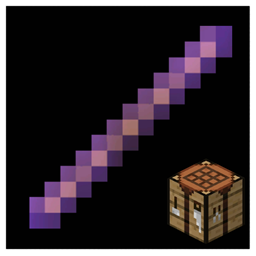
The debug stick is an item used to edit the block states of blocks. It is visually identical to a regular stick, but with a glint (as if enchanted).
Obtaining
In Java Edition, the debug stick is obtainable via commands such as /give or /item, or the Creative inventory if the player has the appropriate permissions. It can be obtained only in worlds with commands on.
In Bedrock Edition, this item only exists in internal versions and privately released versions.
Usage
The debug stick can be used to change block states. Hitting the block allows players to select the block state key they wish to change. For example, switching between the conditional and the facing block state keys for a command block. Using the block allows them to cycle through the valid values for the block state key, again as an example, the player can make the command block face, down, east, north, south, up, or west if they chose the facing block state key. Sneaking while hitting or using cycles through the block state keys or values in reverse order.
It is notable that using debug stick directly on an interactive block without sneaking uses the block itself instead of the stick.[1]
The debug stick cannot be used while in Survival or Adventure mode. It works only in Creative mode with cheats enabled. In modes other than Creative, it acts like a regular item — although when using it on a block, the player swings the stick as if interacting with it (but nothing happens).
Data values
ID
| Name | Identifier | Form | Translation key |
|---|---|---|---|
 Debug Stick Debug Stick | debug_stick | Item | item |
Item data
- [NBT Compound / JSON Object] components: the item's components tag.
- [NBT Compound / JSON Object] minecraft:debug_stick_state: The selected block state properties used by this debug stick.
- [String] <block ID>: A key-value pair, where the key is a block ID and the value is a block state key to edit on the block, for example
"minecraft:oak_fence": "east".
- [String] <block ID>: A key-value pair, where the key is a block ID and the value is a block state key to edit on the block, for example
- [NBT Compound / JSON Object] minecraft:debug_stick_state: The selected block state properties used by this debug stick.
History
Java Edition
| Java Edition | |||||||
|---|---|---|---|---|---|---|---|
| 1.13 | 17w47a |  Added debug sticks. Added debug sticks. | |||||
| 1.16 | 20w10a | Debug sticks are now capable of editing fire due to its added hitbox. | |||||
| 1.17 | 21w20a | The rarity of debug sticks has been changed from "Common" to "Epic". | |||||
| 1.19.3 | 22w44a | The debug stick is now available in the Creative inventory, but only if cheats are enabled. | |||||
| 22w45a | Moved the debug stick behind the Operator Utilities tab in the Creative inventory. The tab is only available if cheats are enabled and the "Operator Items Tab" option in the controls menu is turned on. | ||||||
Bedrock Edition
| Bedrock Edition | |||||||
|---|---|---|---|---|---|---|---|
| 1.14.0 | beta 1.14.0.1 | By this point, the debug stick had been added to private developer versions, but was not available in any public version. | |||||
Issues
The debug stick is not supported, and any issues resulting of its usage are closed as "Won't Fix" in the issue tracker.
Issues with the stick itself are considered valid.[2][3]
Issues relating to "Debug Stick" are maintained on the bug tracker. Issues should be reported and viewed there.
Trivia
- An add-on made by Mineplex was showcased in MINECON Live 2019, which had an editor stick for Bedrock Edition, similar to the Debug Stick.[4]
Gallery
In other media
-
 Artwork of Steve and Alex wielding debug sticks
See also
References
- ↑ MC-200199 – Right-Clicking on an Interactive Block with Debug Stick Uses the Block Instead of Changing Its States if Not Holding Shift – resolved as "Invalid".
- ↑ https://bugs.mojang.com/browse/MC-122323?focusedCommentId=419481&page=com.atlassian.jira.plugin.system.issuetabpanels:comment-tabpanel#comment-419481
- ↑ "Just be aware that any weird state you create with it you cannot naturally create and any bugs that come from it will be shot down as 'Wont fix' :D" – u/_Grum on Reddit, November 22, 2017
- ↑ "MINECON Live 2019 @ 1:05:02" – Minecraft on YouTube, September 28, 2019