Not to be confused with World.
This article is about the craftable map. For maps showing the locations of certain structures, see Explorer Map. For other uses, see Map (disambiguation).
Not to be confused with World.
This article is about the craftable map. For maps showing the locations of certain structures, see Explorer Map. For other uses, see Map (disambiguation).


A map or locator map is an item used to view explored surface terrain and players. Maps can be cloned, zoomed out and locked using a cartography table. A (non-locator) map is a variant in Bedrock Edition which does not show players.
Obtaining
Crafting
| Name | Ingredients | Crafting recipe | Notes |
|---|---|---|---|
| JE: Empty Map BE: Empty Locator Map |
Paper + Compass |
   |
This map records terrain and displays a marker showing the player's location. |
| Empty Map[BE only] | Paper | |
[Bedrock Edition only]
This map only records terrain and does not show the player's location. |
Cartography table

In Bedrock Edition, a map can also be created using a single paper in a cartography table to create an empty map, or a paper and a compass for an empty locator map.
| Name | Ingredients | Cartography recipe | Notes |
|---|---|---|---|
| Empty Map | Paper | |
This map only records terrain and does not show the player's location. |
| Empty Locator Map | Paper + Compass |
|
This map records terrain and displays a marker showing the player's location. |
Starting map
When creating a new world in Bedrock Edition, the player can enable the "Starting Map" option to spawn with an empty locator map in the hotbar. This option is not available in Hardcore mode. The map's zoom scale is 1:8.
Generated loot
| Item | Structure | Container | Quantity | Chance |
|---|---|---|---|---|
| Java Edition | ||||
 Empty Map Empty Map
|
 Abandoned Camp Abandoned Camp
|
Common chest | 1 | 27.5%{ "item": "Empty Map", "stacksize": 1, "chance": 0.2747977375984192, "structure": "Abandoned Camp", "container": "Common chest" }
|
| Secret chest | 1 | 75.6%{ "item": "Empty Map", "stacksize": 1, "chance": 0.756103515625, "structure": "Abandoned Camp", "container": "Secret chest" }
| ||
 Shipwreck Shipwreck
|
Map chest | 1 | 7.7%{ "item": "Empty Map", "stacksize": 1, "chance": 0.07688803032512026, "structure": "Shipwreck", "container": "Map chest" }
| |
 Stronghold Stronghold
|
Library chest | 1 | 10.9%{ "item": "Empty Map", "stacksize": 1, "chance": 0.10885842114094657, "structure": "Stronghold", "container": "Library chest" }
| |
 Village Village
|
Cartographer's chest | 1–3 | 46.2%{ "item": "Empty Map", "stacksize": "1–3", "chance": 0.462144, "structure": "Village", "container": "Cartographer's chest" }
| |
| Bedrock Edition | ||||
| Empty Map
|
Abandoned Camp
|
Common chest | 1 | 27.5%{ "item": "Empty Map", "stacksize": 1, "chance": 0.2747977375984192, "structure": "Abandoned Camp", "container": "Common chest" }
|
| Secret chest | 1–2 | 75.6%{ "item": "Empty Map", "stacksize": "1–2", "chance": 0.756103515625, "structure": "Abandoned Camp", "container": "Secret chest" }
| ||
 Map[A] Map[A]
|
Shipwreck
|
Map chest | 1 | 7.7%{ "item": "Map", "stacksize": 1, "chance": 0.07688803032512026, "structure": "Shipwreck", "container": "Map chest" }
|
| Stronghold
|
Library chest | 1 | 10.5%{ "item": "Map", "stacksize": 1, "chance": 0.10505089050634986, "structure": "Stronghold", "container": "Library chest" }
| |
| Village
|
Cartographer's chest | 1–3 | 46.2%{ "item": "Map", "stacksize": "1–3", "chance": 0.462144, "structure": "Village", "container": "Cartographer's chest" }
| |
- ↑ Named unknown map, but changed to map 0, the scale level is 1:4, Maps from the same stack are stackable, but maps that are not stacked are unstackable despite looking identical.
Trading
| Villager | Probability | Villager wants | Player receives | Trades in stock | Villager experience | Price multiplier | ||
|---|---|---|---|---|---|---|---|---|
| JE | BE | |||||||
 Cartographer Cartographer |  Novice Novice | 100% | 100% | 7 ×  Emerald Emerald | Empty Map | 12 | 1 | 0.05 |
Villager gifts
In Java Edition, cartographer villagers may give players with the Hero of the Village effect an empty map.
Usage
Mapping
Crafting a map creates an empty map. The map is drawn for the first time when it is held and used (by pressing the use item control). After conversion to a drawn map item, it starts to draw a top-down view of the player's surroundings, with North pointing to the top of the map. A pointed oval pointer indicates the player's position on the map, and moves in real-time as the player moves across the terrain shown on the map. In Bedrock Edition, this pointer is displayed exclusively on locator maps.

The map does not center on the player when created; rather, the world is broken up into large invisible grid squares, and the map displays the area of whichever grid square it was in when it was first used. For example, if a player uses a new map in a certain grid square, then moves a distance away and uses another fresh map within the same grid square, both maps still have the exact same boundary. To make a map with different bounds than the first one, the player would have to move outside of the edges of the first map to enter a new grid square. This way, no two maps of the same size can ever partially overlap. However, by externally editing a map's NBT file, the center coordinate of a map can be changed to arbitrary X and Z integer coordinates, and it will work correctly. So, technically, this restriction on possible center positions only applies to map creation.
To record the world on a map, that specific map must be held in either of the player's hands while the player moves around the world. The map records terrain within a 128-block radius (8 chunks) from a player in the Overworld or the End, or 64 blocks in the Nether. The map only records the surface even if the player is underground. The world is recorded as-is during exploration, meaning that if the world is modified, a player must revisit the area while holding the map to update the map.
Maps display as a mini-map when held in the off-hand, or if the off-hand slot is occupied; the map is full-sized only when held in the dominant hand with both hands free.
Maps can be cloned to synchronize them or framed for display.
To create a custom picture, a player can make a large piece of pixel art (128×128) facing upward, center a map on it, and place that map in an item frame. Locking is recommended. See Map item format § Map pixel art for details on the techniques.
Map content
Maps are shown as a 128×128 square grid of colored pixels, with each pixel representing a square portion of land. A standard map (meaning zoom level 0/4) represents 128×128 blocks with 1 block per pixel. It can be zoomed out to represent up to 2048×2048 blocks with 16×16 blocks per pixel at zoom level 4/4.
In Java Edition, the color of a map pixel generally matches the color of the most common opaque block in the corresponding area, as seen from a bird's-eye view. 'Minority blocks' in the target area have no effect on the color of the pixel, thus small features tend to be undetectable on zoomed-out maps.
In Bedrock Edition, the color of a map pixel instead matches the single top-most opaque block in a grid sized by the map's scale factor. For example, a map with zoom level 3/4 has a pixel size of 8×8 blocks; this means the map reads only the top-most opaque blocks at the 0,0 coordinate, the 8,0 coordinate, the 0,8 coordinate, etcetera, ignoring all other blocks in the area. This means that in Bedrock Edition, map pixel art requires only one block per pixel regardless of map magnification.
In Bedrock Edition, grass, foliage and water colors that are biome-dependent are represented accurately on a map.
On land above water, a block's color is darker if placed at a lower elevation than the block north of it, or brighter if placed at a higher elevation than the block north of it. Maps also show ground up to about 15 blocks below the surface of the water as slightly lighter blue, to show where the ground rises.
Other dimensions
While maps in the Nether work, they show only a red-and-gray pattern, regardless of the blocks placed. The only useful function is finding where the player is in relation to framed copies, which show as green pointers. Additionally, the player pointer rapidly spins and is not a good indicator of direction. In Java Edition, banner markers placed in the Nether still show on the map as usual. Despite its unreliability, having a mapped trail can still be useful in some cases, such as while riding a strider over lava. Maps in the End work as usual, mapping the terrain and showing the accurate location and direction of the player.
In Java Edition, holding a map from the Overworld in a different dimension shows the player's last position and direction in the Overworld. This effect is temporary, and the marker disappears after quitting and joining the world/server again.
In Bedrock Edition, an Overworld locator map in the Nether shows the player's relative location and direction in the Overworld. Similarly, a Nether locator map in the Overworld shows the player's relative location in the Nether, but the place marker spins. An Overworld locator map in the End shows the world spawn. A Nether locator map cannot be used in the End — the map appears, but the place marker is not shown anywhere — and similarly, an End locator map cannot be used in the Overworld or the Nether. The place marker changes color depending on the dimension that the player is currently in (white for the Overworld, red for the Nether, and magenta for the End).
Zooming out
A map can be zoomed out up to 4 times, increasing the covered area from 128×128 blocks up to a maximum of 2048×2048 blocks. An empty map cannot be zoomed out; it needs to be activated for the zooming to be possible. Changing the zoom level of a map resets its contents, and terrain needs to be explored again to be drawn on the zoomed out map.
Locked maps cannot be zoomed out.
| Ingredients | Cartography recipe | Notes |
|---|---|---|
| Map or Locator Map + Paper |  |
Locked maps cannot be zoomed out. |
| Ingredients | Crafting recipe | Notes |
|---|---|---|
| Map or Locator Map + Paper | |
Locked maps cannot be zoomed out. |
| Name | Ingredients | Anvil usage | Description |
|---|---|---|---|
| Map or Locator Map (zoomed out) | Map or Locator Map + Paper |
MapLocator Map
8 |
[Bedrock Edition only]
Supplying 8 sheets of paper results in a zoomed-out version of the input map.
|
Zoom details
The zooming function starts from when the map is created (zoom level 0/4) up to its fourth zoom step (zoom level 4/4).
| Zoom step 0 | Zoom step 1 | Zoom step 2 | Zoom step 3 | Zoom step 4 | ||
|---|---|---|---|---|---|---|

|

|

|

|

| ||
| Zoom level | 0/4 | 1/4 | 2/4 | 3/4 | 4/4 | |
| 1 map pixel represents | 1 block | 4 blocks
2×2 blocks |
16 blocks
4×4 blocks |
64 blocks
8×8 blocks |
256 blocks (1 chunk)
16×16 blocks | |
| Scaling ratio | 1:1 | 1:2 | 1:4 | 1:8 | 1:16 | |
| Map covers an area of | 128×128 blocks | 256×256 blocks | 512×512 blocks | 1024×1024 blocks | 2048×2048 blocks | |
| 8×8 chunks | 16×16 chunks | 32×32 chunks | 64×64 chunks | 128×128 chunks | ||
| Total paper needed to zoom out from Level 0 | in anvil[BE only] or crafting table | - |  8 8
|
16
|
24
|
32
|
| in cartography table | - | 1
|
2
|
3
|
4
| |
Maps are always aligned to a grid at all zoom levels. That means zooming out any different map in a specific area covered by that map always has the same center. As such, maps are aligned by map width (1024 blocks for a level 3 map) minus 64. A level 3 map generated at X=0 Z=0 covers X and Z coordinates from -64 to 959. All maps generated in this area zoom out to the same coordinates, guaranteeing that they are always 'aligned' on a map wall. For a zoomed-out map to cover a new area, it must start with a base (level 0) map that is in that new area.
At zoom level 0, a map created on the point (0,0) has (0,0) at the center of the map. At higher zoom levels of the same map, the coordinate (0,0) is in the top left square of the map.
In Java Edition, the zoom level and the scaling factor are displayed in the tooltip of a map by turning on advanced tooltips (a debug option that can be toggled by using the key combination F3 + H). In Bedrock Edition, the zoom level of a map is always displayed in its tooltip.
Cloning
A map can be cloned to create multiple synchronized copies linked to the same map data. Multiple players can hold clones of the same map to record different parts of the world simultaneously.
Upon cloning a map, the parts of the world that have already been explored and mapped are copied; thereafter, newly explored areas appear on all cloned instances automatically. The resulting copies have the same zoom level as the starting map. If one of the maps is later zoomed out, then that map loses its connection to the original and functions as a completely separate map that has to be individually filled by exploring.
All cloned maps stack with each other, unless renamed. Even if renamed, the mapped areas continue to remain in sync.
In Bedrock Edition, both empty maps and empty locator maps may be used to clone a map. Whether the cloned maps show position markers is dependent only on the input map. For this reason, using an empty locator map instead of an empty map for cloning is a waste of a compass.
| Ingredients | Cartography recipe | Notes |
|---|---|---|
| Map + Empty Map | Cloned maps are stackable. |
| Name | Ingredients | Anvil usage | Description |
|---|---|---|---|
| Map or Locator Map (cloned) | Map or Locator Map + Empty Map |
[Bedrock Edition only]
Only one copy can be made at a time. The non-empty input map must be a locator map for the output to be a locator map. An empty locator map is the same as an empty map for this recipe. |
In Creative mode, a map in an item frame may be cloned by using pick block on it, as long as that map is not also in the player's inventory.
Player markers
Holding any map in Java Edition, or a locator map in Bedrock Edition, displays a white pointer that marks the position of the player and points in the same direction as the player. When a player moves out of a map, the pointer turns into a white dot which moves along the edge relative to the player's position. The marker disappears if the player is too far from the mapped area; in explorer maps, the dot becomes smaller instead of fully disappearing. The distance on the X or Z axis from the map's edge required for the dot to vanish (regular maps) or to turn smaller (explorer maps) depends on the zoom level of the map:
- Level 0/4 : more than 256 blocks away
- Level 1/4 : more than 512 blocks away
- Level 2/4 : more than 1024 blocks away
- Level 3/4 : more than 2048 blocks away
- Level 4/4 : more than 4096 blocks away
Java Edition
In multiplayer, other players are displayed on the map only if they have a map in their inventory cloned from the one being looked at. Other players are marked using white pointers. Players wearing a carved pumpkin are not marked on other players' maps.
Bedrock Edition
In Bedrock Edition, position markers are displayed exclusively on locator maps. A map without position markers can be turned into a locator map at a later time by combining it with a compass on the crafting grid, on an anvil, or at a cartography table.
| Ingredients | Cartography recipe | Notes |
|---|---|---|
| Map or Empty Map + Compass |
|
[Bedrock Edition only]
Maps crafted from only paper do not show the location marker; to add it, a compass must be added to the map. The map keeps its current zoom level, and remembers all of the terrain it has mapped out. |
| Ingredients | Crafting recipe | Notes |
|---|---|---|
| Map or Empty Map + Compass |
|
[Bedrock Edition only]
Maps crafted from only paper do not show the location marker; to add it, a compass must be added to the map. The map keeps its current zoom level, and remembers all of the terrain it has mapped out. |
| Name | Ingredients | Anvil usage | Description
|
|---|---|---|---|
| Locator Map | Map + Compass |
Map
|
[Bedrock Edition only]
Maps crafted with only paper do not show the location marker; to add it, a compass must be added to the map. |

In multiplayer, a locator map contains markers for all players who are not in Spectator mode and are not wearing a head or a carved pumpkin, even if they don't have any maps in their inventory. In the Overworld, players see themselves as a white pointer, and other players are displayed in different colors depending on the order in which they joined: the first player who joined - or the host - is light gray (looking almost identical to the regular white pointer), the second player is cyan, the third player is orange, the fourth player is light green, and so on. All players in the Nether are displayed with a red pointer, and all players in the End use a magenta pointer.
If other players have a map in their inventory cloned from the one being looked at, they are displayed using white pointers. This also includes players wearing a head or a carved pumpkin, and players in Spectator mode.
Players who are between 10 to 80 blocks away are displayed using the face of their skin instead of the pointer, with a border colored as described above.
Framing
When a map is placed into an item frame, the map displays a green pointer at the location of the item frame (it must be a locator map in Bedrock Edition). If the player leaves a map in an item frame and then views a clone of it, the green pointer is displayed on both copies. This can be used to track waypoints. If a player holds a map whose clone is on display in an item frame, then the map in the item frame updates along with the held map.
These markers work only on clones of the same map. Other maps of the same area do not show the existing markers that the player(s) had placed.
The size of the item frame expands when displaying a map. This allows for combining multiple maps side-by-side to create a much larger map display that visually appears to be one continuous map. For example, a player could display four maps in a 2×2 grid on a wall; if each map is zoom level 2, the total area displayed would be 1024×1024 blocks (the same as a zoom level 3 map) but with a scaling ratio of 1:4 (the same as a zoom level 2 map), depicting much more detail than a zoom level 3 map.
Unexplored areas of a framed map are transparent, making the item frame visible.
-
 An item frame with a partially filled map
 -
 Item frame markers on a held map
Banner markers


In Java Edition, the player can also mark spots on a map by using a map on a placed-down banner. The mark takes the color of whatever the base color is for the banner, and if the banner was given a name using an anvil, the mark shows that name. Banner marks on a map in the Overworld are always oriented with their top facing north, regardless of the banner's actual orientation. Banner marks in the Nether match the current orientation of the player's pointer on the map, however the banner's name is still oriented normally. If the banner is destroyed, the mark of the banner remains at first, but if the player gets closer to where the banner previously was, it disappears as the area is updated on the map.
Locking
Maps can be locked when using a glass pane in a cartography table. This creates a new map containing the same data and locks it. All new copies of this new map are also locked. A locked map never changes, even when the depicted terrain changes. In Bedrock Edition, locked maps have a unique texture; this texture is intentionally excluded from Java Edition.[1]
Stained glass panes cannot be used to lock maps.
| Ingredients | Cartography recipe |
|---|---|
| Map + Glass Pane |   |
| Condition | Newly created map | Map after terrain alteration |
|---|---|---|
| Unlocked map |  |

|
| Locked map | |
|
Renaming

In Bedrock Edition, a map or an empty map can be renamed at a cartography table. A renamed empty map keeps its name when activated. Unlike renaming items at an anvil, this does not cost any experience.
Sounds
| Sounds | ||||||||
|---|---|---|---|---|---|---|---|---|
| Sound | Closed captions | Source | Description | Identifier | Translation key | Volume | Pitch | Attenuation distance |
| Map drawn | Players | When a map is drawn | ui | subtitles | 1.0 | 1.0 | 16 | |
| Map drawn | Blocks | When a map is edited using a cartography table | ui | subtitles | 1.0 | 1.0 | 16 | |
| Sounds | |||||||
|---|---|---|---|---|---|---|---|
| Sound | Closed captions | Source | Description | Identifier | Translation key | Volume | Pitch |
| Map drawn | Blocks | When a map is drawn | ui | ? | 0.8 | 1.0 | |
| Map drawn | Blocks | When a map is edited using a cartography table | ui | ? | 0.8 | 1.0 | |
Data values
ID
| Name | Identifier | Form | Translation key |
|---|---|---|---|
| Empty Map | map | Item | item |
| Map | filled_map | Item | item |
| Name | Identifier | Alias ID | Numeric ID | Form | Translation key |
|---|---|---|---|---|---|
| Empty Map | empty_map | emptymap | 515 | Item | itemitem |
| Map | filled_map | map | 420 | Item | itemitemitemitem |
Metadata
In Bedrock Edition, maps use the following data values:
Empty map:
| DV | Description | |
|---|---|---|
|
0 | Empty Map |
|
2 | Empty Locator Map |
Filled map:
| DV | Description | |
|---|---|---|
|
0 | Map |
|
2 | Map (locator) |
 |
3 | Ocean Monument Map |
 |
4 | Woodland Mansion Map |
 |
5 | Treasure Map |
 |
6 | Locked Map |
 |
7 | Snowy Village Map |
 |
8 | Taiga Village Map |
 |
9 | Plains Village Map |
 |
10 | Savanna Village Map |
 |
11 | Desert Village Map |
 |
12 | Jungle Pyramid Map |
 |
13 | Swamp Hut Map |
 |
14 | Buried Trial Chambers Map |
 |
15 | Bamboo Camp Map |
|
16 | Birch Forest Camp Map |
|
17 | Cherry Grove Camp Map |
|
18 | Dappled Forest Camp Map |
|
19 | Windswept Forest Camp Map |
|
20 | Flower Forest Camp Map |
|
21 | Pale Garden Camp Map |
|
22 | Swamp Camp Map |
 |
23 | Buried Ancient City Map |
 |
24 | Buried Mineshaft Map |
 |
25 | Desert Pyramid Map |
 |
26 | Warm Ocean Ruins Map |
Item data
- [NBT Compound / JSON Object] components: the item's components tag.
- [Int] minecraft:map_color: The color code for the
minecraft:map_colorcolor provider in item model definitions. Normally used by theminecraft:filled_mapitem model. - [NBT Compound / JSON Object] minecraft:map_decorations: Contains key-value pairs of the icons to display on this filled map.
- [NBT Compound / JSON Object] <key>: The key-value pair of a single icon, where the key is an arbitrary unique string identifying the decoration.
- [String] type: The type of the icon. Can be
player,frame,red_marker,blue_marker,target_x,target_point,player_off_map,player_off_limits,mansion,monument,banner_white,banner_orange,banner_magenta,banner_light_blue,banner_yellow,banner_lime,banner_pink,banner_gray,banner_light_gray,banner_cyan,banner_purple,banner_blue,banner_brown,banner_green,banner_red,banner_black,red_x,village_desert,village_plains,village_savanna,village_snowy,village_taiga,jungle_temple,swamp_hut,trial_chambers,abandoned_camp,ancient_city,desert_pyramid,mineshaft, orocean_ruin_warm. - [Double] x: The X world coordinate of the decoration.
- [Double] z: The Z world coordinate of the decoration.
- [Float] rotation: The rotation of the icon, ranging from 0.0 to 360.0, rotated clockwise from north in degrees.
- [String] type: The type of the icon. Can be
- [NBT Compound / JSON Object] <key>: The key-value pair of a single icon, where the key is an arbitrary unique string identifying the decoration.
- [Int] minecraft:map_id: The map data number for this item, representing the shared state holding map contents banner and item frames decoration. When present, add information to the tooltip and change the rendering of the item in hand or in the item frame for map rendering. Only maps (
filled_map) and explorer maps can update map content.
- [Int] minecraft:map_color: The color code for the
Map icons
Map icons are decorations serving various purposes on maps like showing the player's location on a filled map.
In Java Edition they are 8x8 and individual textures; As such because they all are 8x8, there are minor misalignment issues in rare cases.[2]
In Bedrock Edition there is a predefined 64x64 texture atlas, containing 16 different 16x16 icons but also 13 individual 8x8 texture files, being icons for several structures, 6/7 of these individual textures are icons for different village types, the remaining one being for jungle pyramids.

| Java ID | Bedrock ID | Text ID | Appearance | Purpose | Shown in item frames? |
|---|---|---|---|---|---|
| 0 | player |
 White marker White marker
|
Players (on map); in Bedrock Edition, dynamically recolored for other players or players in the Nether or End | No | |
| 1 | 1 | frame |
  Green marker Green marker |
The current map in an item frame | Yes |
| 2 | red_marker |
  Red marker Red marker |
Unused | No | |
| 3 | blue_marker |
  Blue marker Blue marker |
Unused | No | |
| 4 | target_x |
 White X White X |
Unused | Yes | |
| 5 | 5 | target_point |
  Red triangle Red triangle |
Unused | Yes |
| 6 | 6 | player_off_map |
 Large white pointer Large white pointer
|
Players off map, nearby | No |
| 7 | 13 | player_off_limits |
 Small white pointer Small white pointer
|
Players off map, far away | No |
| 8 | 14 | mansion |
 Woodland mansion Woodland mansion
|
Woodland mansion | Yes |
| 9 | 15 | monument |
 Ocean monument Ocean monument |
Ocean monument | Yes |
| 10 - 25 | banner_* |
                Banners in all 16 wool colors[Java Edition only] |
Banner markers | Yes | |
| 26 | 4 | red_x |
  Red X Red X |
Buried treasure | Yes |
| 8 |  Magenta marker Magenta marker
|
Unused | No | ||
| 9 |  Orange marker Orange marker
|
Unused | Yes | ||
| 10 |  Yellow marker Yellow marker
|
Unused | No | ||
| 11 |  Cyan marker Cyan marker
|
Unused | No | ||
| - | 12 |  Green triangle Green triangle
|
Other structure such as stronghold, fortress, End city, etc. when used as explorer map destination[Bedrock Edition only] | Yes | |
| 27 | 17 | desert_village |
 Desert village Desert village |
Desert village | Yes |
| 28 | 18 | plains_village |
 Plains village Plains village |
Plains village | Yes |
| 29 | 19 | savanna_village |
 Savanna village Savanna village |
Savanna village | Yes |
| 30 | 20 | snowy_village |
 Snowy village Snowy village |
Snowy village | Yes |
| 31 | 21 | taiga_village |
 Taiga village Taiga village |
Taiga village | Yes |
| 32 | 22 | jungle_pyramid |
 Jungle pyramid Jungle pyramid |
Jungle pyramid | Yes |
| 33 | 23 | swamp_hut |
 Swamp hut Swamp hut |
Swamp hut | Yes |
| 34 | 24 | trial_chambers |
 Trial chambers Trial chambers |
Trial chambers | Yes |
| 35 | 25 | abandoned_camp |
 Abandoned camp Abandoned camp |
Abandoned camp | Yes |
| 36 | 26 | ancient_city |
 Ancient city Ancient city |
Ancient city | Yes |
| 37 | 28 | desert_pyramid |
 Desert pyramid Desert pyramid |
Desert pyramid | Yes |
| 38 | 27 | mineshaft |
 Mineshaft Mineshaft |
Mineshaft | Yes |
| 39 | 29 | warm_ocean_ruins |
 Warm ocean ruin Warm ocean ruin |
Warm ocean ruin | Yes |
Even if the player uses an NBT editor to add an additional icon on the map, Minecraft displays only the first one listed when the player loads the world.
Achievements
| Icon | Achievement | In-game description | Actual requirements (if different) | Gamerscore earned | Trophy type (PS) | |
|---|---|---|---|---|---|---|
| PS4 | Other | |||||
 |  | Map Room | Place 9 fully explored, adjacent maps into 9 item frames in a 3 by 3 square. | The item frames have to be on a 3×3 flat wall; not on the floor nor ceiling. Level 0 maps are the easiest and fastest. | 40 | Silver |
History
Development
| April 27, 2011 | Notch unveiled screenshots of the map. | ||||||
|---|---|---|---|---|---|---|---|
| April 28, 2011 | Notch said that he would try to make maps placeable on walls.[3] | ||||||
Java Edition
| Java Edition Beta | |||||||
|---|---|---|---|---|---|---|---|
| 1.6 | Test Build 3 |  Added maps. Added maps. | |||||
| 1.6.6 | The ability to auto-craft maps using shift-click has been disabled. | ||||||
| 1.8 | Pre-release | Maps can now be found in library chests in the brand-new strongholds. | |||||
| Auto crafting maps has been restored. Map cloning, therefore, is unavailable for a period of time. | |||||||
| 1.8.1 | Maps now work both while walking and flying. | ||||||
| Java Edition | |||||||
| 1.0.0 | Beta 1.9 Prerelease 5 | Prior to this update, the sun in Minecraft rose in the north, which threw off many players and led to a common misconception that Minecraft maps/worlds were oriented with east at the top.[4][5] The sun now rises in the east and sets in the west, making navigation much more intuitive. | |||||
| 1.4.2 | 12w34a |  Crafting a map now creates an empty map. The map is drawn for the first time when it is held and right clicked, and is centered near the location of the player when clicked (not as before where it was centered on the location it was crafted.) Crafting a map now creates an empty map. The map is drawn for the first time when it is held and right clicked, and is centered near the location of the player when clicked (not as before where it was centered on the location it was crafted.) | |||||
| Previously, in order to map a new area, the map had to be crafted in that area (rather than carrying a previously-crafted map to the new area). The point where a map is crafted becomes its permanent center, and could never be changed. | |||||||
| The pointer no longer disappears when leaving the map, but transforms into a white dot, indicating on what side of the map the player is located. | |||||||
| Maps now align to a grid, making it easier to create adjacent maps. | |||||||
| Maps can now be zoomed out (but not zoomed in). | |||||||
| Maps can now be cloned and scaled. | |||||||
| 12w34b | Maps now have a zoom level, which was fixed at 1:8 prior to snapshot 12w34a,[6] but now starts at 1:1 and can be increased up to 1:16 by re-crafting an existing map. | ||||||
| Maps are no longer numbered on the top-left corner and is labeled through the tooltip. | |||||||
| 12w36a | New maps are now crafted at a scale factor of 1:1. A zoomed in map can be zoomed out by re-crafting it with another 8 sheets of paper on a crafting table. Each time this is done, the scale increases - 1:1, 1:2, 1:4, 1:8, 1:16 with a map scale of 1:16 being the current maximum. | ||||||
| 1.7.2 | 13w38a | The map size has been increased when placed on a wall using the item frame. | |||||
| More colors have been added to maps for different blocks.[7] | |||||||
| 1.8 | 14w31a | Zoomed maps now conform to an expanded grid based on their zoom level. Previously, careful considerations would need to be taken to create a wall of adjoining maps. | |||||
| 1.8.1 | pre1 | Some colors have been changed on maps to more accurately represent these respective blocks. | |||||
| 1.9 | 15w31a | Maps now display as a mini-map when held in the off-hand, or if the off-hand slot is occupied; the (old) large version is visible only when held in the dominant hand with the secondary hand free. | |||||
| The hand animation in first person for the big map has been changed to be symmetrical. | |||||||
| 15w34a | New maps are now crafted at a scale factor of 1:4. | ||||||
A crafting recipe has been added for zooming in maps.  | |||||||
| 15w43a | The average yield of empty maps from stronghold library chests has been doubled. | ||||||
| 15w45a | New maps are once again crafted at a scale factor of 1:1, as they had been before snapshot 15w34a. | ||||||
| The crafting recipe for zooming in maps has been removed. | |||||||
| 15w49a | Map making now uses armor equipping sounds. | ||||||
| 1.11 | 16w39a | Maps now work in the End. | |||||
| Empty maps are now sold by cartographer villagers as their tier 3 trade. | |||||||
| Added explorer maps, sold by cartographers as their tier 4 trades. | |||||||
| The texture for filled maps has been split into a base layer and a tinted overlay layer. | |||||||
 The texture of filled maps has been changed. The texture of filled maps has been changed. | |||||||
| 16w39c |  The texture for empty maps has been moved slightly to the bottom left to match with filled maps and paper.[8] The texture for empty maps has been moved slightly to the bottom left to match with filled maps and paper.[8] | ||||||
| 1.12 | 17w17a | Maps now have separate colors for stained terracotta blocks from other colored blocks. | |||||
| 1.13 | 17w47a | More than 32,768 maps can now be created per world. | |||||
| 17w50a | Maps can now be placed on floor and ceiling item frames. | ||||||
| 18w10a | Spots on maps can now be marked using banners. | ||||||
| 18w11a | Empty maps can now generate in shipwreck chests. | ||||||
| pre7 | Maps have been changed slightly, in regard to which blocks are shown and which blocks are not. | ||||||
| 1.14 | 18w43a |   The textures of maps have been changed. The textures of maps have been changed. | |||||
| 18w48a | Empty maps can now be found in chests in village cartographer houses. | ||||||
| 19w02a | Maps can now be cloned and zoomed out (extended) by using a cartography table. | ||||||
| Maps can now be locked by using a glass pane with a cartography table. | |||||||
| 19w06a | Map making is now silent again. | ||||||
| 19w11a | Cartographer villagers now sell empty maps for 7 emeralds. | ||||||
| 19w13a | Cartographer villagers now give empty maps to players under the Hero of the Village effect. | ||||||
| 1.16 | 20w21a | Map making sounds are now the same as when using a cartography table. | |||||
| 1.21.2 | 24w39a | Players wearing a carved pumpkin are no longer marked on other players' maps. | |||||
| 26.3 | snap1 | Empty maps can now generate as part of abandoned camps in chests. | |||||
| snap7 |   The textures of maps have been changed. The textures of maps have been changed.
| ||||||
| The filled map markings texture has been removed. | |||||||
| Explorer maps no longer share the same item ID as regular filled maps. | |||||||
   The textures of player, player off map and player off limits icons have been changed. The textures of player, player off map and player off limits icons have been changed. | |||||||
Bedrock Edition
| Pocket Edition Alpha | |||||||
|---|---|---|---|---|---|---|---|
| v0.14.0 | build 1 | Added maps.
| |||||
| Maps are crafted using nine paper, one for every slot of the crafting grid. | |||||||
| Maps must be combined with a compass using an anvil in order to show the player's position. | |||||||
| Maps can be zoomed using an anvil. | |||||||
| build 3 | New maps are now crafted at full zoom. | ||||||
| Empty maps now have a "Create Map" button to initialize them. | |||||||
| build 7 | New maps are now crafted at a scale factor of 1:1. | ||||||
| v0.15.0 | build 1 | Maps can now be crafted either with 8 pieces of paper and a compass or 9 pieces of paper, to get a map with or without a position marker. | |||||
| v0.16.0 | build 1 | Different colors have been added to maps for different biomes. | |||||
| Pocket Edition | |||||||
| 1.0.0 | alpha 0.17.0.1 | Maps can now be found inside stronghold library chests. | |||||
| release | Windows 10 Edition can now use the anvil as well as the crafting table to clone, zoom and apply markers, just as Pocket Edition in general could. | ||||||
| 1.1.0 | alpha 1.1.0.0 | Empty maps with direction markers built-in are now called "locator maps". | |||||
| Changed the displayed name of filled maps from "Map" to "Map #", with # being dependent on the order in which maps have been created. Maps created before this version, as well as maps that generate in loot chests, have the display name "Map 0". | |||||||
| alpha 1.1.0.3 | "Locator maps" are now called "empty locator maps". | ||||||
| Empty maps are now sold by cartographer villagers for 7-11 emeralds as their tier 3 trade. | |||||||
| Bedrock Edition | |||||||
| 1.2.0 | beta 1.2.5.12 | Players outside of a locator map's area are no longer displayed using a dot and instead stay a pointer. | |||||
| 1.4.0 | beta 1.2.14.2 | Maps can now be found inside map room chests in shipwrecks. | |||||
| ? | Maps now function in dimensions other than the dimension in which they were created. | ||||||
| 1.10.0 | beta 1.10.0.3 |  The textures of maps have been changed. The textures of maps have been changed.
| |||||
| Maps can now be found in cartographer house chests in villages. | |||||||
| 1.11.0 | beta 1.11.0.1 | Empty maps can now be created from 1 paper in cartography tables. | |||||
| Maps can now be zoomed, cloned, renamed, and have pointers added in cartography tables. | |||||||
| beta 1.11.0.4 | Cartographer villagers now sell empty map for an emerald as their first tier trades. | ||||||
| Empty locator maps can now be bought from cartographer villagers | |||||||
| Maps can now be locked by using a glass pane with a cartography table. | |||||||
| 1.13.0 | beta 1.13.0.1 |  Locked maps now have unique inventory icons. Locked maps now have unique inventory icons. | |||||
| 1.16.0 | beta 1.16.0.57 | Trading has been changed, novice-level cartographer now sell an empty map for 7 emeralds. Cartographer villagers no longer sell empty locator maps. | |||||
| 1.21.20 | Preview 1.21.10.20 | Players outside of a locator map's area are displayed using a dot instead of a pointer again, matching Java Edition. | |||||
| 26.40 Experiment | Preview 26.40.27 | Empty maps can now generate as part of abandoned camps in chests. | |||||
| 26.50 | Preview 26.50.22 | All features from the "Drop 3 of 2026" experiment have been fully implemented. | |||||
| Preview 26.50.24 |  The textures of maps have been changed. The textures of maps have been changed.
| ||||||
| The textures of player, player off map and player off limits icons have been changed. | |||||||
Legacy Console Edition
| Legacy Console Edition | |||||||
|---|---|---|---|---|---|---|---|
| Xbox 360 | Xbox One | PS3 | PS4 | PS Vita | Wii U | Switch | |
| TU1 | CU1 | 1.00 | 1.00 | 1.00 | Patch 1 | 1.0.1 | Added maps. |
| The player spawns with a free map. | |||||||
| Maps are available only as zoom step 3 maps centered at coordinates 0,0. | |||||||
| TU2 | Added a coordinate display to the in-game map. | ||||||
| TU5 | Added map icons to the in-game player list to match their color in the map. | ||||||
| TU9 | Maps now show an X at the location of the End portal if someone is in the End. | ||||||
 Maps in item frames have their position represented by a green triangle. Maps in item frames have their position represented by a green triangle. | |||||||
| Larger sized worlds on Xbox One and Playstation 4 have zoom step 3 maps aligned to a grid with maps centered at 0, 1024, or 2048 on the X or Z coordinates. | |||||||
| TU19 | CU7 | 1.12 | 1.12 | 1.12 | Added empty maps to the creative inventory. | ||
| TU21 | CU9 | 1.14 | 1.14 | 1.14 | Crafting a map now produces an empty map. | ||
| TU31 | CU19 | 1.22 | 1.22 | 1.22 | The player now starts with an empty map instead of an already drawn map. | ||
| Some colors have been changed on maps to more accurately represent their respective block. | |||||||
| TU46 | CU36 | 1.38 | 1.38 | 1.38 | Patch 15 | The outer End islands appear on different maps; even on Xbox 360, Playstation 3, Vita, and Wii U editions. | |
| TU49 | CU39 | 1.42 | 1.42 | 1.42 | Patch 18 | The hand animation in first person for maps has been changed to be symmetrical. | |
| Larger sized worlds on Nintendo Switch have zoom step 3 maps aligned to a grid with maps centered at 0, 1024, or 2048 on the X or Z coordinates. | |||||||
| TU53 | CU43 | 1.49 | 1.50 | 1.49 | Patch 23 | 1.0.3 | Maps now display as a mini-map when held in the off-hand, or if the off-hand slot is occupied; the (old) large version is visible only when held in the dominant hand with the secondary hand free. |
| TU54 | CU44 | 1.52 | 1.52 | 1.52 | Patch 24 | 1.0.4 |  Maps in item frames now have their position represented by an item frame icon. Maps in item frames now have their position represented by an item frame icon.
|
| Empty maps are now sold by cartographer villagers as their tier 3 trade. | |||||||
| Added explorer maps, sold by cartographers as their tier 4 trades. | |||||||
| The texture of filled maps has been changed. | |||||||
| TU57 | CU49 | 1.57 | 1.56 | 1.56 | Patch 27 | 1.0.7 | Coordinate display of maps no longer has spaces. |
| TU69 | 1.76 | 1.76 | 1.76 | Patch 38 | Maps and empty maps can now be found inside map room chests in shipwrecks. | ||
| 1.90 | The textures of maps have been changed. | ||||||
| 1.91 | Maps can now be created and used in cartography tables. | ||||||
| Maps can now be cloned and zoomed out (extended) by using a cartography table. | |||||||
 Maps can now be locked by using a glass pane with a cartography table. Maps can now be locked by using a glass pane with a cartography table. | |||||||
Data history
Java Edition
| Java Edition | |||||||
|---|---|---|---|---|---|---|---|
| 1.13 | 17w47a | Prior to The Flattening, the numeral ID of filled maps was 358 and the numeral ID of empty maps was 395. | |||||
| Maps now use additional NBT to specify which map they contain. Prior to this version, they used item damage instead. | |||||||
| Map IDs are no longer limited to 32,768. | |||||||
Bedrock Edition
| Bedrock Edition | |||||||
|---|---|---|---|---|---|---|---|
| 1.16.100 | beta 1.16.100.56 | The ID of maps have been changed from emptymap to empty_map and map to filled_map. | |||||
-
 A map edited to the scale of 1.
 -
 A map mapping the Sky Dimension.
 -
 A map of a Large Biomes world.
 -

-
 Maps in Legacy Console Edition, showing coordinates at the top left corner.
 -
 A map displayed on an item frame, as it looked before Java Edition 1.7.2.
Issues
Issues relating to "Map" are maintained on the bug tracker. Issues should be reported and viewed there.
Trivia
- In Java Edition, a map created using
/givecan be any map by using the Map parameter to specify the map number desired. E.g./give [player] minecraft:filled_map[minecraft:map_id=5]gives the specified player map_5. If no data value is supplied it defaults to map_0. If map_0 has not ever been crafted, it is centered on x=0, z=0. - The maps are stored separately as their own data (
.dat) file asmap_x.datwith (x) being the map number, see map item format for more info. By manipulating this number, players can organize their maps to suit them, or if they accidentally create a map in the same location, they can delete their extra map so as to save the number they make. - Certain programs can be used to make customized maps with images or text on them instead of actual maps.
- Since all copies of a map are links to the same file, copying an unfinished map keeps it synchronized with the copy as the player fills it in. Thus, a copy stored in a chest can act as a remote backup.
- A map that is in an item frame does not update itself until a player picks it up, lets it reload, and places it back again. However, if a player holds a clone of the map, both maps update.
- Filled maps are the only[JE & LCE only]/only obtainable[BE only] items that make 90 degree rotations in item frames, and also the only[JE & LCE only]/only obtainable[BE only] items that can expand the item frame to a full block wide. In Minecraft Education and Bedrock Edition, photos also do this, though photos are unused in the latter edition.
- In Legacy Console Edition, the player always spawns with a map in their inventory after creating a world. This was later added to Bedrock Edition as an optional feature in the world creation menu.
- Maps in Legacy Console Edition always show the player's current coordinates at the player's eye level, as a substitute for the optional coordinate display in other editions.
- A map cannot be created in New Nintendo 3DS Edition. Instead, the map is always displayed on the bottom screen along with the coordinates. Biome colors do not appear on maps.
Gallery
Renders
-
 A completely explored map
 -
 Partly filled treasure map with an odd area at the bottom left
 -
 Partly filled ocean explorer map
 -
 A collection of 9 connected full maps
 -
 A combination of 25 maps pasted together as one map
 -
 A map wall, showing large areas of biome colors for each biome
 -
 A map in the End
Screenshots
-
 Two 2×2 item frames displaying maps, each showing the same center point (-64, -64) at two different zoom levels: 2 and 4
 -
 Having a map in hand does not stop the ability to see ahead.
 -
 Nearly fully explored map
 -
 A village and how it is represented on a map
 -
 A map containing a custom image made by placing a large number of blocks
 -
 A map view of a mushroom biome, showing that mycelium appears purple on a map
 -
 Maps held in the off-hand or in either hand while dual wielding appear as mini-maps.
 -
 A map in the Nether
 -
 A map in the Nether; the arrow turns around itself, like in compass.
 -
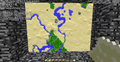 Multiple maps in item frames. Notice a village, two desert pyramids and a lava lake.
 -
 Maps can be placed into item frames so they can be viewed together.
 -
 The comparison between 3 zooms of maps
 -

-
 A 3×3 map wall with banner markers
Mojang images
-
 A fully zoomed map
 -
 Demonstration of maps not obstructing the player's view when looking forward
 -
 A world being recorded onto a map
 -
 Screenshot of a map in early development
 -
 Stained glasses' appearances on maps before and after 1.13
 -
 Ditto
Ditto -
 Various blocks' appearances on maps before and after 1.13
 -
 Ditto
Ditto -
 Holding a map in the offhand in Bedrock Edition
 -
 Holding a map in both hands in Bedrock Edition
 -
 The first image of a map in the End
 -
 He-Man map art
 -
 First image of player icons on maps
 -
 Second image of player icons on maps
 -

In other media
-
 A diagram showing how maps zoomed out before Java Edition 1.8. Notice how the larger maps have borders made of half and quarter small maps.
 -
 From 1.8, zoomed maps are aligned to this grid exactly.
 -
 Efe placing a map of a pale garden
 -
 Kai holding a trial chamber map
 -
 A map in a promo for The Mid-Offs Live
 -
 A map as it appears in Minecraft Mini-Series
 -
![A stylized map of different physical geography, based off a meme[9][10]](https://minecraft.wiki/images/thumb/Geography_Terms.jpeg/120px-Geography_Terms.jpeg?40949)
-
 A cow holding a map
 -
 A map featured as an accessory in action figures of the cartographer and panda
 -
 The same figures, but unboxed
 -
 A map featured as an accessory in a bundle with a spyglass and a Steve action figure
See also
- Explorer Map
 Clock
Clock- Navigation
- Mapping
References
- ↑ MC-310781
- ↑ MC-214649 – resolved as "Won't Fix".
- ↑ "Being able to place maps on walls WOULD be cool.. but.. hmmm.. maybe, I'll try to solve it." – @notch (Markus Persson) on X (formerly Twitter), April 28, 2011
- ↑ "@jeb_ it's pretty easy for most of us we have server mods with a /compass command." – @RustyDagger1 on X (formerly Twitter), July 4, 2011
"@RustyDagger1 But in Minecraft, the sun rises in the north. Everybody knows that!" – @jeb_ (Jens Bergensten) on X (formerly Twitter), July 4, 2011 - ↑ "@Weird_Notch yes :(" – @notch (Markus Persson) on X (formerly Twitter), July 5, 2011
- ↑ https://web.archive.org/web/0/http://notch.tumblr.com/post/4988431144/the-maps
- ↑ https://web.archive.org/web/0/https://www.mojang.com/2013/10/minecraft-1-7-the-update-that-changed-the-world
- ↑ MC-72962
- ↑ "Geography Terms Learning Chart" – TREND enterprises, Inc., 2003.
- ↑ "Here is a visual of every major geography term" – @AMAZlNGNATURE on X (formerly Twitter), September 23, 2025


![Xaero's Minimap & World Map - Waystones Compatibility [Forge & NeoForge]](https://media.forgecdn.net/avatars/thumbnails/847/598/256/256/638247062895610203.png)