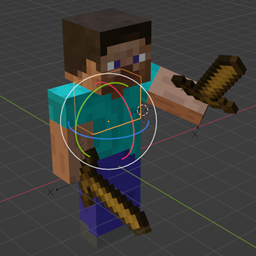
This article is about the entity controlled by the real person playing Minecraft. For the removed passive mob, see Mob (entity). For the removed hostile mob, see Monster (entity). For the fake player in Java Edition, see Mannequin.
"Minecrafter" redirects here. For the joke block, see Mine Crafter.
This article is about the entity controlled by the real person playing Minecraft. For the removed passive mob, see Mob (entity). For the removed hostile mob, see Monster (entity). For the fake player in Java Edition, see Mannequin.
"Minecrafter" redirects here. For the joke block, see Mine Crafter.


| Health points | 20HP × 10 × 10
|
|---|---|
| Armor points | 0 ( ) - 20 ( ) - 20 ( × 10) (Varies) × 10) (Varies)
|
| Behavior | Controlled |
| Attack strength |
Unarmed: 1HP  [until: JE Combat Tests] [until: JE Combat Tests]2HP [upcoming: JE Combat Tests]Armed: Varies |
| Hitbox size | Height: 1.8 blocks Width: 0.6 blocks Sneaking: Height: 1.5 blocks Width: 0.6 blocks Gliding, Swimming, or Crawling: Height: 0.6 blocks Width: 0.6 blocks Sleeping: |
| Speed | 0.10 |
| Spawn | Player spawn point, if set World spawn |
The player is a unique entity or mob[BE only] whose actions are controlled by a real person, and not the game itself. They are the main character of singleplayer Minecraft worlds, where most interactions and mechanics revolve around them as part of the gameplay. Players may also partake in the multiplayer mode with other players, putting more emphasis on player-driven activities.
Appearance
Every player's model uses a skin as its texture, composed of one full texture file or multiple Character Creator items.[BE only] Players can choose a skin to use prior to launch in the Minecraft Launcher[JE only] or at any time in-game in the Dressing Room.[BE only]
Nine default skins are always available: Steve, Alex, Zuri, Sunny, Noor, Makena, Kai, Efe, or Ari. Players can obtain custom skins from skin packs or other content in the Marketplace, third-party resources, or create their own. Classic skins can have either "classic" or "slim" shapes, which makes their arm models wide or slim. External skin textures cannot be imported on consoles.

In Bedrock Edition, the Character Creator allows players to compose a character from multiple persona items, some of which are animated or use custom geometry, obtained from completing achievements, various events, or Minecoins. These characters can be further customized with four different player heights and slim or wide arms.
A cape can be added to any skin, which is a cosmetic item obtained from special events. Characters from the Character Creator periodically blink their eyes in Bedrock Edition.
In Bedrock Edition, any character can also be assigned a set of 4 emotes, obtained similarly to character pieces, which they can express in-game by pressing B.
Characters and classic skins are synchronized with the player's Microsoft account and available on any device, except imported skin files in Bedrock Edition. In Java Edition, playing in the demo or offline does not allow usage of custom skins and always applies a random default skin.
The player's appearance can be obscured by equipping armor, such as a turtle shell, helmets, chestplates, leggings, and boots, as well as other equippable items such as an elytra, a carved pumpkin, and heads of mobs and other players.
In Java Edition, if the player is shot with an arrow or stung by a bee, the arrow or stinger appears physically embedded inside the player for a given time. These do not apply to other mobs.
Drops
- The content of their inventory (except any items with Curse of Vanishing)
- Current XP level multiplied by 7, which is then the amount of points dropped. This is capped at 100 XP points, which corresponds to just over level 7.
If the game rule "Keep inventory" (or keep_inventory) is enabled, nothing is dropped.
Interaction range

Players can interact with most blocks and entities in the world. A player's interaction range (reach) differs. The area forms a three-dimensional cylinder because it encompasses vertical and horizontal distances:[1][needs testing in Java Edition]
| Type | In other game modes | In Creative mode |
|---|---|---|
| Java Edition block | 4.5 blocks | 5 blocks |
| Java Edition entity | 3 blocks | 5 blocks |
| Bedrock Edition block | 5 blocks | |
| Bedrock Edition entity | 3 blocks | 5 blocks |
| Bedrock Edition touch | 6 blocks | 12 blocks |
Health and hunger meters
The player has 10 full hearts or 20 health points, visible on the HUD. Players in Survival mode can take damage, depleting health points and eventually killing the player. After death, players respawn at their spawn point, which can be a bed or respawn anchor, or the world spawn if absent.
When the player's hunger bar is at 18 ( × 9) or higher and "Natural regeneration" is enabled, health slowly regenerates by 1HP every four seconds, but when it is at 20 ( × 10) with saturation remaining, health regenerates by 1HP every half second.[JE only] The hunger bar depletes faster from energy-intensive activities like sprinting, jumping, attacking mobs, and mining, and it can be refilled by eating food. If the hunger bar is at 17 ( × 8.5) or lower, the player does not regenerate health. While the hunger bar is at 0 (
 ), the player is starving and proceeds to lose health. On Hard difficulty, starvation kills the player, while on Normal or Easy, it depletes health to 1HP or 10HP, respectively.
On Peaceful difficulty, the hunger bar does not deplete and the player can always regenerate health.
Like any other mob, players can posess status effects that positively, neutrally, or negatively affect them.
Movement
Walking
The most basic movement the player can perform is walking. The player can walk at a reasonable speed rate of 4.317 blocks per second[a], all while taking no hunger impact. This means that the player can walk a total of 5181 blocks[b] in one Minecraft day, in a straight line, without sprinting or sneaking.
Sprinting
The player can move faster by sprinting, but at the cost of draining the hunger bar considerably while doing so. The player sprints approximately 5.612 blocks per second[c], as opposed to the regular pace of 4.317 blocks per second. The maximum distance a player can jump when sprinting is approximately 4.225 blocks. The Speed effect increases momentum. The player cannot sprint if the hunger bar is at 6 () or less. Sprinting is activated by double-tapping the forward key (default W), then holding it, or by holding the sprint key (⎈ Control by default, ⌘ Command if using a Mac) while pressing the forward key. Holding the sprint key in Creative mode while flying causes the player to fly faster.
Sneaking
Sneaking is a feature activated by pressing and holding the sneak key (default is ⇧ Shift). Sneaking prevents players from falling more than half a block, making it highly useful for building horizontally outward over space. Going past the edge of a block and stopping sneaking does not result in falling off that block. The player can still dismount blocks while sneaking by jumping over the block's edge. In multiplayer, a player's name tag is grayed out in Java Edition or completely disappears in Bedrock Edition when they sneak, to relate to the fact that sneaking makes them harder to see.
Jumping
The maximum height a player can jump without the Jump Boost effect is about 1.2522 blocks in Java Edition. The jump height on Bedrock Edition is shorter (similar to the pre-Combat Update) with the value of 1.24919 blocks.
Swimming
Swimming occurs when the player is sprinting (by double pressing W, or pressing ⎈ Control or ⌘ Command) while the player is submerged underwater. Swimming has the same animation as crawling.
Crawling
Crawling occurs when the player is in an area less than 1.5 blocks high and prevents suffocation.
Climbing
Climbing occurs whenever the player's lower half is in the block occupied by a climbable block, such as a ladder or vines. If this condition is satisfied:
- If the player pushes against a wall, the player moves upward at about 2.35 blocks per second instead of horizontally. (Thus inside a 1×1 ladder shaft, the player can use any movement key to move upward.)
- The player can ascend the ladder by holding jump instead of using a horizontal movement key.
- If a player moving perpendicular to the climbable block enters said block, the player begins to move upward, but then falls off the block shortly afterward if the player continues to move horizontally.
- The player's maximum downward speed is reduced to a "descending" speed, at about 3 blocks per second.
- The player's horizontal movement friction is the same as on ice. (That is, moving around in the tiny space the player is in while still hanging on the ladder at the same level.)
Additionally:
- In Bedrock Edition, a player can hold down the jump button while climbing to make the climbing speed faster.
- A player on a slab in front of the climbable block must jump to get on despite being only half a block down.
- Consuming food, blocking with a shield or pulling back a bow, do not slow the player down while climbing (unlike when walking, sprinting and swimming).
Movement speed
There isn't a simple hard-coded maximum velocity for walking, sprinting, etc. The maximum is a result of a base acceleration countered by "friction" or air resistance. The base acceleration for walking is 0.098, and sprinting is 30% faster than that. Velocity is increased by this acceleration value every tick (1/20th of a second), then the player is moved by the resulting velocity, then the velocity is multiplied by the friction value of the block they are walking on. For most blocks, the friction value is 0.546. As the player walks forward, each tick their velocity goes +0.098, *0.546, +.098, *0.546, +0.098, and so on. The result is that eventually, the 0.546 multiplier counteracts the 0.098 increase, so the player doesn't go any faster. The formula for this "terminal velocity" is a/(1-r), where a is the acceleration, and r is the block's friction. 0.098/(1-0.546) ≈ 0.2159 meters/tick = 4.317 meters/second. Sprinting is 30% faster than that, at about 5.612 meters/second. Flying is similar, but the base acceleration is 0.049 and the "friction" is 0.91, which comes out to ~10.89 m/s.
| Movement mode | Speed (m/s) | Speed (km/h) | % of Walking Speed |
|---|---|---|---|
| Walking | 4.317 | 15.54 | 100% |
| Sprinting | 5.612 | 20.20 | 130% |
| Sneaking | 1.295 | 4.663 | 30% |
| Flying | 10.79 | 38.85 | 250% |
| Sprint Flying | 21.58 | 77.71 | 500% |
| Falling | 77.71 | 279.75 | 1800% |
Gameplay HUD
The onscreen heads-up display (HUD) consists of the player's health bar, hunger bar, experience bar, and hotbar among with many other UI elements shown sporadically.
The armor rating bar appears above the health bar if the player is wearing armor and the oxygen bar appears if the player is submerged in water or is suffocating in a block.[BE only] The HUD also contains the crosshair and a held object or fist. Appearance of HUD elements be toggled with F1, in the settings, or using /hud.
When the player is in Creative mode, the health, hunger, experience, armor, and oxygen bars are hidden, and only the hotbar is visible. Despite this, the player can still collect experience and wear armor. In Spectator mode, the hotbar, crosshair, and held object/fist are also hidden; in Java Edition, the hotbar appears as a player spectating list when a number is pressed or the  Scroll Wheel is moved.
Experience
Experience points (XP) can be gained via experience orbs when killing mobs or mining certain minerals. The current level is indicated by a green number above the HUD, and the experience points can be used to enchant weapons, tools, or armor with different useful attributes and skills (see enchanting table.) Anvils require experience to use.
The level increases by obtaining enough experience points. All levels and points are lost upon death but can be partially restored by picking up the experience orbs at the place of death.[2]
Experience is also obtained through activities such as mining, fishing, mob breeding, killing certain mobs, trading, or smelting.
Game modes
- In Survival mode, the player can place and destroy most blocks, and use all tools available. The player has limited health (HP icons), hunger ( icons), and oxygen. When the player runs out of health, they die and respawn at their spawn point.
- In Hardcore mode, the player can respawn only in Spectator mode, and the difficulty level is locked on Hard mode.
- In Creative mode, the player can fly by double-tapping the jump key and have access to infinite items from the Creative inventory. No mobs attack the player, and the player cannot take damage and die (except in the void and using
/killin Java Edition). The player also has no hunger, unlimited oxygen, and can break blocks instantly. - In Adventure mode, there are no changes from Survival mode aside from being unable to break or place blocks unless they possess a tool with the
can_breakitem component for that block, or have a block with thecan_place_oncomponent. This game mode is used for adventure maps. - Spectator mode is similar to Creative mode, but the player cannot interact with the world in any way. Players in Spectator are invisible to players in other game modes, are always flying, and can phase through blocks. In Java Edition, the player can also spectate mobs and inspect inventories.
Username
Players in-game are referred to by a username. These are used to target the player with commands, play online multiplayer, and differentiate other players.
In Java Edition, usernames must be 3-16 characters, although there are exceptions for players with under 3 characters, who bought the game early in its development. Players can change their username no more than once every 30 days on the preferences page of minecraft.net. When the player changes their username, the previous username becomes available for other users to claim after 37 days. Because players can change usernames every 30 days, a player can manage two usernames without anyone being able to take either of them. If the player has a username under 3 characters and changes it, the old sub-3-character username is permanently unable to be obtained again.[3] This also applies for symbol names.[4]
In Bedrock Edition, the players username is the same as the Xbox Gamertag of the player's Microsoft account. Gamertags can be changed on the change gamertag page in the Xbox website for a fee of US$9.99, though changing it for the first time is free.[5] However, players can sign out of their Microsoft account and change the username in-game to any of 3-32 characters long in the Profile settings. While signed out, multiplayer is inaccessible. Changing the player's name to "Dinnerbone" or "Grumm" turns the player model upside-down.
Player names appear above their head as nameplates, typically in white letters within a dark transparent rectangle. Player nameplates can also be seen through solid blocks and other obstructions, although a player can sneak to dim the nameplate's visibility when in sight in Java Edition, or hide it completely when out of sight in Bedrock Edition. When a player is in the same party, the font is colored blue.
Furthermore, player names are visible in the player list in multiplayer, the chat when mentioning a player with @,[BE only] and the social drawer or Friends List. Player names are required for invitations to Realms.
Sounds
Java Edition:
Players use the Players sound category for entity-dependent sound events.
| Sounds | ||||||||
|---|---|---|---|---|---|---|---|---|
| Sound | Closed captions | Source | Description | Identifier | Translation key | Volume | Pitch | Attenuation distance |
| Eating | Players | While a player is eating something | entity | subtitles | varies[sound 1] | 0.8–1.2 | 16 | |
| Sipping | Players | While a player is drinking something | entity | subtitles | 0.5 | 0.9–1.0 | 16 | |
| Gulping | Players | While a player is drinking a honey bottle | item | subtitles | 0.5 | varies[sound 2] | 16 | |
| Eating | Friendly Mobs | When a player finishes eating something | entity | subtitles | 1.0 | 0.6–1.4 | 16 | |
| Burp[until: JE 26.4] | Players | When a player finishes eating or drinking | entity | subtitles | 0.5 | 0.9–1.0 | 16 | |
| Strong attack | Players | When a player deals an attack that does not trigger any other attack sounds | entity | subtitles | varies [sound 3] | 1.0 | 16 | |
| Critical attack | Players | When a player deals a critical hit | entity | subtitles | 0.7 | 1.0 | 16 | |
| Knockback attack | Players | When a player deals a sprinting attack | entity | subtitles | 0.7 | 1.0 | 16 | |
| Sweeping attack | Players | When a player deals a sweep attack | entity | subtitles | 0.7 | 1.0 | 16 | |
| Weak attack | Players | When a player deals an attack with no damage | entity | subtitles | 0.7 | 1.0 | 16 | |
| Weak attack | Players | When a player attempts to attack without sufficient cooldown | entity | subtitles | 0.7 | 1.0 | 16 | |
| Player dings | Players | When a player levels up to a multiple of 5[sound 4] | entity | subtitles | 0.75 [sound 5] | 1.0 | 16 | |
| Player dies | Players | When a player dies | entity | subtitles | 1.0 | 0.8–1.2 | 16 | |
| Player hurts[until: JE 26.4] | Players | When a player is damaged from a generic source | entity | subtitles | 1.0 | 0.8–1.2 | 16 | |
| Player drowning[until: JE 26.4] | Players | When a player is damaged by running out of breath | entity | subtitles | 1.0 | 0.8–1.2 | 16 | |
| Player burns[until: JE 26.4] | Players | When a player is damaged by fire | entity | subtitles | 1.0 | 0.8–1.2 | 16 | |
| Player freezes[sound 6] | Blocks | When a player is damaged by freezing in powder snow | entity | subtitles | 1.0 | 0.8–1.2 | 16 | |
| Player hurts[until: JE 26.4] | Players | When a player is damaged by touching a sweet berry bush | entity | subtitles | 1.0 | 0.8–1.2 | 16 | |
| Something trips | Players | When a player falls from 4 to 7 blocks high in Survival or Adventure mode | entity | subtitles | 1.0 | 1.0 | 16 | |
| Something fell[until: JE 26.4] | Players | When a player falls from 8 or more blocks high in Survival or Adventure mode | entity | subtitles | 1.0 | 1.0 | 16 | |
| Splashing | Players | When a player enters water at low speed [sound 7] | entity | subtitles | 0.0–0.25 [sound 8] | 0.6–1.4 | 16 | |
| Splashing | Players | When a player enters water at high speed [sound 7] | entity | subtitles | 0.25–1.0 [sound 8] | 0.6–1.4 | 16 | |
| Swimming | Players | While a player is moving through water | entity | subtitles | 0.0–1.0 [sound 8] | 0.6–1.4 | 16 | |
| Player teleports[sound 9] | Players | When a player teleports using an ender pearl | entity | subtitles | 1.0 | 1.0 | 16 | |
| None[sound 10] | None | Unused sound event[sound 11] | entity | None[sound 10] | None | None | None | |
- ↑ Can be 0.5, 1.0, or 1.5
- ↑ 0.9-1.0 for
drink_honey1anddrink_honey2, 0.315-0.35 fordrink_honey3, and 0.675-0.75 for the second copy ofdrink_honey3 - ↑ 0.6 for
strong1throughstrong4, and 0.7 forstrong5andstrong6 - ↑ And more than five seconds have passed since the last time this sound played
- ↑ Is 0.75 for all levels over 30, and is When below 30
- ↑ MC-312298
- ↑ a b The player's momentum, with the horizontal axes' velocity multiplied by 0.2, compared to 0.25
- ↑ a b c The player's momentum, with the horizontal axes' velocities multiplied by 0.2 (capped at 1.0)
- ↑ MC-311734
- ↑ a b No bug reports have been made for this case, however given the resolution of most others the lack of a subtitle is implied to be intentional
- ↑ MC-185414
| Sounds | |||||||
|---|---|---|---|---|---|---|---|
| Sound | Closed captions | Source | Description | Identifier | Translation key | Volume | Pitch |
| ? | Players | While a player is eating something | random | ? | 0.5–1.1 | 0.8–1.2 | |
| ? | Players | While a player is drinking something | random | ? | 0.35 | 0.9–1.1 | |
| ? | Players | While a player is drinking a honey bottle | random | ? | varies[sound 1] | 0.9–1.0 | |
| ? | Players | When a player finishes eating or drinking | random | ? | 0.5 | 0.9–1.0 | |
| Strong attack | Players | When a player deals an attack with damage | game | ? | 0.2 | 0.8–1.2 | |
| Critical attack | Players | When a player deals a critical hit | game | ? | ? | ? | |
| Weak attack | Players | When a player deals an attack with no damage | game | ? | 0.2 | 0.8–1.2 | |
| Player dings | Players | When a player reaches a level multiple of 5 | random | ? | 1.0 | 1.0 | |
| Player dies | Players | When a player dies | game | ? | 1.0 | 0.8–1.2 | |
| Player hurts | Players | When a player is damaged from a generic source | game | ? | 1.0 | 0.8–1.2 | |
| ? | Players | When a player is damaged by running out of breath | mob | ? | 1.0 | 1.0 | |
| ? | Players | When a player is damaged by fire | mob | ? | 1.0 | 1.0 | |
| ? | Players | When a player is damaged by freezing in powder snow | mob | ? | 1.0 | 1.0 | |
| ? | Players | When a player falls from 4 to 7 blocks high in Survival or Adventure mode | damage | ? | 0.75 | 1.0 | |
| ? | Players | When a player falls from 8 or more blocks high in Survival or Adventure mode | damage | ? | 0.75 | 1.0 | |
| ? | Ambient/Environment | When a player enters water | entity | ? | ? | 0.6–1.4 | |
| ? | Players | When the player's eye level goes underwater | ambient | ? | ? | 1.0 | |
| ? | Players | When the player's eye level exits underwater | ambient | ? | ? | 1.0 | |
| ? | Players | While a player is moving through water | random | ? | ? | 0.6–1.4 | |
| ? | Players | Unused sound event | random | ? | 1.0 | 1.0 | |
- ↑ 0.5 for
drink_honey1anddrink_honey2, butdrink_honey3is 0.175 or 0.375
Data values
ID
| Name | Identifier | Translation key |
|---|---|---|
 Player Player | player |
entity |
| Name | Identifier | Numeric ID | Family | Translation key |
|---|---|---|---|---|
| Player | player | 63 |
player | entity |
Entity data
Players have entity data associated with them that contain various properties.
- [NBT Compound / JSON Object] The root tag. In level.dat files, this tag is called
Player.- Tags common to all entities see Template:Nbt inherit/entity/template
- except for the tags:
CustomName,CustomNameVisible, andGlowing. - Tags common to all mobs see Template:Nbt inherit/mob/template
- except for the tags:,
CanPickUpLoot,LeftHanded,PersistenceRequired,Leash,drop_chances. - [NBT Compound / JSON Object] abilities: The abilities this player has.
- [Byte] flying: 1 or 0 (
true/false) -trueif the player is currently flying. - [Float] flySpeed: The flying speed, set to
0.05. - [Byte] instabuild: 1 or 0 (
true/false) - Iftrue, the player can place blocks without depleting them. This istruefor Creative mode, andfalsefor other game modes. - [Byte] invulnerable: 1 or 0 (
true/false) - Behavior is not the same as the invulnerable tag on other entities. Iftrue, the player is immune to all damage and harmful effects except for void damage and/kill. Also, all mobs, whether hostile or not, are passive to the player.truewhen in Creative or Spectator mode, andfalsewhen in Survival or Adventure mode. - [Byte] mayBuild: 1 or 0 (
true/false) - Iftrue, the player can place blocks.truewhen in Creative or Survival mode, andfalsewhen in Spectator or Adventure mode. - [Byte] mayfly: 1 or 0 (
true/false) - Iftrue, the player can fly and doesn't take fall damage.truewhen in Creative and Spectator modes, andfalsewhen in Survival and Adventure modes. - [Float] walkSpeed: The walking speed, set to
0.1.
- [Byte] flying: 1 or 0 (
- [Int] DataVersion: Version of the player NBT structure. Is increased with every new snapshot and release. See Data version.
- [String] Dimension: The ID of the dimension the player is in. Used to store the player's last known location along with
Pos. - [NBT List / JSON Array] EnderItems: Each compound tag in this list is an item in the player's 27-slot ender chest inventory. When empty, list type may have unexpected value.
- [NBT Compound / JSON Object] An item in the inventory.
- Includes the [Byte] Slot tag - slots are numbered
0–26, inclusive. - See Data component format § Item format.
- Includes the [Byte] Slot tag - slots are numbered
- [NBT Compound / JSON Object] An item in the inventory.
- [NBT List / JSON Array] entered_nether_pos: May not exist. A list of 3 doubles, describing the Overworld position from which the player entered the Nether. Used by the
nether_traveladvancement trigger. Set every time the player passes through a portal from the Overworld to the Nether. When entering a dimension other than the nether (not by respawning) this tag is removed. Entering the Nether without using a portal does not update this tag.- [Double] x: The X coordinate in the Overworld.
- [Double] y: The Y coordinate in the Overworld.
- [Double] z: The Z coordinate in the Overworld.
- [Float] foodExhaustionLevel: See Hunger § Mechanics.
- [Int] foodLevel: The value of the hunger bar. Referred to as hunger. See Hunger.
- [Float] foodSaturationLevel: Referred to as saturation. See Hunger § Mechanics.
- [Int] foodTickTimer: See Hunger.
- [Boolean] ignore_fall_damage_from_current_explosion: 1 or 0 (
true/false) -trueif the current explosion should apply a fall damage reduction. Only used by explosions from wind charges. - [NBT List / JSON Array] Inventory: Each compound tag in this list is an item in the player's inventory. (Note: when empty, list type may have unexpected value.)
- [NBT Compound / JSON Object] An item in the inventory.
- [NBT Compound / JSON Object] LastDeathLocation: May not exist. Location of the player's last death.
- [String] dimension: Dimension of last death.
- [Int Array] pos: Coordinates of last death.
- [Int] playerGameType: The current game mode of the player.
0means Survival,1means Creative,2means Adventure, and3means Spectator. - [Int] previousPlayerGameType: The previous game mode of the player.
- [NBT Compound / JSON Object] recipeBook: Contains a JSON object detailing recipes the player has unlocked.
- Tags related to the recipe book see Template:Nbt inherit/Recipe Book/template
- [NBT Compound / JSON Object] respawn: May not exist. The respawn information of the player. Removed when the player attempts to respawn with no valid bed or respawn anchor to spawn at these coordinates. They are unaffected by breaking a bed or respawn anchor at these coordinates, and are unaffected by the player's death.
- [Int Array] pos: block position to spawn at
- [Float] yaw: angle to spawn with (default: 0.0)
- [String] dimension: dimension id to spawn in (default minecraft:overworld) (required)
- [Float] pitch: pitch to spawn with. (required)
- [Boolean] forced: true if this spawn was set through commands (default: false)
- [NBT Compound / JSON Object] RootVehicle: May not exist. The root entity that the player is riding.
- [Int Array] Attach: The UUID of the entity the player is riding, stored as four ints.
- [NBT Compound / JSON Object] Entity: The NBT data of the root vehicle.
- See Entity format.
- [Int] Score: The score displayed upon death.
- [Byte] seenCredits: 1 or 0 (
true/false) -trueif the player has entered the exit portal in the End at least once. - [NBT Compound / JSON Object] SelectedItem: Data of the item currently being held by the player, excluding the Slot tag. Only exists when using the /data command, this value is not saved in the player.dat format.
- See item format.
- [Int] SelectedItemSlot: The selected hotbar slot of the player. Values are 0-indexed, so the leftmost slot is 0 and the rightmost slot is 8.
- [NBT Compound / JSON Object] ShoulderEntityLeft: The entity that is on the player's left shoulder. Always displays as a parrot.
- See Entity format.
- [NBT Compound / JSON Object] ShoulderEntityRight: The entity that is on the player's right shoulder. Always displays as a parrot.
- See Entity format.
- [Short] SleepTimer: The number of game ticks the player had been in bed.
0when the player is not sleeping. When in bed, increases up to 100 ticks, then stops. Skips the night after enough players in beds have reached 100 (see Bed § Passing the night). When getting out of bed, instantly changes to 100 ticks and then increases for another 9 ticks (up to 109 ticks) before returning to 0 ticks. - [Boolean] spawn_extra_particles_on_fall:
- [NBT Compound / JSON Object] warden_spawn_tracker: Contains data about the warden spawning process for this player.
- [Int] warning_level: A warning level between
0, and4(inclusive). The warden spawns at level 4. - [Int] cooldown_ticks: The number of game ticks before the
warning_levelcan be increased again. Decreases by 1 every tick. It is set to 200 game ticks (10 seconds) every time the warning level is increased. - [Int] ticks_since_last_warning: The number of game ticks since the player was warned for warden spawning. Increases by 1 every tick. After 12000 game ticks (10 minutes) it resets to a value of 0, and the
warning_leveldecreases by 1 level.
- [Int] warning_level: A warning level between
- [Int] XpLevel: The level shown on the experience bar.
- [Float] XpP: The progress across the experience bar to the next level, stored as a percentage.
- [Int] XpSeed: The seed used for the next enchantment in enchanting tables.
- [Int] XpTotal: The total amount of experience the player has collected over time; used for the score upon death.
Achievements
| Icon | Achievement | In-game description | Actual requirements (if different) | Gamerscore earned | Trophy type (PS) | |
|---|---|---|---|---|---|---|
| PS4 | Other | |||||
 |  | Diamonds to you! | Throw diamonds at another player. | Drop a diamond. Another player or a zombie must then pick up this diamond. | 15 | Bronze |
 |  | Time for Stew | Give someone a suspicious stew. | Drop a suspicious stew. Another player must then pick up this suspicious stew. | 20 | Bronze |
 |  | Cheating Death | Use the Totem of Undying to cheat death | Have the totem of undying in your hand when you take fatal damage. | 30 | Silver |
Achievements that apply to all mobs:
| Icon | Achievement | In-game description | Actual requirements (if different) | Gamerscore earned | Trophy type (PS) | |
|---|---|---|---|---|---|---|
| PS4 | Other | |||||
 |  | Overkill | Deal nine hearts of damage in a single hit. | Damage can be dealt to any mob, even those that do not have nine hearts of health overall. | 30 | Bronze |
 |  | Over-Overkill | Deal 50 hearts of damage in a single hit using the Mace | Damage can be dealt to any mob, even those that do not have 50 hearts of health overall. | 20 | Silver |
 |  | Mob Kabob | Hit five mobs in the same Charge attack using the Spear | Armor stands and players also count for this achievement as they are technically mobs. | 10 | Bronze |
Advancements
Advancements that apply to all mobs:
| Icon | Advancement | In-game description | Actual requirements (if different) |
|---|---|---|---|
  | Adventure | Adventure, exploration and combat | Kill any mob, or be killed by any living entity. |
 | A Throwaway Joke | Throw a Trident at something. Note: Throwing away your only weapon is not a good idea. | Hit a mob with a thrown trident. |
 | Take Aim | Shoot something with an Arrow | Using a bow or a crossbow, shoot a mob with an arrow, tipped arrow, or spectral arrow. |
  | Mob Kabob | Hit five mobs in the same Charge attack using the Spear |  Armor Stand and Armor Stand and  Mannequin also count for this advancement. Mannequin also count for this advancement. |
  | Arbalistic | Kill five unique mobs with one crossbow shot | Armor Stand and Mannequin also count for this advancement. This is a hidden advancement, meaning that it can be viewed by the player only after completing it, regardless of if its child advancement(s), if any, have been completed. |
History
Java Edition
| Java Edition pre-Classic | |||||||
|---|---|---|---|---|---|---|---|
| Cave game tech test | The player currently has no visible model. | ||||||
| The player hitbox is 0.6 blocks wide and 1.8 blocks tall, and the player eye height is 1.62 blocks tall. | |||||||
| rd-132328 |  Mobs were added with their skin and model ported from Zombie Town. These are later used for the player. Mobs were added with their skin and model ported from Zombie Town. These are later used for the player. | ||||||
| rd-20090515 | Players can now jump further and also walk and fall faster. | ||||||
| Players move slower when in midair. | |||||||
| Java Edition Classic | |||||||
| 0.0.15a (Multiplayer Test 1) | Added the player model for the newly introduced multiplayer mode. Its model and texture are both taken from the mob.
| ||||||
| The player's arms flail wildly when walking.[note 1] | |||||||
| August 13, 2009 |  Notch shows a test skin with a hat layer. Notch shows a test skin with a hat layer. | ||||||
| 0.24_SURVIVAL_TEST |  The texture was changed. The texture was changed. | ||||||
| 0.28 |  The texture was changed, once again, removing the beard. The texture was changed, once again, removing the beard. | ||||||
| December 19, 2009 | Player shadow test. | ||||||
| December 22, 2009 | Notch shows concept art of a new player model, appearing similar to the base "Steve" model, but with a miner hat and different clothes. | ||||||
| Java Edition Infdev | |||||||
| 20100227-1414 | Players logged in as Notch now drop an apple upon death. | ||||||
| 20100327 | The player now drops their inventory and respawns at the spawn location upon death, rather than having to reload the last save. | ||||||
| Java Edition Alpha | |||||||
| v1.0.4 | The player can jump only two blocks horizontally, instead of three. | ||||||
| v1.0.6 | Held items now appear in third person. | ||||||
| v1.0.9 | The player's arms no longer flail wildly when walking. | ||||||
| v1.0.15 | The player model is made visually smaller when seen in third person; the hitbox is unaffected. | ||||||
| Players now have an arm swinging animation when attacking or mining, visible in third person. | |||||||
| v1.1.1 | Added ability to sneak with ⇧ Shift by default. | ||||||
| Java Edition Beta | |||||||
| 1.5 | Unarmed damage was increased from 1HP to 2HP. | ||||||
| 1.8 | Pre-release | The player now has an experience and hunger bar. | |||||
| The player can now jump four blocks horizontally by sprinting. | |||||||
| Unarmed damage was decreased from 2HP to 1HP. | |||||||
| Java Edition | |||||||
| 1.0.0 | RC1 | Changed the sounds the player makes. Any physical damage plays a "tick" sound, and damage from falling would play sounds like bones breaking. | |||||
| Before this version, when the player was damaged, they would make a deep "Ooh!" sound that represented the player's response when hurt. However, this sound suggested that the player was male, which was not consistent with/representative of female player skins, so Mojang changed the sound to make it more gender-neutral. | |||||||
| 1.3.1 | 12w18a | Players no longer drop apples when killed while logged in as Notch. | |||||
As a result of internal changes, players in singleplayer worlds are immune to all damage except void and the /kill command for 3 seconds when spawning, respawning, or joining the world. | |||||||
| 1.4.2 | 12w38a | Changed hurt sounds for player, the fleshy stab sound alongside the generic tick sound and the bone breaking sound from falling were both removed/changed to be less violent. | |||||
| 1.8 | pre1 |  Added a new player model with smaller arms, and a new default player skin named Alex. Added a new player model with smaller arms, and a new default player skin named Alex. | |||||
| February 4, 2015 | Players can now change usernames. | ||||||
| 1.9 | 15w42a | Player's hitbox (usually 1.8 blocks tall) is now shorter (1.65m) when crouching, is a 0.6-block cube when gliding with elytra, and is a 0.2-block cube while laying in bed. | |||||
| 15w45a | Jump height increased from 1.24919 blocks to 1.2522 blocks. | ||||||
| 1.12 | 17w13a | Players walking backward now use the same animation as moving forward instead of rotating the model to the side as if they are going sideways. | |||||
| 1.13 | 18w07a | Added the ability to sprint while in water, which causes the player to dive to the ground and swim much faster. | |||||
| 18w15a | Sprinting at the surface of water no longer makes the player swim, instead the player stays at the same altitude constantly. | ||||||
| Swimming through 1 block holes is now possible.[6] | |||||||
| 1.14 | 19w12a | The player's hitbox height while sneaking is now 1.5 blocks instead of 1.65. | |||||
| 19w14a | The player now crawls when they are in a space less than 1.5 blocks tall. | ||||||
| 1.15 | 19w34a | Fixed the slim model being a half-pixel lower than the torso of the player. This had been an issue since the introduction of the slim skin model in 1.8. | |||||
| August 20, 2022 |     New skin textures for Steve and Alex were added in the Minecraft Launcher beta, including classic and slim versions. New skin textures for Steve and Alex were added in the Minecraft Launcher beta, including classic and slim versions. | ||||||
| 1.19.3 | 22w45a | Integrated player skin now stored separately by wide and slim model. | |||||
  Updated integrated skins of Steve and Alex. Updated integrated skins of Steve and Alex.
| |||||||
              Integrated 7 new skins: Ari, Efe, Kai, Makena, Noor, Sunny and Zuri. Integrated 7 new skins: Ari, Efe, Kai, Makena, Noor, Sunny and Zuri.
| |||||||
| The 7 new skins can be assigned to offline players now. | |||||||
| 1.21.2 | 24w33a |          The slim player model has changed, moving the arms down half a pixel The slim player model has changed, moving the arms down half a pixel | |||||
| 24w34a | The slim player model has been reverted to the pre-24w33a shape.[7] | ||||||
| 1.21.4 | 24w45a | Players no longer receive 3 seconds of damage immunity when spawning, respawning, or joining a world or server. | |||||
| Java Edition Combat Tests | |||||||
| 5 | Players now get knockback from hits that deal less than half a heart of damage, including no damage. | ||||||
Bedrock Edition
| Pocket Edition Alpha | |||||||
|---|---|---|---|---|---|---|---|
| Demo | Added the player. | ||||||
| v0.8.0 | build 1 |  The player skin was changed. The player skin was changed. | |||||
| v0.10.0 | build 1 |   The player skin was changed, once again. Removed hole from head bottom. The player skin was changed, once again. Removed hole from head bottom. | |||||
| v0.11.0 | build 1 | The player's skin can now be customized. | |||||
| Added a new player model with smaller arms, and a new default player skin named Alex.
| |||||||
| Changed Steve's skin to match Java Edition. | |||||||
| v0.12.1 | build 10 | Changed the sounds the player makes. Any physical damage plays a flesh impact sound, and damage from falling would play sounds like bones breaking. | |||||
| Before this version, when the player was damaged, they would make a deep "ooh!" sound that represented the player's response when hurt. However, this sound suggested that the player was male, so Mojang changed the sound to make it more gender-neutral. | |||||||
| ? | Alex's shoulders lowered by half a pixel. | ||||||
| Bedrock Edition | |||||||
| 1.2.13 | beta 1.2.13.8 | Added the ability to sprint while in water, which causes the player to dive to the ground and swim much faster. | |||||
| 1.4.0 | beta 1.2.20.1 | Players can now swim through 1x1 gaps. | |||||
| 1.5.0 | beta 1.5.0.0 | Improved player swimming at the surface of water. | |||||
| 1.13.0 | beta 1.13.0.13 | The player left leg no longer slightly bob when the player is idle or looking around. | |||||
| beta 1.13.0.15 | Player height is now customizable in 4 different sizes in the Character creator: tall, medium, small, smaller, though have the same hitbox. Also, player eyes (Steve, Alex, and custom Character creator skins) can now blink. | ||||||
| 1.14.0 | beta 1.14.0.1 | Players can now sprint on top of water instead of being able to swim. | |||||
| 1.18.30 | beta 1.18.30.20 | Unarmed damage has been decreased from 2HP to 1HP to match Java Edition. | |||||
| 1.19.50 | Preview 1.19.50.21 | Added 7 new skins: Ari, Efe, Kai, Makena, Noor, Sunny and Zuri. | |||||
| 1.19.70 | Preview 1.19.70.20 | The player’s hitbox height now reduces to 1.5 blocks while sneaking. | |||||
| 1.19.80 Experiment | Preview 1.19.80.20 | Sneaking is now behind the "Short Sneak" experimental toggle. | |||||
| 1.20.10 Experiment | Preview 1.20.10.20 | The "Short Sneak" experimental toggle has been renamed to "Short Sneaking and Crawling". | |||||
| 1.20.10 Experiment | Preview 1.20.10.23 | Renamed the "Short Sneaking and Crawling" experimental toggle to "Crawling". | |||||
| 1.20.10 | Preview 1.20.10.23 | Sneaking under 1.5 block gaps is no longer behind experimental gameplay. | |||||
| 1.20.30 | Preview 1.20.20.22 | Crawling is no longer behind experimental gameplay. | |||||
| Removed the "Crawling" toggle. | |||||||
| 1.21.30 | Preview 1.21.30.21 | When the player enters water, the splashing sound is now changed to match Java Edition. | |||||
| Preview 1.21.30.23 |   The texture of the Ari skin has been changed. The texture of the Ari skin has been changed. | ||||||
| 26.40 | Preview 26.40.27 | Players can no longer get soft-locked when standing inside a sulfur cube's or a creaking's bounding box, as they are now able to interact with the entities and blocks around them through the mob.
| |||||
| Upcoming Bedrock Edition | |||||||
| 26.60 | Preview 26.60.21 | Players now take fall damage when landing on a solid block at the boundary of a water block. | |||||
Legacy Console Edition
| Legacy Console Edition | |||||||
|---|---|---|---|---|---|---|---|
| Xbox 360 | Xbox One | PS3 | PS4 | PS Vita | Wii U | Switch | |
| TU1 | CU1 | 1.00 | 1.00 | 1.00 | Patch 1 | 1.0.1 | Added the player. |
| TU3 | 1.04 | Added skin packs. | |||||
| TU5 | 1.00 | The sound of the player taking damage is changed from a man's grunt to be more gender-neutral. | |||||
| TU24 | CU12 | 1.16 | 1.16 | 1.16 | Added the Alex skin. | ||
| TU46 | CU36 | 1.38 | 1.38 | 1.38 | Patch 15 | Player's hitbox (usually 1.8 blocks tall) is now shorter (1.65m) when crouching, is a 0.6-block cube when gliding with elytra, and is a 0.2-block cube while laying in bed. | |
| TU54 | CU44 | 1.52 | 1.52 | 1.52 | Patch 24 | 1.0.4 | Players walking backward now use the same animation as moving forward instead of rotating the model to the side as if they are going sideways. |
| TU69 | 1.76 | 1.76 | 1.76 | Patch 38 | Changed hurt sounds for player again. | ||
Gallery
-
 The first image of mobs
 -
 First screenshot of a player model with hat layer
 -
 Character concept art for Minecraft by Dock
 -
 Height comparison of the player model before (left) and in/after (right) Java Edition Alpha v1.0.15
Historical sounds
| Sound | Added in | Removed in | Volume | Pitch | Attenuation Distance |
|---|---|---|---|---|---|
| Hurt | Java Edition Classic 0.24 SURVIVAL TEST | Java Edition 1.0.0 (RC1) Pocket Edition v0.12.1 alpha (build 10) |
1.0 | 0.8-1.2 | 16 |
| Hurt flesh | Java Edition 1.0.0 (RC1) | Java Edition 1.4.2 (12w38a) | 1.0 | 0.8-1.2 | 16 |
| Landing from a small fall | 1.0 | 1.0 | 16 | ||
| Landing from a big fall | 1.0 | 1.0 | 16 |
Data history
| Java Edition | |||||||
|---|---|---|---|---|---|---|---|
| 1.11 | 16w32a | Changed entity ID from Player to player. | |||||
| 1.13 | 17w47a | Numeric IDs for entities were presumably deprecated in this version. | |||||
| 1.21.5 | 25w06a | The armor and off-hand equipment of players is now also stored in the equipment field. | |||||
| 25w07a | The SpawnX, SpawnY, SpawnZ, SpawnAngle, SpawnDimension, and SpawnForced fields have been collected into a single respawn field. | ||||||
The enteredNetherPosition field has been renamed to entered_nether_pos, and is now formatted as a list of doubles. | |||||||
| 1.21.9 | Pre-Release 1 | angle has been renamed to yaw and is now a required field. | |||||
pitch has been added as a required field. | |||||||
dimension is now a required field. | |||||||
Issues
Issues relating to "Player" are maintained on the bug tracker. Issues should be reported and viewed there.
Trivia
- The original Steve skin and player model was originally created for another one of Notch's games called Zombie Town.
- The player's eye level when using the default player height (according to coordinates on the debug screen) is 1.62m when standing, 1.27m when sneaking and 0.4m when swimming, crawling or gliding.
- The player's actual size doesn't match the hitbox. Their model is as tall as 2 blocks, but is scaled down by a factor of 0.9375, making them 1.875m tall and 0.9375m wide, exactly 2 texels shorter than the height of 2 blocks.
- The player's legs do not line up perfectly with the torso to prevent z-fighting when wearing armor. This is the same case for zombies and their variants.[8]
- In Bedrock Edition, a dead player can still collect experience orbs near their death location until they choose to respawn.
- Likewise, when the player slept in a bed, the world revolved around the player during the animation instead of the player's camera rotating, which led to some visual bugs.[9]
- With a length of 3 to 16 characters and 63 characters to choose from, the total number of possible player usernames in Java Edition is or more than 62 octillion.
- The Knockback attack sounds from 1-2 actually have the punch sound effect.
Gallery
Renders
Idle
-
 Alex with wide arms
 -
 Ari with slim arms
 -
 Efe with wide arms
 -
 Kai with slim arms
 -
 Makena with wide arms
 -
 Noor with wide arms
 -
 Steve with slim arms
 -
 Sunny with slim arms
 -
 Zuri with slim arms
Animated
-
 Alex's eyes blinking in Bedrock Edition
 -
 Steve's eyes blinking in Bedrock Edition
Textures
-
 Alex
Alex -
 Alex with slim arms
 -
 Ari
Ari -
 Ari with slim arms
 -
 Efe
Efe -
 Efe with slim arms
 -
 Kai
Kai -
 Kai with slim arms
 -
 Makena
 -
 Makena with slim arms
 -
 Noor
Noor -
 Noor with slim arms
 -
 Steve
Steve -
 Steve with slim arms
 -
 Sunny
Sunny -
 Sunny with slim arms
 -
 Zuri
Zuri -
 Zuri with slim arms
Screenshots
-
 Several players looking at an axolotl
 -
 Ari looks at Efe from afar
 -
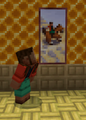 Noor looking at Prairie Ride. Unsurprisingly, Noor is seen in the painting.
 -
 Five of the default skins customized using the Character Creator
 -
 Players around a campfire
 -
 Steve and Alex at the beach
 -
 Steve and Alex at a village
See also


External links
- "Introducing New Default Minecraft Skins" by Sophia Dankis – Minecraft.net, October 19, 2022.
Notes
- ↑ Can also be seen in "Zombie Town" by Notch, which features the mob.
References
- ↑ Vertical attack reach forms a cylinder, not a sphere.
- ↑ http://www.pcgamer.com/first-details-on-minecrafts-xp-system-notch-when-you-die-you-lose-all-levels-you-lose-all-xp/
- ↑ https://namemc.com/name/NY
- ↑ https://namemc.com/search?q=y-93
- ↑ https://support.xbox.com/help/account-profile/profile/change-xbox-live-gamertag
- ↑ MC-125240
- ↑ MC-275473
- ↑ MC-42 – resolved as "Works As Intended".
- ↑ "Another one: when the player is in a bed and lying down, we don't move the camera to the bed. We just move and rotate the whole world to make it be in front of where the camera was last. ¯\_(ツ)_/¯" – @Dinnerbone (Nathan Adams) on X (formerly Twitter), February 25, 2019