"Hop" redirects here. For the redstone component that transfers items, see Hopper.
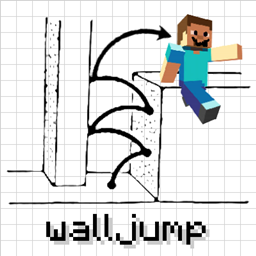
Jumping is a form of movement that elevates the player by approximately 1.25 blocks into the air. Mobs can also jump, as part of their behavior.
Mechanic
Activation
Jumping is done by pressing the jump key (which defaults to ␣ Space on a keyboard) or button (e.g. the  button on an Xbox controller). When the auto-jump setting is enabled, and the player walks toward the edge of a block, the player automatically jumps.
Usage
When the player jumps, a specific upward velocity is added to the player. A player always starts a jump with the same speed moving upward.
Sneaking and crawling, when activated by suffocation prevention in Java Edition, prevent players from jumping due to the reduced space. These two actions normally do not prevent players from jumping.
Jump height
Jumping normally lets the player climb up 1.2522 blocks. Players with Jump Boost I can jump 1.8361 blocks, and 2.5168 blocks for level II.
Sprint-jumping
Jumping can be combined with sprinting to increase the player's movement speed. This costs less hunger than regular sprinting because hunger is only calculated on the ground so while the cost of sprinting is 0.1 saturation per block and jumping is 0.2 per jump the player skips the cost of up to 4 blocks per jump.
Mobs
Most land-based mobs are able to jump when they are walking up blocks. However, they only jump when they need to in order to climb hills, except in (but not limited to) these cases:
- Illagers and witches when celebrating a successful raid
- Foxes, when attacking
- Spiders and cave spiders, when attacking
- Rabbits, as part of their normal movement
- The killer bunny[JE only] has the same attack pattern as spiders, and jumps around similarly.
- Frogs, as a part of their normal movement
- Slimes and magma cubes, as a part of their normal movement
- Baby villagers when playing on beds
- Adult pandas when a nearby baby panda sneezes
These mobs are able to walk up full-sized blocks without jumping:
- Horses and their variants
- Iron golems
- Endermen
- Pigs, when controlled by the player
- Striders, when controlled by the player
- Llamas
- Ravagers
- Drowned on land
- Turtles
Flying mobs (ghasts, phantoms, etc.) and water mobs (except turtles) do not jump.
- Fishes, guardians and elder guardians flop around when out of water, but do not jump.
Blocks
- Blocks affected by jumping on or near them
- Farmland reverts to a standard dirt block if an entity jumps and/or lands on it. This also causes any seeds and crops planted in the farmland to pop out. Entities do not need to jump for this to occur, as simply landing on farmland from a fall causes the same effect.
- Turtle eggs can be broken by being jumped/landed on enough times.
- A sculk sensor is able to detect almost any interaction or movement from an entity. A sculk sensor cannot sense when an entity jumps, but can sense when one lands. Jumping or landing while sneaking cannot be detected by the sensor. Walking or landing on a wool block nullifies the vibrations, so the sculk sensor cannot detect that either. Wool can also nullify vibrations that are between both the source of the disturbance and the sensor itself.
- The vibration of an entity hitting the ground causes the sculk sensor to output a redstone signal with a strength of 5.
- Blocks affecting entities that jump on them
- Soul sand causes entities to sink down by 2 pixels, also lowering jump height by that much.
- Honey blocks make players jump 3⁄16 of a block from them, which is an 85% jump-height reduction.
- Slime blocks bounce entities back up to a height proportional to their downward velocity. Holding the jump key while falling on a slime block causes the player to jump just at the moment of making contact with the slime block. This can be done without suffering any fall damage. Holding the sneak key while landing on a slime block completely negates the bouncing.
- A pointed dripstone that is pointing upward (also known as a stalagmite) hurts any player or mob that falls on it. Standing on a stalagmite and then jumping harms the entity repeatedly. The farther a fall before landing on a stalagmite, the more damage it does (Equal to 2 times standard fall damage).
- Jumping over walls
- Fences, fence gates, and walls have hitboxes that are 1.5 blocks tall, which prevents most mobs from jumping over them. A carpet can be placed on one of a fence of wall in order to allow a player to easily climb over it while keeping most mobs trapped since they can't pathfind onto the carpet and over the wall.
- Jumping in or from blocks
- Water or lava prevents any entity from jumping while in it. However, if a player is above the surface of the liquid, holding the jump key and in tandem with moving up against a block, the player attempts to jump out of the liquid in an effort to land on the block that the player moved toward.
- Pressing the jump key while submerged in water or lava makes the player ascend in it.
- Ladders and vines can be climbed by holding the jump key while being close enough to them. Simply moving forward into them achieves the same effect.
- Cobwebs and sweet berry bushes prevent players from jumping from them.
Trivia
- Jumping was one of the first transportation mechanics added.
- The longest possible distance a player can jump without status effects is a little over 9 blocks, by sprint-jumping out of a 2-block tall corridor of ice.
- The longest possible distance a player can jump with obtainable effects in Survival is over 11 blocks, by using a potion of Leaping, Swiftness and Slow Falling combined with Soul Speed III boots on soul sand.
- The longest possible distance a player can jump without effects or ice is 5 blocks by just sprinting.
- Jumping while sprinting uses less saturation than just sprinting.
History
Java Edition
| Java Edition pre-Classic | |||||||
|---|---|---|---|---|---|---|---|
| Cave game tech test | Added jumping. | ||||||
| Java Edition Alpha | |||||||
| 1.0.4 | As a result of ice's slipperiness, entity physics have changed and jumps are now shorter. | ||||||
| Java Edition | |||||||
| 1.0.0 | Beta 1.9 Prerelease | When the player jumps, their experience increases by a number between 1 and 100. | |||||
| Continuous jumping by holding down the jump key is no longer possible. | |||||||
| Beta 1.9 Prerelease 2 | Removed the ability of gaining experience when jumping. | ||||||
| Holding the jump key now has a delay of half a second before jumping again.[1] | |||||||
| 1.9 | 15w45a | Player's jump height is increased from 1.24919 blocks to 1.2522 blocks. | |||||
| 1.10 | 16w20a | A new 'Auto-jump' toggle has been added, which automatically makes the player jump when running toward a one block tall obstacle. This option is enabled by default. | |||||
| 1.11 | 16w32a | The exhaustion cost per jump has been decreased from 0.2 to 0.05. | |||||
| The exhaustion cost per sprint-jump has been decreased from 0.8 to 0.2. | |||||||
| 1.17 | 20w49a | Player's jump while sneaking ignores sculk sensors. | |||||
Bedrock Edition
| Pocket Edition Alpha | |||||||
|---|---|---|---|---|---|---|---|
| Demo | Added jumping. | ||||||
| v0.1.0 | Added Auto-Jump. | ||||||
Legacy Console Edition
| Legacy Console Edition | |||||||
|---|---|---|---|---|---|---|---|
| Xbox 360 | Xbox One | PS3 | PS4 | PS Vita | Wii U | Switch | |
| TU1 | CU1 | 1.00 | 1.00 | 1.00 | Patch 1 | 1.0.1 | Added jumping. |
| ? | ? | ? | ? | ? | ? | ? | Player's jump height is increased from 1.24919 blocks to 1.2522 blocks. |
| TU54 | CU44 | 1.52 | 1.52 | 1.52 | Patch 24 | 1.0.4 | The exhaustion cost per jump has been decreased from 0.2 to 0.05. |
| The exhaustion cost per sprint-jump has been decreased from 0.8 to 0.2. | |||||||
| A new 'Auto-jump' toggle has been added, which automatically makes the player jump when running toward a one block tall obstacle. This option is disabled by default. | |||||||
New Nintendo 3DS Edition
| New Nintendo 3DS Edition | |||||||
|---|---|---|---|---|---|---|---|
| 0.1.0 | Added jumping. | ||||||
Issues
Issues relating to "Jumping" are maintained on the bug tracker. Issues should be reported and viewed there.