

 For the item produced after a book and quill is signed, see Written Book.
A book and quill is an item that can be used to write and edit text, with up to 100 pages available. Signing it allows it to be named for free and prevents further edits. It can also be displayed on a lectern.
Obtaining
Crafting


Usage
Crafting ingredient
| Name | Ingredients | Crafting recipe | Notes |
|---|---|---|---|
| Written Book | Book and Quill + Written Book |
The input written book is not consumed. The new copies are "Copy of Original" or "Copy of Copy", depending on whether the input written book is "Original" or "Copy of Original". Copies of copies cannot be copied. Copied books of the same generation ("Original", "Copy of Original", "Copy of Copy", or "Tattered") stack. |

Writing

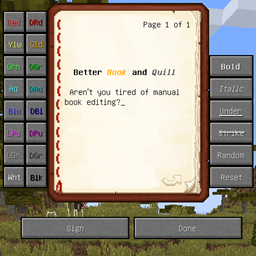
By pressing use item or long tapping screen anywhere[Bedrock Edition only] while holding a book and quill in their hand, the player can open a text editor GUI. This shows one[JE only] or two[BE only] pages with a text box. The top of each page indicates its number and the total number of pages, and buttons at the bottom allow to flip through pages.
In Java Edition, the player can write a single book up to 100 pages, with up to 1023 characters per page, and up to 102,300 characters inside the entire book. No page may be longer than 14 lines, and each line can have a width of 114 pixels.
In Bedrock Edition, the player can write a single book up to 50 pages long, with up to 256 characters per page, and up to 12,800 characters inside the entire book. No page may be longer than 14 lines and may have a width of up to 121 pixels each. Formatting codes apply to the character limit but do not apply to the pixel limit.
The player has the ability to copy and paste into books. However, the paste does not work if the text being pasted is longer than a single page. Most Unicode characters are available in books, and they may be pasted in without issue.
In singleplayer, the world pauses while a book is being edited.[Java Edition only]
Pressing the "next" button on the last page automatically creates the page and increases the page count. In Bedrock Edition, the edit button allows to swap the page with the previous or next page, delete the page, or insert a new page before the selected page.
In Java Edition, the book writing interface must be closed by pressing the Done button. Any other way of closing it (such as by pressing the Escape key) causes all work from the session to be lost. In Bedrock Edition, the player can use the exit keybinds or X button like any other GUI.
Lecterns
A book and quill (as well as a written book) can be placed on an empty lectern.
The lectern then emits a redstone signal depending on the displayed page in the book. On the last page, the lectern emits a signal strength of 15.
Formatting codes

Text in a book can be styled using codes starting with the § character (section sign).
§kcreates randomly changing characters.§lcreates bold text.§ocreates italic text.- Most other numbers and letters create colored text.
§rresets any of the previous styles so text after it appears normally.
If the player uses multiple codes, and continue typing past the end of a line, the next line exhibits only the last formatting code used.
Signing

Books can be signed by pressing the "Sign" button while in the interface. In Java Edition, when signed, a book bears the name of the player who wrote it and a title chosen upon signing. In Bedrock Edition, the book doesn't display the name of the player as the author; instead, the author can be any text the player wants. After it has been signed, it cannot be edited again – it has turned into a written book.
Special characters can be used in the title, although alt codes do not work and text cannot be pasted in Java Edition. Also, on Linux, using the compose key to produce special characters does work. The title and author can be formatted in-game with the § character in Bedrock Edition.
The title of the book and author can be up to 15[JE only]/16[BE only] characters long.[1] If a custom name is removed from a written book, it reverts to the title it was given during the signing process.
Chiseled bookshelf
Using the chiseled bookshelf while having a book and quill in the main hand puts the book inside the chiseled bookshelf.
Trading
| Villager | Probability | Villager wants | Player receives | Trades in stock | Villager experience | Price multiplier | ||
|---|---|---|---|---|---|---|---|---|
| JE | BE | |||||||
 Librarian Librarian |  Expert Expert | 50% | 100% |  Book and Quill Book and Quill+ Book and Quill[t 1] |  Emerald Emerald | 12 | 30 | 0.05 |
- ↑ In Java Edition only one is requested per trade because of MC-248042 – Librarian's book and quill trade is always discounted to 1 since books are unstackable. In Bedrock Edition, the second book is placed in another slot instead.
Inserting screenshots

Screenshots in the portfolio can be inserted into book and quill.[2] This can be done by clicking the pencil button on the bottom of the page, and clicking the photo button (shown as an icon that looks like a photo with a plus next to it).
The photo button brings up the portfolio menu, where players can select which screenshot to be inserted into the book and quill page. Each screenshot takes up one page.
Players can export their books and quills photos and written texts as a PDF file. The default name for the file is formatted "(Book Name) (Author Name)".
Sounds
| Sounds | ||||||||
|---|---|---|---|---|---|---|---|---|
| Sound | Closed captions | Source | Description | Identifier | Translation key | Volume | Pitch | Attenuation distance |
| Page rustles | UI | When the page of a book is turned | item | subtitles | 2.0 | 1.0 | 16 | |
| Page rustles | Blocks | When the page of a book is turned on a lectern | item | subtitles | 2.0 | 0.9–1.0 | 16 | |
| Book thumps | Blocks | When a book is placed on a lectern | item | subtitles | 1.0 | 1.0 | 16 | |
| Book placed | Blocks | When a book and quill is placed in a chiseled bookshelf | block | subtitles | 0.8 | varies [sound 1] | 16 | |
| Book taken | Blocks | When a book and quill is removed from a chiseled bookshelf | block | subtitles | 0.8 | varies [sound 2] | 16 | |
| Sounds | |||||||
|---|---|---|---|---|---|---|---|
| Sound | Closed captions | Source | Description | Identifier | Translation key | Volume | Pitch |
| Page rustles | Sound | When the page of a book is turned | item | ? | 2.0 | 1.0 | |
| Book thumps | Blocks | When a book is placed on a lectern | item | ? | 4.8 | 1.0 | |
| Book placed | Blocks | When a book and quill is placed in a chiseled bookshelf | insert | ? | 0.8 | varies [sound 1] | |
| Book taken | Blocks | When a book and quill is removed from a chiseled bookshelf | pickup | ? | 0.8 | varies [sound 2] | |
Data values
ID
| Name | Identifier | Form | Item tags | Translation key |
|---|---|---|---|---|
 Book and Quill Book and Quill | writable_book | Item | bookshelf_bookslectern_books |
item |
| Name | Identifier | Numeric ID | Form | Item tags | Translation key |
|---|---|---|---|---|---|
| Book and Quill | writable_book | 510 | Item | minecraft:bookshelf_booksminecraft:lectern_books |
item |
Item data
- [NBT Compound / JSON Object] components: the item's components tag.
- [NBT Compound / JSON Object] minecraft:writable_book_content: The contents of this book and quill. Adding this component to any item other than a
writable_bookdoes nothing. If this component is removed from awritable_bookitem, attempting to use the item will still swing the arm and increment itsusedstatistic, but no UI will appear.- [NBT List / JSON Array] pages: A list of the pages in the book.
- [NBT Compound / JSON Object] or [String]: A single page. If set to a string, it corresponds to [String] raw.
- [String] raw: The plain text content of the page.
- [String] filtered: The filtered text of the page. Optional. Shown only to players with chat filter enabled, instead of [String] raw.
- [NBT Compound / JSON Object] or [String]: A single page. If set to a string, it corresponds to [String] raw.
- [NBT List / JSON Array] pages: A list of the pages in the book.
- [NBT Compound / JSON Object] minecraft:writable_book_content: The contents of this book and quill. Adding this component to any item other than a
Videos
History
Java Edition
| Java Edition | |||||||
|---|---|---|---|---|---|---|---|
| 1.3.1 | 12w17a |  Added books and quills. Added books and quills. | |||||
| 12w18a | The game no longer pauses when writing in a book and quill. | ||||||
| 1.7.2 | 13w36a | Books and quills can now be crafted with a written book to clone the written book. | |||||
| 1.8 | 14w05a | Copying written books now marks them as "Copy of Original" or "Copy of Copy". | |||||
| The copying status of a book is now denoted in a separate line in the tooltip, beneath the author's name. | |||||||
| Copies of copies cannot be copied. | |||||||
| 1.14 | 18w43a |  The texture of books and quills has now been changed. The texture of books and quills has now been changed.
| |||||
| Added support for editing anywhere in the book and quill.[3] | |||||||
| Books and quills now permit copying and pasting text.[3] | |||||||
| The page limit of books and quills has now been increased from 50 to 100 pages. | |||||||
| 19w02a | Books and quills can now be put onto lecterns. | ||||||
| 19w11a | Librarian villagers now buy books and quills instead of written books. | ||||||
| 1.16 | 20w17a | The character limit for book titles has been decreased from 16 to 15 characters.[1] | |||||
| 1.19.3 Experiment | 22w42a | Books and quills can now interact with chiseled bookshelves. | |||||
| 1.21.6 | pre3 | The turn page sound is now controlled by the "UI" source. | |||||
Bedrock Edition
| Bedrock Edition | |||||||
|---|---|---|---|---|---|---|---|
| 1.2.0 | beta 1.2.0.2 | Added books and quills. | |||||
| 1.4.0 | beta 1.2.14.2 | Books and quills can now be found inside buried treasure chests. | |||||
| 1.6.0 | beta 1.6.0.1 | Pages within books and quills can now be turned using the controller bumper buttons. | |||||
| 1.10.0 | beta 1.10.0.3 | The texture of books and quills has now been changed. | |||||
| 1.11.0 | beta 1.11.0.4 | Books and quills can now be sold to librarian villagers. | |||||
| 1.21.30 | Preview 1.21.30.22 | Changed name from "Book & Quill" to "Book and Quill" to match Java Edition. | |||||
Legacy Console Edition
| Legacy Console Edition | |||||||
|---|---|---|---|---|---|---|---|
| Xbox 360 | Xbox One | PS3 | PS4 | PS Vita | Wii U | Switch | |
| TU25 | CU14 | 1.17 | 1.17 | 1.17 | Patch 1 | 1.0.1 | Added books and quills. |
| TU31 | CU19 | 1.22 | 1.22 | 1.22 | Patch 3 | Books and quills can now be crafted with a written book to clone the written book. | |
| Copying written books marks them as "Copy of Original" or "Copy of Copy". | |||||||
| The copying status of a book is denoted in a separate line in the tooltip, beneath the author's name. | |||||||
| Copies of copies cannot be copied. | |||||||
| TU69 | 1.76 | 1.76 | 1.76 | Patch 38 | Books and quills can now be found inside buried treasure chests. | ||
| 1.90 | The texture of books and quills has now been changed. | ||||||
| Books and quills can now be put onto lecterns. | |||||||
| 1.91 | Books and quills can now be sold to librarian villagers. | ||||||
Data history
| Java Edition | |||||||
|---|---|---|---|---|---|---|---|
| 1.8 | 14w25a | Books and quills now use JSON text components instead of plain text with the new pages tag
| |||||
Book and quills are now capable of using the clickEvent and hoverEvent tags. | |||||||
| 1.13 | 17w47a | Prior to The Flattening, this item's numeral ID was 386. | |||||
Issues
Issues relating to "Book and Quill" are maintained on the bug tracker. Issues should be reported and viewed there.
Trivia
- The in-game restrictions on books are not hard limits. Third party editors or commands can make books have more than 100 pages[Java Edition only] (2,147,483,639 pages), more than 256 characters per page (32,767 characters per page), can change author names, and can have colored titles, among other things. These books still function properly in vanilla Minecraft, meaning the player may encounter such books on adventure maps or multiplayer servers.[4]
- If the player renames a book and quill in an anvil before signing it, it retains the name from the anvil instead of taking the name from signing.
Gallery
Screenshots
-
 The first image of a written book in Java Edition
 -
 The first image of a book and quill in Bedrock Edition
 -
 The GUI of a book and quill in Java Edition
 -
 Writing in a book and quill in Bedrock Edition
 -
 Signing a book and quill in Java Edition
 -
 Private use area emojis typed in a book in Bedrock Edition
 -
 A signed book
 -
 An example of text in a book and quill in Java Edition
 -
 Display of styles used in a book in older Java Edition versions
References
External links
- Bookshop - Book Sharing And Editing Tool
- Full-Width Text Generator
- Small Caps Text Generator
- Revise - External Book Editor
- "Taking Inventory: Book and Quill" by Duncan Geere – Minecraft.net, July 11, 2025.


![[ Letters over Books and Quills ]](https://media.forgecdn.net/avatars/thumbnails/1929/438/256/256/639200561650442879.png)