Mineuniverse
Cushion

Cushion

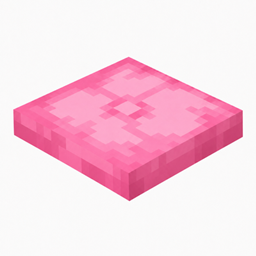
A cushion is a placeable entity that can be sat on. Cushions can be placed on any surface within any block in the game, excluding fluids and a few…

8 min read Updated 4 views
Items Stackable resources Renewable resources Entities Stationary entities
Advertisement Remove ads with Premium →
Contents (23)
  1. Obtaining
  2. Breaking
  3. Crafting
  4. Natural generation
  5. Generated loot
  6. Usage
  7. Fuel
  8. Vibration interactions
  9. Sounds
  10. Data values
  11. ID
  12. Entity data
  13. History
  14. Java Edition
  15. Bedrock Edition
  16. Issues
  17. Quotes
  18. Gallery
  19. Textures
  20. Screenshots
  21. Mojang images
  22. In other media
  23. References
Cushion
White Cushion.png: Infobox image for Minecraft item entity 'Cushion'
Light Gray Cushion.png: Infobox image for Minecraft item entity 'Cushion'
Gray Cushion.png: Infobox image for Minecraft item entity 'Cushion'
Black Cushion.png: Infobox image for Minecraft item entity 'Cushion'
Brown Cushion.png: Infobox image for Minecraft item entity 'Cushion'
Red Cushion.png: Infobox image for Minecraft item entity 'Cushion'
Orange Cushion.png: Infobox image for Minecraft item entity 'Cushion'
Yellow Cushion.png: Infobox image for Minecraft item entity 'Cushion'
Lime Cushion.png: Infobox image for Minecraft item entity 'Cushion'
Green Cushion.png: Infobox image for Minecraft item entity 'Cushion'
Cyan Cushion.png: Infobox image for Minecraft item entity 'Cushion'
Light Blue Cushion.png: Infobox image for Minecraft item entity 'Cushion'
Blue Cushion.png: Infobox image for Minecraft item entity 'Cushion'
Purple Cushion.png: Infobox image for Minecraft item entity 'Cushion'
Magenta Cushion.png: Infobox image for Minecraft item entity 'Cushion'
Pink Cushion.png: Infobox image for Minecraft item entity 'Cushion'
Invicon White Cushion.png: Inventory sprite for White Cushion in Minecraft as shown in-game with description: White CushionInvicon Light Gray Cushion.png: Inventory sprite for Light Gray Cushion in Minecraft as shown in-game with description: Light Gray CushionInvicon Gray Cushion.png: Inventory sprite for Gray Cushion in Minecraft as shown in-game with description: Gray CushionInvicon Black Cushion.png: Inventory sprite for Black Cushion in Minecraft as shown in-game with description: Black CushionInvicon Brown Cushion.png: Inventory sprite for Brown Cushion in Minecraft as shown in-game with description: Brown CushionInvicon Red Cushion.png: Inventory sprite for Red Cushion in Minecraft as shown in-game with description: Red CushionInvicon Orange Cushion.png: Inventory sprite for Orange Cushion in Minecraft as shown in-game with description: Orange CushionInvicon Yellow Cushion.png: Inventory sprite for Yellow Cushion in Minecraft as shown in-game with description: Yellow CushionInvicon Lime Cushion.png: Inventory sprite for Lime Cushion in Minecraft as shown in-game with description: Lime CushionInvicon Green Cushion.png: Inventory sprite for Green Cushion in Minecraft as shown in-game with description: Green CushionInvicon Cyan Cushion.png: Inventory sprite for Cyan Cushion in Minecraft as shown in-game with description: Cyan CushionInvicon Light Blue Cushion.png: Inventory sprite for Light Blue Cushion in Minecraft as shown in-game with description: Light Blue CushionInvicon Blue Cushion.png: Inventory sprite for Blue Cushion in Minecraft as shown in-game with description: Blue CushionInvicon Purple Cushion.png: Inventory sprite for Purple Cushion in Minecraft as shown in-game with description: Purple CushionInvicon Magenta Cushion.png: Inventory sprite for Magenta Cushion in Minecraft as shown in-game with description: Magenta CushionInvicon Pink Cushion.png: Inventory sprite for Pink Cushion in Minecraft as shown in-game with description: Pink Cushion
Rarity tier
 
Common
Renewable Yes
Stackable Yes (16)
Size Height: 0.249 blocks

Width: 0.999 blocks

A cushion is a placeable entity that can be sat on. Cushions can be placed on any surface within any block in the game, excluding fluids and a few invisible blocks, and break shortly after their supporting block is removed. Cushions always drop themselves when broken.

Obtaining

Breaking

Cushions are entities, meaning that they cannot be mined like a typical block. Instead, cushions immediately break when attacked, including with projectiles, or by non-player entities, even if the damage received is 0. A cushion also breaks when a piston attempts to move it.

Like paintings and item frames, cushions also break if they don't have a support block. The existence of a support block is checked every 100 game ticks (5 seconds), starting when the entity is loaded.

Crafting

Name Ingredients Crafting recipe
Cushion Matching Wool Slab
Invicon White Wool Slab.png: Inventory sprite for White Wool Slab in Minecraft as shown in-game linking to White Wool Slab with description: White Wool SlabInvicon Light Gray Wool Slab.png: Inventory sprite for Light Gray Wool Slab in Minecraft as shown in-game linking to Light Gray Wool Slab with description: Light Gray Wool SlabInvicon Gray Wool Slab.png: Inventory sprite for Gray Wool Slab in Minecraft as shown in-game linking to Gray Wool Slab with description: Gray Wool SlabInvicon Black Wool Slab.png: Inventory sprite for Black Wool Slab in Minecraft as shown in-game linking to Black Wool Slab with description: Black Wool SlabInvicon Brown Wool Slab.png: Inventory sprite for Brown Wool Slab in Minecraft as shown in-game linking to Brown Wool Slab with description: Brown Wool SlabInvicon Red Wool Slab.png: Inventory sprite for Red Wool Slab in Minecraft as shown in-game linking to Red Wool Slab with description: Red Wool SlabInvicon Orange Wool Slab.png: Inventory sprite for Orange Wool Slab in Minecraft as shown in-game linking to Orange Wool Slab with description: Orange Wool SlabInvicon Yellow Wool Slab.png: Inventory sprite for Yellow Wool Slab in Minecraft as shown in-game linking to Yellow Wool Slab with description: Yellow Wool SlabInvicon Lime Wool Slab.png: Inventory sprite for Lime Wool Slab in Minecraft as shown in-game linking to Lime Wool Slab with description: Lime Wool SlabInvicon Green Wool Slab.png: Inventory sprite for Green Wool Slab in Minecraft as shown in-game linking to Green Wool Slab with description: Green Wool SlabInvicon Cyan Wool Slab.png: Inventory sprite for Cyan Wool Slab in Minecraft as shown in-game linking to Cyan Wool Slab with description: Cyan Wool SlabInvicon Light Blue Wool Slab.png: Inventory sprite for Light Blue Wool Slab in Minecraft as shown in-game linking to Light Blue Wool Slab with description: Light Blue Wool SlabInvicon Blue Wool Slab.png: Inventory sprite for Blue Wool Slab in Minecraft as shown in-game linking to Blue Wool Slab with description: Blue Wool SlabInvicon Purple Wool Slab.png: Inventory sprite for Purple Wool Slab in Minecraft as shown in-game linking to Purple Wool Slab with description: Purple Wool SlabInvicon Magenta Wool Slab.png: Inventory sprite for Magenta Wool Slab in Minecraft as shown in-game linking to Magenta Wool Slab with description: Magenta Wool SlabInvicon Pink Wool Slab.png: Inventory sprite for Pink Wool Slab in Minecraft as shown in-game linking to Pink Wool Slab with description: Pink Wool SlabInvicon White Wool Slab.png: Inventory sprite for White Wool Slab in Minecraft as shown in-game linking to White Wool Slab with description: White Wool SlabInvicon Light Gray Wool Slab.png: Inventory sprite for Light Gray Wool Slab in Minecraft as shown in-game linking to Light Gray Wool Slab with description: Light Gray Wool SlabInvicon Gray Wool Slab.png: Inventory sprite for Gray Wool Slab in Minecraft as shown in-game linking to Gray Wool Slab with description: Gray Wool SlabInvicon Black Wool Slab.png: Inventory sprite for Black Wool Slab in Minecraft as shown in-game linking to Black Wool Slab with description: Black Wool SlabInvicon Brown Wool Slab.png: Inventory sprite for Brown Wool Slab in Minecraft as shown in-game linking to Brown Wool Slab with description: Brown Wool SlabInvicon Red Wool Slab.png: Inventory sprite for Red Wool Slab in Minecraft as shown in-game linking to Red Wool Slab with description: Red Wool SlabInvicon Orange Wool Slab.png: Inventory sprite for Orange Wool Slab in Minecraft as shown in-game linking to Orange Wool Slab with description: Orange Wool SlabInvicon Yellow Wool Slab.png: Inventory sprite for Yellow Wool Slab in Minecraft as shown in-game linking to Yellow Wool Slab with description: Yellow Wool SlabInvicon Lime Wool Slab.png: Inventory sprite for Lime Wool Slab in Minecraft as shown in-game linking to Lime Wool Slab with description: Lime Wool SlabInvicon Green Wool Slab.png: Inventory sprite for Green Wool Slab in Minecraft as shown in-game linking to Green Wool Slab with description: Green Wool SlabInvicon Cyan Wool Slab.png: Inventory sprite for Cyan Wool Slab in Minecraft as shown in-game linking to Cyan Wool Slab with description: Cyan Wool SlabInvicon Light Blue Wool Slab.png: Inventory sprite for Light Blue Wool Slab in Minecraft as shown in-game linking to Light Blue Wool Slab with description: Light Blue Wool SlabInvicon Blue Wool Slab.png: Inventory sprite for Blue Wool Slab in Minecraft as shown in-game linking to Blue Wool Slab with description: Blue Wool SlabInvicon Purple Wool Slab.png: Inventory sprite for Purple Wool Slab in Minecraft as shown in-game linking to Purple Wool Slab with description: Purple Wool SlabInvicon Magenta Wool Slab.png: Inventory sprite for Magenta Wool Slab in Minecraft as shown in-game linking to Magenta Wool Slab with description: Magenta Wool SlabInvicon Pink Wool Slab.png: Inventory sprite for Pink Wool Slab in Minecraft as shown in-game linking to Pink Wool Slab with description: Pink Wool SlabInvicon White Wool Slab.png: Inventory sprite for White Wool Slab in Minecraft as shown in-game linking to White Wool Slab with description: White Wool SlabInvicon Light Gray Wool Slab.png: Inventory sprite for Light Gray Wool Slab in Minecraft as shown in-game linking to Light Gray Wool Slab with description: Light Gray Wool SlabInvicon Gray Wool Slab.png: Inventory sprite for Gray Wool Slab in Minecraft as shown in-game linking to Gray Wool Slab with description: Gray Wool SlabInvicon Black Wool Slab.png: Inventory sprite for Black Wool Slab in Minecraft as shown in-game linking to Black Wool Slab with description: Black Wool SlabInvicon Brown Wool Slab.png: Inventory sprite for Brown Wool Slab in Minecraft as shown in-game linking to Brown Wool Slab with description: Brown Wool SlabInvicon Red Wool Slab.png: Inventory sprite for Red Wool Slab in Minecraft as shown in-game linking to Red Wool Slab with description: Red Wool SlabInvicon Orange Wool Slab.png: Inventory sprite for Orange Wool Slab in Minecraft as shown in-game linking to Orange Wool Slab with description: Orange Wool SlabInvicon Yellow Wool Slab.png: Inventory sprite for Yellow Wool Slab in Minecraft as shown in-game linking to Yellow Wool Slab with description: Yellow Wool SlabInvicon Lime Wool Slab.png: Inventory sprite for Lime Wool Slab in Minecraft as shown in-game linking to Lime Wool Slab with description: Lime Wool SlabInvicon Green Wool Slab.png: Inventory sprite for Green Wool Slab in Minecraft as shown in-game linking to Green Wool Slab with description: Green Wool SlabInvicon Cyan Wool Slab.png: Inventory sprite for Cyan Wool Slab in Minecraft as shown in-game linking to Cyan Wool Slab with description: Cyan Wool SlabInvicon Light Blue Wool Slab.png: Inventory sprite for Light Blue Wool Slab in Minecraft as shown in-game linking to Light Blue Wool Slab with description: Light Blue Wool SlabInvicon Blue Wool Slab.png: Inventory sprite for Blue Wool Slab in Minecraft as shown in-game linking to Blue Wool Slab with description: Blue Wool SlabInvicon Purple Wool Slab.png: Inventory sprite for Purple Wool Slab in Minecraft as shown in-game linking to Purple Wool Slab with description: Purple Wool SlabInvicon Magenta Wool Slab.png: Inventory sprite for Magenta Wool Slab in Minecraft as shown in-game linking to Magenta Wool Slab with description: Magenta Wool SlabInvicon Pink Wool Slab.png: Inventory sprite for Pink Wool Slab in Minecraft as shown in-game linking to Pink Wool Slab with description: Pink Wool Slab
Invicon White Cushion.png: Inventory sprite for White Cushion in Minecraft as shown in-game linking to White Cushion with description: White CushionInvicon Light Gray Cushion.png: Inventory sprite for Light Gray Cushion in Minecraft as shown in-game linking to Light Gray Cushion with description: Light Gray CushionInvicon Gray Cushion.png: Inventory sprite for Gray Cushion in Minecraft as shown in-game linking to Gray Cushion with description: Gray CushionInvicon Black Cushion.png: Inventory sprite for Black Cushion in Minecraft as shown in-game linking to Black Cushion with description: Black CushionInvicon Brown Cushion.png: Inventory sprite for Brown Cushion in Minecraft as shown in-game linking to Brown Cushion with description: Brown CushionInvicon Red Cushion.png: Inventory sprite for Red Cushion in Minecraft as shown in-game linking to Red Cushion with description: Red CushionInvicon Orange Cushion.png: Inventory sprite for Orange Cushion in Minecraft as shown in-game linking to Orange Cushion with description: Orange CushionInvicon Yellow Cushion.png: Inventory sprite for Yellow Cushion in Minecraft as shown in-game linking to Yellow Cushion with description: Yellow CushionInvicon Lime Cushion.png: Inventory sprite for Lime Cushion in Minecraft as shown in-game linking to Lime Cushion with description: Lime CushionInvicon Green Cushion.png: Inventory sprite for Green Cushion in Minecraft as shown in-game linking to Green Cushion with description: Green CushionInvicon Cyan Cushion.png: Inventory sprite for Cyan Cushion in Minecraft as shown in-game linking to Cyan Cushion with description: Cyan CushionInvicon Light Blue Cushion.png: Inventory sprite for Light Blue Cushion in Minecraft as shown in-game linking to Light Blue Cushion with description: Light Blue CushionInvicon Blue Cushion.png: Inventory sprite for Blue Cushion in Minecraft as shown in-game linking to Blue Cushion with description: Blue CushionInvicon Purple Cushion.png: Inventory sprite for Purple Cushion in Minecraft as shown in-game linking to Purple Cushion with description: Purple CushionInvicon Magenta Cushion.png: Inventory sprite for Magenta Cushion in Minecraft as shown in-game linking to Magenta Cushion with description: Magenta CushionInvicon Pink Cushion.png: Inventory sprite for Pink Cushion in Minecraft as shown in-game linking to Pink Cushion with description: Pink Cushion
Cushion Any Cushion +
Matching Dye
Invicon White Cushion.png: Inventory sprite for White Cushion in Minecraft as shown in-game linking to White Cushion with description: White CushionInvicon Light Gray Cushion.png: Inventory sprite for Light Gray Cushion in Minecraft as shown in-game linking to Light Gray Cushion with description: Light Gray CushionInvicon Gray Cushion.png: Inventory sprite for Gray Cushion in Minecraft as shown in-game linking to Gray Cushion with description: Gray CushionInvicon Black Cushion.png: Inventory sprite for Black Cushion in Minecraft as shown in-game linking to Black Cushion with description: Black CushionInvicon Brown Cushion.png: Inventory sprite for Brown Cushion in Minecraft as shown in-game linking to Brown Cushion with description: Brown CushionInvicon Red Cushion.png: Inventory sprite for Red Cushion in Minecraft as shown in-game linking to Red Cushion with description: Red CushionInvicon Orange Cushion.png: Inventory sprite for Orange Cushion in Minecraft as shown in-game linking to Orange Cushion with description: Orange CushionInvicon Yellow Cushion.png: Inventory sprite for Yellow Cushion in Minecraft as shown in-game linking to Yellow Cushion with description: Yellow CushionInvicon Lime Cushion.png: Inventory sprite for Lime Cushion in Minecraft as shown in-game linking to Lime Cushion with description: Lime CushionInvicon Green Cushion.png: Inventory sprite for Green Cushion in Minecraft as shown in-game linking to Green Cushion with description: Green CushionInvicon Cyan Cushion.png: Inventory sprite for Cyan Cushion in Minecraft as shown in-game linking to Cyan Cushion with description: Cyan CushionInvicon Light Blue Cushion.png: Inventory sprite for Light Blue Cushion in Minecraft as shown in-game linking to Light Blue Cushion with description: Light Blue CushionInvicon Blue Cushion.png: Inventory sprite for Blue Cushion in Minecraft as shown in-game linking to Blue Cushion with description: Blue CushionInvicon Purple Cushion.png: Inventory sprite for Purple Cushion in Minecraft as shown in-game linking to Purple Cushion with description: Purple CushionInvicon Magenta Cushion.png: Inventory sprite for Magenta Cushion in Minecraft as shown in-game linking to Magenta Cushion with description: Magenta CushionInvicon Pink Cushion.png: Inventory sprite for Pink Cushion in Minecraft as shown in-game linking to Pink Cushion with description: Pink CushionInvicon White Dye.png: Inventory sprite for White Dye in Minecraft as shown in-game linking to White Dye with description: White DyeInvicon Light Gray Dye.png: Inventory sprite for Light Gray Dye in Minecraft as shown in-game linking to Light Gray Dye with description: Light Gray DyeInvicon Gray Dye.png: Inventory sprite for Gray Dye in Minecraft as shown in-game linking to Gray Dye with description: Gray DyeInvicon Black Dye.png: Inventory sprite for Black Dye in Minecraft as shown in-game linking to Black Dye with description: Black DyeInvicon Brown Dye.png: Inventory sprite for Brown Dye in Minecraft as shown in-game linking to Brown Dye with description: Brown DyeInvicon Red Dye.png: Inventory sprite for Red Dye in Minecraft as shown in-game linking to Red Dye with description: Red DyeInvicon Orange Dye.png: Inventory sprite for Orange Dye in Minecraft as shown in-game linking to Orange Dye with description: Orange DyeInvicon Yellow Dye.png: Inventory sprite for Yellow Dye in Minecraft as shown in-game linking to Yellow Dye with description: Yellow DyeInvicon Lime Dye.png: Inventory sprite for Lime Dye in Minecraft as shown in-game linking to Lime Dye with description: Lime DyeInvicon Green Dye.png: Inventory sprite for Green Dye in Minecraft as shown in-game linking to Green Dye with description: Green DyeInvicon Cyan Dye.png: Inventory sprite for Cyan Dye in Minecraft as shown in-game linking to Cyan Dye with description: Cyan DyeInvicon Light Blue Dye.png: Inventory sprite for Light Blue Dye in Minecraft as shown in-game linking to Light Blue Dye with description: Light Blue DyeInvicon Blue Dye.png: Inventory sprite for Blue Dye in Minecraft as shown in-game linking to Blue Dye with description: Blue DyeInvicon Purple Dye.png: Inventory sprite for Purple Dye in Minecraft as shown in-game linking to Purple Dye with description: Purple DyeInvicon Magenta Dye.png: Inventory sprite for Magenta Dye in Minecraft as shown in-game linking to Magenta Dye with description: Magenta DyeInvicon Pink Dye.png: Inventory sprite for Pink Dye in Minecraft as shown in-game linking to Pink Dye with description: Pink Dye
Invicon White Cushion.png: Inventory sprite for White Cushion in Minecraft as shown in-game linking to White Cushion with description: White CushionInvicon Light Gray Cushion.png: Inventory sprite for Light Gray Cushion in Minecraft as shown in-game linking to Light Gray Cushion with description: Light Gray CushionInvicon Gray Cushion.png: Inventory sprite for Gray Cushion in Minecraft as shown in-game linking to Gray Cushion with description: Gray CushionInvicon Black Cushion.png: Inventory sprite for Black Cushion in Minecraft as shown in-game linking to Black Cushion with description: Black CushionInvicon Brown Cushion.png: Inventory sprite for Brown Cushion in Minecraft as shown in-game linking to Brown Cushion with description: Brown CushionInvicon Red Cushion.png: Inventory sprite for Red Cushion in Minecraft as shown in-game linking to Red Cushion with description: Red CushionInvicon Orange Cushion.png: Inventory sprite for Orange Cushion in Minecraft as shown in-game linking to Orange Cushion with description: Orange CushionInvicon Yellow Cushion.png: Inventory sprite for Yellow Cushion in Minecraft as shown in-game linking to Yellow Cushion with description: Yellow CushionInvicon Lime Cushion.png: Inventory sprite for Lime Cushion in Minecraft as shown in-game linking to Lime Cushion with description: Lime CushionInvicon Green Cushion.png: Inventory sprite for Green Cushion in Minecraft as shown in-game linking to Green Cushion with description: Green CushionInvicon Cyan Cushion.png: Inventory sprite for Cyan Cushion in Minecraft as shown in-game linking to Cyan Cushion with description: Cyan CushionInvicon Light Blue Cushion.png: Inventory sprite for Light Blue Cushion in Minecraft as shown in-game linking to Light Blue Cushion with description: Light Blue CushionInvicon Blue Cushion.png: Inventory sprite for Blue Cushion in Minecraft as shown in-game linking to Blue Cushion with description: Blue CushionInvicon Purple Cushion.png: Inventory sprite for Purple Cushion in Minecraft as shown in-game linking to Purple Cushion with description: Purple CushionInvicon Magenta Cushion.png: Inventory sprite for Magenta Cushion in Minecraft as shown in-game linking to Magenta Cushion with description: Magenta CushionInvicon Pink Cushion.png: Inventory sprite for Pink Cushion in Minecraft as shown in-game linking to Pink Cushion with description: Pink Cushion

Natural generation

Cushions can be found naturally in abandoned camps. They normally spawn within 1–2 blocks of a campfire, assuming the camp generates with one. The color depends on the template, all 16 can be generated. See Abandoned Camp § Components for more details.

Generated loot

Item Structure Container Quantity Chance
Java Edition and Bedrock Edition
White Cushion Abandoned Camp Barrel 1–2 35.5%

Usage

Cushions can be placed on any flat surface, and align horizontally to the grid unless teleported, but vertically sit on top of the supporting surface. They break if their supporting surface is removed or if they are pushed by a piston. Since they are entities with a finite amount of health, they also break after a few seconds if placed in lava.

They can be sat on by pressing use on them. Players cannot be affected by portals or forms of movement (e.g. knockback, geysers and pistons) while sitting on a cushion, but will become affectable again once they dismount.

Cushions cannot move, do not have collision, and can overlap with other objects, except for other cushions and custom blocks in Bedrock Edition. This means they can rest properly on top of any surface which is less than one block in height, including snow layers, wildflowers, enchanting tables, slabs, and stairs. Cushions placed on the lower step of stairs are partly obscured by the upper step of the stairs.

Fuel

Cushions can be used as fuel in furnaces, smelting one item per 4 cushions (burn time of 50 game ticks (2.5 seconds) when used in a regular furnace).

Vibration interactions

Unlike wool-based blocks, cushions do not dampen vibrations from sculk sensors or sculk shriekers. Placing, breaking, walking, sprinting, jumping, sitting on, and getting off a cushion produce detectable vibrations.

Sounds

Java Edition:

Sounds
SoundClosed captionsSourceDescriptionIdentifierTranslation keyVolumePitchAttenuation
distance
​Sits on Cushion[sound 1]Friendly MobsWhen a player sits on a cushionentity.cushion.sitsubtitles.entity.cushion.sit​1.01.0?
​Gets up from Cushion[sound 1]Friendly MobsWhen a player gets up from a cushionentity.cushion.get_upsubtitles.entity.cushion.get_up​1.01.0?
​Cushion placed[sound 2]BlocksWhen a cushion is placedentity.cushion.placesubtitles.entity.cushion.place​1.01.0?
​Cushion breaksFriendly MobsWhen a cushion breaksentity.cushion.breaksubtitles.entity.cushion.break​1.01.0?

Bedrock Edition:

Sounds
SoundClosed captionsSourceDescriptionIdentifierTranslation keyVolumePitch
​Sits on CushionFriendly MobsWhen a player sits on a cushionentity.cushion.sitsubtitles.entity.cushion.sit​1.01.0
​Gets up from CushionFriendly MobsWhen a player gets up from a cushionentity.cushion.get_upsubtitles.entity.cushion.get_up​1.01.0
​Cushion placedBlocksWhen a cushion is placedentity.cushion.placesubtitles.entity.cushion.place​1.01.0
​Cushion breaksBlocksWhen a cushion breaksentity.cushion.breaksubtitles.entity.cushion.break​1.01.0

Data values

ID

Java Edition:

NameIdentifierFormItem tags Translation key
ItemSprite white-cushion.png: Sprite image for white-cushion in Minecraft White Cushionwhite_cushionItemcushions item.minecraft.white_cushion
ItemSprite orange-cushion.png: Sprite image for orange-cushion in Minecraft Orange Cushionorange_cushionItemcushions item.minecraft.orange_cushion
ItemSprite magenta-cushion.png: Sprite image for magenta-cushion in Minecraft Magenta Cushionmagenta_cushionItemcushions item.minecraft.magenta_cushion
ItemSprite light-blue-cushion.png: Sprite image for light-blue-cushion in Minecraft Light Blue Cushionlight_blue_cushionItemcushions item.minecraft.light_blue_cushion
ItemSprite yellow-cushion.png: Sprite image for yellow-cushion in Minecraft Yellow Cushionyellow_cushionItemcushions item.minecraft.yellow_cushion
ItemSprite lime-cushion.png: Sprite image for lime-cushion in Minecraft Lime Cushionlime_cushionItemcushions item.minecraft.lime_cushion
ItemSprite pink-cushion.png: Sprite image for pink-cushion in Minecraft Pink Cushionpink_cushionItemcushions item.minecraft.pink_cushion
ItemSprite gray-cushion.png: Sprite image for gray-cushion in Minecraft Gray Cushiongray_cushionItemcushions item.minecraft.gray_cushion
ItemSprite light-gray-cushion.png: Sprite image for light-gray-cushion in Minecraft Light Gray Cushionlight_gray_cushionItemcushions item.minecraft.light_gray_cushion
ItemSprite cyan-cushion.png: Sprite image for cyan-cushion in Minecraft Cyan Cushioncyan_cushionItemcushions item.minecraft.cyan_cushion
ItemSprite purple-cushion.png: Sprite image for purple-cushion in Minecraft Purple Cushionpurple_cushionItemcushions item.minecraft.purple_cushion
ItemSprite blue-cushion.png: Sprite image for blue-cushion in Minecraft Blue Cushionblue_cushionItemcushions item.minecraft.blue_cushion
ItemSprite brown-cushion.png: Sprite image for brown-cushion in Minecraft Brown Cushionbrown_cushionItemcushions item.minecraft.brown_cushion
ItemSprite green-cushion.png: Sprite image for green-cushion in Minecraft Green Cushiongreen_cushionItemcushions item.minecraft.green_cushion
ItemSprite red-cushion.png: Sprite image for red-cushion in Minecraft Red Cushionred_cushionItemcushions item.minecraft.red_cushion
ItemSprite black-cushion.png: Sprite image for black-cushion in Minecraft Black Cushionblack_cushionItemcushions item.minecraft.black_cushion
EntityIdentifier Translation key
EntitySprite cushion.png: Sprite image for cushion in Minecraft Cushioncushion entity.minecraft.cushion

Bedrock Edition:

NameIdentifierNumeric ID Form Translation key
ItemSprite white-cushion.png: Sprite image for white-cushion in Minecraft White Cushionwhite_cushion789Item item.cushion.white.name
ItemSprite orange-cushion.png: Sprite image for orange-cushion in Minecraft Orange Cushionorange_cushion785Item item.cushion.orange.name
ItemSprite magenta-cushion.png: Sprite image for magenta-cushion in Minecraft Magenta Cushionmagenta_cushion784Item item.cushion.magenta.name
ItemSprite light-blue-cushion.png: Sprite image for light-blue-cushion in Minecraft Light Blue Cushionlight_blue_cushion781Item item.cushion.lightBlue.name
ItemSprite yellow-cushion.png: Sprite image for yellow-cushion in Minecraft Yellow Cushionyellow_cushion790Item item.cushion.yellow.name
ItemSprite lime-cushion.png: Sprite image for lime-cushion in Minecraft Lime Cushionlime_cushion783Item item.cushion.lime.name
ItemSprite pink-cushion.png: Sprite image for pink-cushion in Minecraft Pink Cushionpink_cushion786Item item.cushion.pink.name
ItemSprite gray-cushion.png: Sprite image for gray-cushion in Minecraft Gray Cushiongray_cushion779Item item.cushion.gray.name
ItemSprite light-gray-cushion.png: Sprite image for light-gray-cushion in Minecraft Light Gray Cushionlight_gray_cushion782Item item.cushion.silver.name
ItemSprite cyan-cushion.png: Sprite image for cyan-cushion in Minecraft Cyan Cushioncyan_cushion778Item item.cushion.cyan.name
ItemSprite purple-cushion.png: Sprite image for purple-cushion in Minecraft Purple Cushionpurple_cushion787Item item.cushion.purple.name
ItemSprite blue-cushion.png: Sprite image for blue-cushion in Minecraft Blue Cushionblue_cushion776Item item.cushion.blue.name
ItemSprite brown-cushion.png: Sprite image for brown-cushion in Minecraft Brown Cushionbrown_cushion777Item item.cushion.brown.name
ItemSprite green-cushion.png: Sprite image for green-cushion in Minecraft Green Cushiongreen_cushion780Item item.cushion.green.name
ItemSprite red-cushion.png: Sprite image for red-cushion in Minecraft Red Cushionred_cushion788Item item.cushion.red.name
ItemSprite black-cushion.png: Sprite image for black-cushion in Minecraft Black Cushionblack_cushion775Item item.cushion.black.name
EntityIdentifier FamilyTranslation key
EntitySprite cushion.png: Sprite image for cushion in Minecraft Cushioncushion cushion
inanimate
actor
entity.cushion.name

Entity data

Java Edition:

Main article: Entity format
  • [NBT Compound / JSON Object] Entity data
    • Tags common to all entities see Template:Nbt inherit/entity/template
    • [Int Array] block_pos: The block space the cushion occupies. Stored as 3 ints.
    • [String] color: The cushion's color. Defaults to "white". Represents the minecraft:cushion/color component.
Color Data value
White "white"
Orange "orange"
Magenta "magenta"
Light Blue "light_blue"
Yellow "yellow"
Lime "lime"
Pink "pink"
Gray "gray"
Light Gray "light_gray"
Cyan "cyan"
Purple "purple"
Blue "blue"
Brown "brown"
Green "green"
Red "red"
Black "black"

Bedrock Edition:

  • [NBT Compound / JSON Object]: The entity's root tag.
    • Tags common to all entities see Template:Bedrock nbt/entity/template
    • [Int] Variant: (May not exist) The ID of the variant. Represents the color of the cushion. Defaults to 15.
Color Data value
White 15
Orange 14
Magenta 13
Light Blue 12
Yellow 11
Lime 10
Pink 9
Gray 8
Light Gray 7
Cyan 6
Purple 5
Blue 4
Brown 3
Green 2
Red 1
Black 0

History

Java Edition

Java Edition
26.3snap3
Added cushions.
snap4 Cauldrons, composters, and hoppers now use their collision box for positioning the cushions.
Cushions can now be placed on the highest edge of a lectern.[1]
Cushions are now destroyed in fire.
Cushions now retain their custom name when dropped.
snap7 White cushions now generate as part of abandoned camps in barrels in addition to being naturally generated there.
Cushions now send vibrations to sculk sensors.
snap8 Cushions are now destroyed only when they are fully covered by blocks that cause suffocation.
Cushions now properly send vibrations to sculk shriekers.
Cushions can no longer be destroyed by players in Adventure mode.
pre1 Tweaked the entity texture of black cushions.[2]

Bedrock Edition

Bedrock Edition
26.40
Experiment
Drop 3 of 2026
Preview 26.40.30
Added cushions.
26.50Preview 26.50.22 All features from the "Drop 3 of 2026" experiment have been fully implemented.
Preview 26.50.25 White cushions now generate as part of abandoned camps in barrels in addition to being naturally generated there.
Cushions can no longer be destroyed by players in Adventure mode.
Breaking cushions now sends vibrations to sculk sensors and shriekers.
Preview 26.50.26 Cushions can no longer be named using name tags.

Issues

Issues relating to "Cushion" are maintained on the bug tracker. Issues should be reported and viewed there.

Quotes

Since the cushion is an entity, it means that it can be placed very freely if we don't add any like additional placement rules. And I remember discussing this with the team, and we decided that we indeed should embrace this creative chaos and let the players place the cushions in any way they want to. And it was a bit of a chaotic decision, but I'm feeling very happy about it,

— Agnes Larsson on cushion placement[3]

Textures

Screenshots

Mojang images

In other media

References

  1. ↑ MC-309659
  2. ↑ MC-309855 – The entity texture of black cushions has one extra color compared to all other cushions – resolved as "Fixed".
  3. ↑ "Minecraft LIVE - September 2026" – Minecraft on YouTube, September 26, 2026
Advertisement Remove ads with Premium →

More in Entities

View all 199 →
Copper GolemCopper GolemA copper golem is a buildable passive mob that takes items out of copper chests, and attempts to store them in nearby wooden chests and trapped chests. A…CowCowA cow is a passive mob found in most grassy biomes and are a source of leather, beef, and milk. They have three variants based on the temperature of the…CreakingCreakingA creaking is a hostile mob spawned by active creaking hearts at night. It moves to attack players with melee headbutts, but cannot move at all while any…CreeperCreeperA creeper is a common hostile mob that quietly approaches a player, hisses, and explodes if the player remains near. Creeper explosions can destroy blocks…Diamond ChickenDiamond ChickenDiamond chickens were rare joke variants of chickens exclusive to Java Edition 2.0. They lay lapis lazuli and diamonds instead of eggs.DolphinDolphinDolphins are aquatic neutral mobs that live in non-frozen oceans. They grant a speed boost to players that swim near them and follow the player while…DonkeyDonkeyA donkey is a passive mob similar to a horse that, when tamed, can be saddled, ridden, and equipped with a chest to transport items.Dragon EggDragon EggThe dragon egg is a gravity-affected block that can be obtained only once per world (or twice in Bedrock Edition) by defeating the ender dragon. It…

Related mods

Entity Pin Cushions Entity Pin Cushions Mod · 133.9K downloads Cushion Backport Cushion Backport Mod · 55.3K downloads Cushion & Straw Bed Backport Cushion & Straw Bed Backport Mod · 9.2K downloads Cushions, Wool Slabs & Stairs Update Backport Cushions, Wool Slabs & Stairs Update Backport Mod · 4.7K downloads
How to craft Cushion
See the exact crafting recipe on a 3×3 grid, the ingredients and step-by-step instructions.
Crafting recipe Wiki home