| Rarity tier | Uncommon |
|---|---|
| Renewable | No |
| Stackable | Yes (64) |
| Tool | Any tool |
| Blast resistance | 1 |
| Hardness | 1 |
| Luminous | No |
| Transparent | Yes |
| Waterloggable | JE: No BE: Yes |
| Flammable | No |
| Catches fire from lava |
No |
| Map color | 0 NONE |
| Note block instrument | Silent by default |
The player head is a block based on the head of a player's skin (Steve by default). Player heads cannot be obtained in Survival.
Obtaining
The player head can be obtained only by using Creative inventory, picking block or executing /give.
Breaking
No tool can accelerate the breaking process of player head.[1]
| Block |  Player Head Player Head
| |
|---|---|---|
| Hardness | 1 | |
| Breaking time (secs) | ||
| Default | 1.5 (JE) 1.5 (BE) | |
- incorrect tool, drops nothing
- correct tool, drops nothing or something other than the block itself
- correct tool, drops the block itself
- italicized can be instant mined
Player head drops itself when it's destroyed.
When destroyed by an explosion, the player head always drops as an item.
Usage
Decoration
Player heads can be oriented in 16 different directions when placed on top of a block, and in 4 directions when placed on the sides of blocks, similar to signs. They can be placed either on top of or beside blocks by shift-clicking.
Wearing
The player can wear player heads, similarly to pumpkins or helmets. This overlays the second layer of the player's skin.
Locator bar
Like all other mob heads, a player head can be worn by a player to hide their location, as it will prevent other players from finding them using the locator bar.
Dispensers
A dispenser can equip a player head on a player, mob, or armor stand with an empty helmet slot, within the block the dispenser is facing.
Enchantments
Player heads can receive the following enchantments, but only through an anvil.
| Name | Max level | Method |
|---|---|---|
| Curse of Binding | I |  Anvil Anvil
|
| Curse of Vanishing | I | Anvil
|
Piston interactivity
Player heads are destroyed when pushed by a piston and cannot be pulled by a sticky piston.
Player skins

Player heads can be given NBT data so that they appear with the skin of any Minecraft account. This means if a player knows that a specific account has a head that is desired to display, the NBT data can be edited to make it appear. Commonly, this kind of head is called a custom head.
The command to give the player a head with the skin of another player is /give @s minecraft:player_head[minecraft:profile={name:PlayerName}]. This command will give a dynamic player head, which will update when the player updates their skin. A static player head instead saves the skin of the player from the time it was created, meaning if the player changes their skin, the head still displays the original texture.[2] The command to get a static player is twofold: first type /fetchprofile name PlayerName, then click on the "Give Item" option to give yourself a static player head of the player named.
Note that it is therefore necessary to be connected to the internet to load the texture of a skin, whatever the property used.
When they are loaded for the first time by the client, the skins textures are cached in .minecraft\assets\skins\(subfolders)\(files).
If the client does not have access to the internet when it first loads, the player's head displays a regular head (Steve's skin) which is also cached.
Afterward, even if the client reconnects to the internet, in order to display the skin correctly, it is necessary to clear the cache manually by deleting the recently created files in .minecraft\assets\skins\(subfolder), then restarting the game.
Marc's Head Format

Marc Watson created a number of accounts with specific skins so mapmakers could use common player heads without the risk of someone changing their skins.[3] Nowadays, since heads do not update the skin if a player changes their skin, this is not something mapmakers need to worry about, though these skins are still useful. These accounts have names in the format MHF_<name>; e.g. MHF_PigZombie is the name of a Minecraft user with a zombified piglin head. MHF stands for "Marc's Head Format".[4] There are also a few blocks and "bonus" heads, for more variety. These player heads have not been updated in compliance with the Texture Update, and are outdated. There are many unofficial MHF accounts.
Because these are names of player accounts, these player heads are obtained or placed using the minecraft:profile component, i.e. /give @s minecraft:player_head[minecraft:profile=MHF_<name>].
The following names/heads have been made available:[5]
- Mobs
 MHF_Alex
 MHF_Blaze
 MHF_CaveSpider
 MHF_Chicken
 MHF_Cow
 MHF_Creeper
 MHF_Enderman
 MHF_Ghast
 MHF_Golem
 MHF_Herobrine
 MHF_LavaSlime
 MHF_MushroomCow
 MHF_Ocelot
 MHF_Pig
 MHF_PigZombie
 MHF_Sheep
 MHF_Skeleton
 MHF_Slime
 MHF_Spider
 MHF_Squid
 MHF_Steve
 MHF_Villager
 MHF_WSkeleton
 MHF_Zombie
- Blocks
 MHF_Cactus
 MHF_Cake
 MHF_Chest
 MHF_CoconutB
 MHF_CoconutG
 MHF_Melon
 MHF_OakLog
 MHF_Present1
 MHF_Present2
 MHF_Pumpkin
 MHF_TNT
 MHF_TNT2
- Bonus
 MHF_ArrowUp
 MHF_ArrowDown
 MHF_ArrowLeft
 MHF_ArrowRight
 MHF_Exclamation
 MHF_Question
Sounds
Generic
 stone sound type | ||||||||
|---|---|---|---|---|---|---|---|---|
| Sound | Closed captions | Source | Description | Identifier | Translation key | Volume | Pitch | Attenuation distance |
| Block broken | Blocks | Once the block has broken | block | subtitles | 1.0 | 0.8 | 16 | |
| Block placed[until: JE 26.4] | Blocks | When the block is placed | block | subtitles | 1.0 | 0.8 | 16 | |
| Block breaking | Blocks | While the block is in the process of being broken | block | subtitles | 0.25 | 0.5 | 16 | |
| Something falls on a block | Entity-Dependent | Falling on the block with fall damage | block | subtitles | 0.5 | 0.75 | 16 | |
| Footsteps | Entity-Dependent | Walking on the block | block | subtitles | 0.15 | 1.0 | 16 | |
stone sound type | |||||||
|---|---|---|---|---|---|---|---|
| Sound | Closed captions | Source | Description | Identifier | Translation key | Volume | Pitch |
| Block broken | Blocks | Once the block has broken | dig | subtitles | 1.0 | 0.8–1.0 | |
| Block placed | Blocks | When the block is placed | place | subtitles | 1.0 | 0.8–1.0 | |
| Block breaking | Blocks | While the block is in the process of being broken | hit | subtitles | 0.37 | 0.5 | |
| Footsteps | Players | Falling on the block with fall damage | fall | subtitles | 0.4 | 1.0 | |
| Footsteps | Players | Walking on the block | step | subtitles | 0.3 | 1.0 | |
| Footsteps | Blocks | Jumping from the block | jump | subtitles | 0.12 | 1.0 | |
| Footsteps | Blocks | Falling on the block without fall damage | land | subtitles | 0.22 | 1.0 | |
Unique
| Sounds | ||||||||
|---|---|---|---|---|---|---|---|---|
| Sound | Closed captions | Source | Description | Identifier | Translation key | Volume | Pitch | Attenuation distance |
| Gear equips | Players | When a player head is equipped | item | subtitles | 1.0 | 1.0 | 16 | |
| Sounds | |||||||
|---|---|---|---|---|---|---|---|
| Sound | Closed captions | Source | Description | Identifier | Translation key | Volume | Pitch |
| ? | Players | When a player head is equipped | armor | ? | 1.0 | 1.0 | |
Data values
ID
| Name | Identifier | Form | Item tags | Translation key |
|---|---|---|---|---|
| Player Head | player_head | Block & Item | skulls |
block |
| Player Wall Head | player_wall_head | Block | — | block |
| Name | Identifier |
|---|---|
| Block entity | skull |
| Name | Identifier | Alias ID | Numeric ID | Form | Item ID[i 1] | Translation key |
|---|---|---|---|---|---|---|
| Player Head | player_head | skull / 3 | -967 | Block & Giveable Item[i 2] | Identical[i 3] | item |
| Name | Savegame ID |
|---|---|
| Block entity | Skull |
Item data
- [NBT Compound / JSON Object] components: the item's components tag.
- [String][NBT List / JSON Array][NBT Compound / JSON Object] minecraft:custom_name: The player-assigned name of this item, block, or entity, typically assigned with an anvil or a name tag. See Text component format.
- If present on an item, this component has highest priority to display as the item's name, and appears italic unless overridden by the text component format.
- If present on an entity, it will replace the entity's name tag, will show the name tag to players when they hover over the entity (unless invisible), and will appear as that entity's name in commands and chat messages.
- If present on a block with a GUI (such as a container), this replaces the name at the top of the GUI.
- If present on a command block, this replaces the execution context name when the command is ran.
- [String] minecraft:note_block_sound: The ID of the sound event played by a note block when this player head is placed above.
- [String][NBT Compound / JSON Object] minecraft:profile: Provides the textures needed for rendering player models (player head blocks, player head item models, and mannequins) and player face sprites. Each texture can be provided either as the namespaced path to a texture in a resource pack, or from a player profile. A player profile can be specified either as player information whose profile properties must be requested on the fly, or a list of already-resolved profile properties.
- If specified as a string, it corresponds to [String] name.
- If present on a player head item, and the [String] name field is specified, the base item name is overridden as "
name's Head". - If present on any item, exactly one of either [String] name or [Int Array] id is specified, and [NBT List / JSON Array] properties is not specified, a gray "Dynamic" text is shown in the item's tooltip.
- [String] name: A username consisting of 0-16 non-whitespace printable ASCII characters. (Note that this is more permissive than actual player usernames, which must be 3-16 characters and may only contain letters, numbers, and underscores.) If no other profile fields are specified, this is used to dynamically request the profile of a player with that username from Mojang's servers. Once received, that profile's properties (such as its skin, cape, and elytra textures) can be used for rendering. If the profile does not exist, an arbitrary default skin is provided (always the same one for the same name). Optional.
- [Int Array] id: A UUID. If no other profile fields are specified, this is used to dynamically request the profile of a player with that UUID from Mojang's servers. Once received, that profile's properties (such as its skin, cape, and elytra textures) can be used for rendering. If the profile does not exist, a random default skin is provided. Optional.
- [NBT List / JSON Array] properties: A non-empty list of user profile properties. If this is specified, the dynamic profile fields are ignored, and a custom profile with these properties is used instead. If set to an empty list, the field is removed rather than invalidating the whole component. Optional.
- [NBT Compound / JSON Object]: A single property.
- [String] name: The name of the property. Can only be
"textures". - [String] value: The texture data json, encoded in base64.
- [String] signature: Optional. Mojang's signature of the value, encoded in base64.
- [String] name: The name of the property. Can only be
- [NBT Compound / JSON Object]: A single property.
- [String] texture: Namespaced path to a player skin texture, relative to the
texturesfolder in a resource pack. If specified, this texture is used when rendering a player model or skin, overriding the skin texture provided by a profile. This skin texture may have transparent pixels on the inner body layers whereas resolved skins' are always opaque. If omitted and no skin is provided by a profile, the slim Alex skin is used (minecraft:entity/player/slim/alex). Optional. - [String] cape: Namespaced path to a cape texture, relative to the
texturesfolder in a resource pack. If specified, this texture is used when rendering a cape, overriding the cape texture provided by a profile. If the resolved profile (or lack thereof) does not have a cape, it will gain one. This does not affect the elytra texture. If Optional. - [String] elytra: Namespaced path to an elytra texture, relative to the
texturesfolder in a resource pack. If specified, this texture is used when rendering an elytra, overriding the elytra texture provided by a profile. This does not affect the cape texture. If omitted and no elytra texture is provided by a profile, the normal elytra texture is used (minecraft:entity/equipment/wings/elytra). Optional. - [String] model: The type of player model to use. Either
"wide"or"slim". If specified, this overrides the model type provided by a profile. If omitted and no model type is provided by a profile, aslimmodel type is used. Optional.
Block states
Java Edition:
Floor
| Name | Default value | Allowed values | Description |
|---|---|---|---|
| powered | false
| true | The block receives a redstone signal. |
false | The block receives no redstone signal. | ||
| rotation | 0
| 0 | The block is facing south. |
1 | The block is facing south-southwest. | ||
2 | The block is facing southwest. | ||
3 | The block is facing west-southwest. | ||
4 | The block is facing west. | ||
5 | The block is facing west-northwest. | ||
6 | The block is facing northwest. | ||
7 | The block is facing north-northwest. | ||
8 | The block is facing north. | ||
9 | The block is facing north-northeast. | ||
10 | The block is facing northeast. | ||
11 | The block is facing east-northeast. | ||
12 | The block is facing east. | ||
13 | The block is facing east-southeast. | ||
14 | The block is facing southeast. | ||
15 | The block is facing south-southeast. |
Wall
| Name | Default value | Allowed values | Description |
|---|---|---|---|
| powered | false
| true | The block receives a redstone signal. |
false | The block receives no redstone signal. | ||
| facing | north | eastnorthsouthwest | The direction the head is facing. Opposite from the direction a player is facing when placing it. |
| Name | Metadata Bits | Default value | Allowed values | Values for Metadata Bits |
Description |
|---|---|---|---|---|---|
| facing_direction | 0x10x20x4 | 0
| 1 | 1 | On the floor (rotation is stored in the tile entity) |
2 | 2 | On a wall, facing north | |||
3 | 3 | On a wall, facing south | |||
4 | 4 | On a wall, facing east | |||
5 | 5 | On a wall, facing west | |||
0 | 0 | Same as 5, but unobtainable without commands or editing. |
Block data
A player head has a block entity associated with it that holds additional data about the block.
- [NBT Compound / JSON Object] Block entity data
- Tags common to all block entities see Template:Nbt inherit/blockentity/template
- [String] custom_name: Optional. The custom name of the head or skull. Represents the
minecraft:custom_namecomponent. - [String] note_block_sound: Optional. If this block is a player head, this is the sound event produced by the note block that this head is placed on. Does nothing if present on any other head or skull type. Represents the
minecraft:note_block_soundcomponent. - [String][NBT Compound / JSON Object] profile: Optional. The textures and/or player profile used to render a player head. If specified as a string, it corresponds to [String] name and is always saved as a [NBT Compound / JSON Object] compound. If omitted, a the wide Steve skin is used. Does nothing if present on any other head or skull type. Represents the
minecraft:profilecomponent.- A player profile and/or textures object see Template:Nbt inherit/profile/template
History
Java Edition
| Java Edition | |||||||
|---|---|---|---|---|---|---|---|
| 1.4.2 | 12w36a |   Added heads, obtainable only from the Creative inventory. Added heads, obtainable only from the Creative inventory. | |||||
| 12w37a |  Changed item textures. Changed item textures.
| ||||||
| Added as a hidden and disabled feature, player heads can now have the skin of a specific player. A line in the language file implies that there either used to be, or in a future update, the possibility of obtaining a specific player's head.[6] | |||||||
Heads do not drop in vanilla, but mapmakers/modders/etc. can make them by adding an NBT string tag {"SkullOwner":"player_name"} on the skull items.[7] | |||||||
| November 7, 2012 | Jeb states that the official opinion is that "[dropping] player heads [on player kills] are a bit too gory for Minecraft, so it's better suited for a plugin or mod." | ||||||
| 1.4.6 | 12w49a | A head can now be used to craft a firework star with creeper-face effect. | |||||
| 1.7.2 | 13w36a | Custom heads can now be obtained without third party programs via /give. | |||||
| 1.8 | 14w03a | Heads now show the skin's hat layer (this also works when a mob/player wears the head). | |||||
| 14w29a | Heads now display a cracking animation. | ||||||
| 14w30a |  Heads in inventories and held by mobs/players now display as blocks. Heads in inventories and held by mobs/players now display as blocks.
| ||||||
| Heads worn by mobs and players are now displayed on the armor layer. Previously, the head replaced the mob/player's head texture; the hat layer appeared over the player head. | |||||||
| 1.8.4 | release | For security reasons, custom heads can now have textures only from mojang.com and minecraft.net. | |||||
| 1.9 | 15w31a | Heads now appear larger in the inventory. | |||||
| 15w39a | Dispensers can now equip heads onto players, mobs, and armor stands. | ||||||
| 15w49a | Heads no longer turn red when the player or mob takes damage.[8] | ||||||
| 1.13 | 17w47a | Renamed "Head" to "Player Head". | |||||
| Player heads now play a sound when placed. | |||||||
| Player heads can no longer be placed inside entities.[9] | |||||||
| 18w21a | The rarity of player heads has been changed from "Common" to "Uncommon". | ||||||
| 1.19.3 | 22w45a |  The texture of the player head has been changed. The texture of the player head has been changed. | |||||
| 1.19.4 Experiment | 23w03a | Player heads can now be placed on top of note blocks without sneaking. | |||||
| 1.19.4 | 23w05a | Player heads can now be swapped with other pieces of headgear in the head inventory slot by using them.[10] | |||||
Bedrock Edition
| Pocket Edition Alpha | |||||||
|---|---|---|---|---|---|---|---|
| v0.12.1 | build 1 | Added heads.
| |||||
| They use the Java textures prior to 14w30a. | |||||||
| v0.14.0 | build 1 | Heads can now be worn as armor. | |||||
| Bedrock Edition | |||||||
| 1.2.0 | beta 1.2.0.2 | Heads can now be used to craft firework stars. | |||||
| beta 1.2.0.11 |  Heads in inventories and when held by mobs/players now display as blocks. Heads in inventories and when held by mobs/players now display as blocks. | ||||||
| 1.19.60 Experiment | Preview 1.19.60.25 | Heads can now be placed on top of note blocks without sneaking. | |||||
| 1.21.30 | Preview 1.21.30.22 | Changed name from "Head" to "Player Head" to match Java Edition. | |||||
| Preview 1.21.30.21 | The rarity of player heads has been changed from "Common" to "Uncommon" to match Java Edition. | ||||||
Legacy Console Edition
| Legacy Console Edition | |||||||
|---|---|---|---|---|---|---|---|
| Xbox 360 | Xbox One | PS3 | PS4 | PS Vita | Wii U | Switch | |
| TU12 | CU1 | 1.00 | 1.00 | 1.00 | Patch 1 | 1.0.1 | Added player heads to the Creative inventory. |
| TU19 | CU7 | 1.12 | 1.12 | 1.12 | A player head can now be used to craft a firework star with creeper-face effect. | ||
| TU34 | CU22 | 1.25 | 1.25 | 1.25 | Patch 4 | Player heads can now be swapped with other pieces of headgear in the head inventory slot by using them. | |
| TU49 | CU39 | 1.42 | 1.42 | 1.42 | Patch 18 | Player heads are now held the same way as on Java Edition in first person. | |
New Nintendo 3DS Edition
| New Nintendo 3DS Edition | |||||||
|---|---|---|---|---|---|---|---|
| 0.1.0 | Added player heads. | ||||||
Data history
Java Edition
| Java Edition | |||||||
|---|---|---|---|---|---|---|---|
| 1.20.5 | 24w10a | Now stores item name in custom_name tag.
| |||||
NBT tag SkullOwner and ExtraType is replaced with profile to keep a consistent format with the item component form. | |||||||
| 1.21.9 | 25w34a | The profile field has been changed to match minecraft:profile component. That means that it also becomes immutable and is resolved only when necessary. | |||||
Bedrock Edition
| Bedrock Edition | |||||||
|---|---|---|---|---|---|---|---|
| 1.21.40 | Preview 1.21.40.20 | The separate and direct item forms of the skull block ID have been merged and its data values have been split up into their own IDs. | |||||
Issues
Issues relating to "Player Head" are maintained on the bug tracker. Issues should be reported and viewed there.
Trivia
- When breaking a player head, the particle effect of breaking it is the same as soul sand.
- Despite there being a default Steve head, heads for the other protagonist skins cannot be obtained without using custom names.
Gallery
Screenshots
-
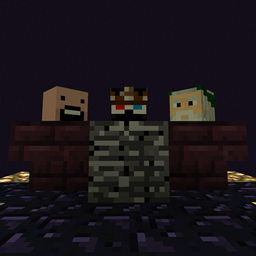
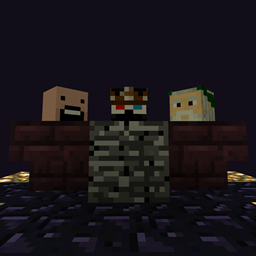
 A picture of player heads, including some Mojang characters.
Development images
-
 Notch's head in a minecart with chest.
 -
 First image of held heads rendering as blocks.
 -
 Second image of held heads rendering as blocks.
References
- ↑ MC-192905 – Heads & Skulls have no assigned tool
- ↑ "Skulls are a snapshot of the skin as it was made; just change your skin, make a skull, and change your skin back. That's intended behaviour." – @Dinnerbone (Nathan Adams) on X (formerly Twitter), May 8, 2014
- ↑ "I'm here to make it so that people don't have to worry about having a consistent account whose skin might change." – u/Marc_IRL on Reddit, September 9, 2013
- ↑ "head format. I needed to pick a prefix that was short and not already taken by other usernames." – @Marc_IRL (Marc Watson) on X (formerly Twitter), September 10, 2013
- ↑ "For those following the MHF list, I have presents for you. Full list of accounts I've made: http://pastebin.com/5mug6EBu" – @Marc_IRL (Marc Watson) on X (formerly Twitter), December 9, 2014
- ↑ Snapshot 12w37a
lang/en_US.lang:item.skull.player.name=%s's Head - ↑ https://reddit.com/r/Minecraft/comments/zxn7u/its_apparently_my_cakeday_so_lets_cash_in_this/
- ↑ MC-85756
- ↑ MC-2208
- ↑ MC-216270 – resolved as "Fixed".