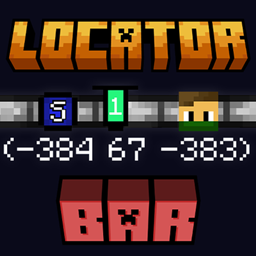
This article is about the bar. For the map, see Locator map. For the game rule, see Game rule § locator_bar.

The locator bar is a UI element on the player's HUD which shows the position of other players in multiplayer.
Usage
The locator bar shows the position of other players in multiplayer as colored indicators, known as waypoints. It takes the place of the experience bar on the player HUD, except when gaining or losing XP, or the anvil or enchanting table GUI is opened, in which the locator bar will be hidden for 100 game ticks (5 seconds) after the XP is updated, or the GUI is closed. It can be toggled in Java Edition with the locator_bar game rule; in Bedrock Edition with the "Player waypoints" (playerwaypoints) setting which can be set to "Everyone" (default) or "Off".
Each target is assigned a waypoint, and appears on the locator bar horizontally within 120 degrees of the camera's view. If the waypoint is above or below the player's camera pitch angle, a visual pointer appears on the indicator, showing the target's vertical direction from the camera's view. In Java Edition, the color of a waypoint is assigned to an entity based on its UUID; it may also be assigned by their team color, or using the /waypoint command. In Bedrock Edition, the color is randomly assigned to the player at every session.
Players can prevent their positions from being shown in the locator bar by sneaking, wearing a mob head or carved pumpkin, or being under the Invisibility effect. Additionally, players in Spectator mode are only visible to other spectators in the locator bar.
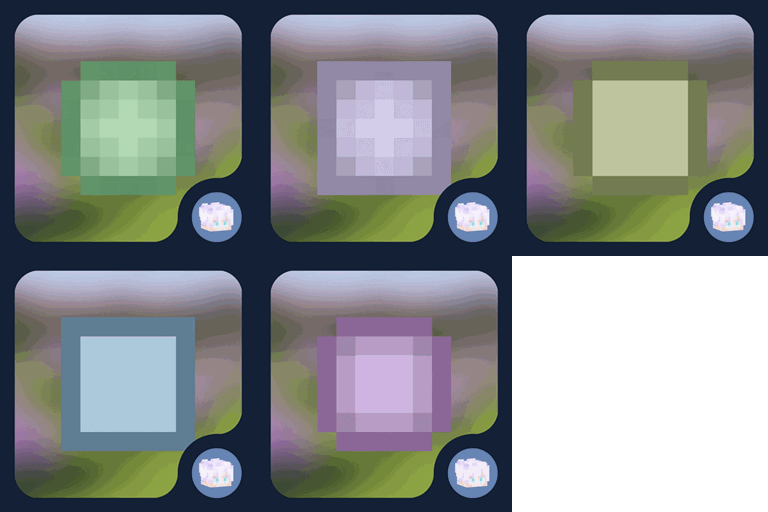
The waypoint's icon changes based on the player's distance to its location. The further the player is from the waypoint, the smaller the icon visually shown on the locator bar. Several sprites of the icon can be observed based on the distance:  square (0–179 blocks),
  circle (179–230 blocks),
  small square (230–281 blocks), and
  small circle (281+ blocks). In Java Edition, these sprites can be changed by setting the waypoint's style using the
 /waypoint command; multiple waypoint styles can be defined in a resource pack.
In Java Edition, the waypoint's visibility range is controlled by the waypoint_transmit_range and waypoint_receive_range attributes; transmission range can be used for players and entities, while receive range applies only to players. A player with a receive range set to zero will not receive any waypoint information.[1] An entity which can transmit a waypoint is called a waypoint transmitter; only living entities, which are armor stands, mobs, and players, can transmit waypoints.[2]
Entities' waypoints are tracked by the game when their transmission range is set to greater than zero. They can also be tracked when setting their waypoints' color using /waypoint command, but they don't appear on the locator bar, removed when the entity is despawned by the game, or when the player exits the world. In Bedrock Edition, only players are tracked in multiplayer mode, other entities are not tracked by the game.
NBT format

The following NBT data are stored on living entities' data about the waypoint's icon visual information:
- [NBT Compound / JSON Object] The root tag.
- Tags common to all entities see Template:Nbt inherit/entity/template
- Tags common to all mobs see Template:Nbt inherit/mob/template
- [NBT Compound / JSON Object] locator_bar_icon: The waypoint's icon visual data in the locator bar.
- [Int] color: The waypoint's color stored as 32-bit signed integer using two's complement, assuming the color is fully opaque.[3]
- [String] style: The waypoint's style name from
waypoint_styledirectory in a resource pack.
History
Java Edition
| Java Edition | |||||||
|---|---|---|---|---|---|---|---|
| 1.21.6 Experiment | 25w15a | Added the locator bar behind its own experimental data pack. | |||||
| 1.21.6 | 25w17a | The locator bar is now available without its experimental data pack. | |||||
| Added waypoint style for customizing waypoints' icon in resource packs. | |||||||
| Removed waypoint fade effects. | |||||||
Bedrock Edition
| Bedrock Edition | |||||||
|---|---|---|---|---|---|---|---|
| 1.21.80 Experiment | Preview 1.21.80.20 | Added the locator bar behind its own experimental toggle. | |||||
| Preview 1.21.80.21 | Player dots on the locator bar now show correctly regardless of simulation distance. | ||||||
| Preview 1.21.80.22 | Dots are now shown representing players in spectator mode to other players also in spectator mode on the locator bar. | ||||||
| 1.21.90 | Preview 1.21.90.23 | The locator bar is now available without its experimental toggle. | |||||
| 26.30 | Preview 26.30.20 | Replaced the locatorbar game rule with playerwaypoints. | |||||
| Preview 26.30.29 | Replaced the "Locator bar" game setting with "Player waypoints". | ||||||
See also
- Banner markers can be used for marking locations on a map using a placed-down banner.
Issues
Issues relating to "Locator Bar" or "Waypoint" are maintained on the bug tracker. Issues should be reported and viewed there.
Trivia
- There exists a secret waypoint icon

bowtie.pngin the game's texture files. It can be enabled by using command/waypoint modify <target> style set bowtie. - The "Locator Bar" experimental toggle on Java Edition is the shortest-lived experimental toggle in any Minecraft version, being removed just 14 days after it was added, existing only in snapshot versions and never released.
Gallery
Mojang screenshots
-
 Three players appear as colored icons on the locator bar.
 -
 Players in a cherry grove appearing on the locator bar.
 -
 Sunny avoids being seen on the locator bar.
 -
 The locator bar correlating with a map's player markers.
 -

External links
- Locator Bar Neighbor Finder by melncat, a tool for showing a Java Edition player's waypoint color, as well as players that are assigned the same color. Data set is as of September 1, 2025.
References
- ↑ "Minecraft Snapshot 25w17a" – Minecraft.net, April 22, 2025.
- ↑ The implementation is from WaypointTransmitter interface in the game's source code. Additionally, LivingEntity implements this interface. (Mojang mapping)
- ↑ Waypoint#Icon static class sets color from ChatFormatting enum. (Mojang mapping)