| Rarity tier | Uncommon |
|---|---|
| Renewable | Yes |
| Stackable | Yes (64) |
| Tool | Any tool |
| Blast resistance | 1 |
| Hardness | 1 |
| Luminous | No |
| Transparent | Yes |
| Waterloggable | JE: No BE: Yes |
| Flammable | No |
| Catches fire from lava |
No |
| Map color | 0 NONE |
| Note block instrument | Zombie moan |
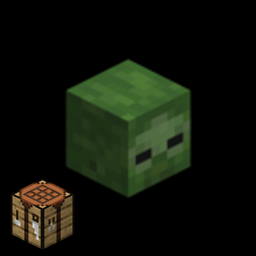
A zombie head is the head of a zombie in the form of a block. It can only be obtained by killing a zombie using a charged creeper's explosion.
Obtaining
Breaking
No tool can accelerate the breaking process of zombie head.[1]
| Block |  Zombie Head Zombie Head
| |
|---|---|---|
| Hardness | 1 | |
| Breaking time (secs) | ||
| Default | 1.5 (JE) 1.5 (BE) | |
- incorrect tool, drops nothing
- correct tool, drops nothing or something other than the block itself
- correct tool, drops the block itself
- italicized can be instant mined
Zombie head drops itself when it's destroyed. When destroyed by an explosion, the zombie head always drops as an item.
Mob loot
Zombie heads are always dropped by a zombie if it dies due to a charged creeper's explosion. In Bedrock Edition, if multiple mobs are killed by the same charged creeper, all of them drop their heads, however in Java Edition only one mob selected at random drops its head.[2]

- ↑ Only when killed by a charged creeper.
- ↑ Only when killed by a charged creeper.
Usage
Decoration
Zombie heads can be oriented in 16 different directions on top of a block, and 4 directions on the sides of blocks, similar to signs. They can be placed on top of, or beside each other by shift clicking.
Wearing
The player can wear zombie heads, similarly to carved pumpkins or helmets. This overlays the second layer of the player's skin.
Disguise
Wearing a zombie head reduces the detection range for zombies to 50% of the normal range. This is similar to (and stacks with) the reductions in detection range from sneaking and from the Invisibility status effect.
In Bedrock Edition, wearing a zombie head makes the player invisible to other players on a locator map.
Locator bar
Like all other mob heads, a zombie head can be worn by a player to hide their location, as it will prevent other players from finding them using the locator bar.
Dispensers
A dispenser can equip a zombie head on a player, mob, or armor stand with an empty helmet slot, within the block the dispenser is facing.
Crafting ingredient


Enchantments
Zombie heads can receive the following enchantments, but only through an anvil.
| Name | Max level | Method |
|---|---|---|
| Curse of Binding | I |  Anvil Anvil
|
| Curse of Vanishing | I | Anvil
|
Note blocks
Placing a zombie head above a note block causes the note block to play the zombie's ambient sound when activated.
The block below the note block does not affect the mob sound it creates.
Piston interactivity
Zombie heads are destroyed when pushed by a piston and cannot be pulled by a sticky piston.
Sounds
Generic
 stone sound type | ||||||||
|---|---|---|---|---|---|---|---|---|
| Sound | Closed captions | Source | Description | Identifier | Translation key | Volume | Pitch | Attenuation distance |
| Block broken | Blocks | Once the block has broken | block | subtitles | 1.0 | 0.8 | 16 | |
| Block placed[until: JE 26.4] | Blocks | When the block is placed | block | subtitles | 1.0 | 0.8 | 16 | |
| Block breaking | Blocks | While the block is in the process of being broken | block | subtitles | 0.25 | 0.5 | 16 | |
| Something falls on a block | Entity-Dependent | Falling on the block with fall damage | block | subtitles | 0.5 | 0.75 | 16 | |
| Footsteps | Entity-Dependent | Walking on the block | block | subtitles | 0.15 | 1.0 | 16 | |
stone sound type | |||||||
|---|---|---|---|---|---|---|---|
| Sound | Closed captions | Source | Description | Identifier | Translation key | Volume | Pitch |
| Block broken | Blocks | Once the block has broken | dig | subtitles | 1.0 | 0.8–1.0 | |
| Block placed | Blocks | When the block is placed | place | subtitles | 1.0 | 0.8–1.0 | |
| Block breaking | Blocks | While the block is in the process of being broken | hit | subtitles | 0.37 | 0.5 | |
| Footsteps | Players | Falling on the block with fall damage | fall | subtitles | 0.4 | 1.0 | |
| Footsteps | Players | Walking on the block | step | subtitles | 0.3 | 1.0 | |
| Footsteps | Blocks | Jumping from the block | jump | subtitles | 0.12 | 1.0 | |
| Footsteps | Blocks | Falling on the block without fall damage | land | subtitles | 0.22 | 1.0 | |
Unique
| Sounds | ||||||||
|---|---|---|---|---|---|---|---|---|
| Sound | Closed captions | Source | Description | Identifier | Translation key | Volume | Pitch | Attenuation distance |
| Zombie groans | Jukebox/Note Blocks | When a zombie head is played using a note block | block | subtitles | 3.0 | 1.0 | 16 | |
| Gear equips | Players | When a zombie head is equipped | item | subtitles | 1.0 | 1.0 | 16 | |
| Sounds | |||||||
|---|---|---|---|---|---|---|---|
| Sound | Closed captions | Source | Description | Identifier | Translation key | Volume | Pitch |
| ? | Jukebox/Note Blocks | When a zombie head is played using a note block | note | ? | ? | 0.84 [sound 1] | |
| ? | Players | When a zombie head is equipped | armor | ? | 1.0 | 1.0 | |
- ↑ Actually equal to , which is about 0.8409
Data values
ID
| Name | Identifier | Form | Item tags | Translation key |
|---|---|---|---|---|
| Zombie Head | zombie_head | Block & Item | skulls |
block |
| Zombie Wall Head | zombie_wall_head | Block | — | block |
| Name | Identifier |
|---|---|
| Block entity | skull |
| Name | Identifier | Alias ID | Numeric ID | Form | Item ID[i 1] | Translation key |
|---|---|---|---|---|---|---|
| Zombie Head | zombie_head | skull / 2 | -966 | Block & Giveable Item[i 2] | Identical[i 3] | item |
| Name | Savegame ID |
|---|---|
| Block entity | Skull |
Block states
Java Edition:
Floor
| Name | Default value | Allowed values | Description |
|---|---|---|---|
| powered | false
| true | The block receives a redstone signal. |
false | The block receives no redstone signal. | ||
| rotation | 0
| 0 | The block is facing south. |
1 | The block is facing south-southwest. | ||
2 | The block is facing southwest. | ||
3 | The block is facing west-southwest. | ||
4 | The block is facing west. | ||
5 | The block is facing west-northwest. | ||
6 | The block is facing northwest. | ||
7 | The block is facing north-northwest. | ||
8 | The block is facing north. | ||
9 | The block is facing north-northeast. | ||
10 | The block is facing northeast. | ||
11 | The block is facing east-northeast. | ||
12 | The block is facing east. | ||
13 | The block is facing east-southeast. | ||
14 | The block is facing southeast. | ||
15 | The block is facing south-southeast. |
Wall
| Name | Default value | Allowed values | Description |
|---|---|---|---|
| powered | false
| true | The block receives a redstone signal. |
false | The block receives no redstone signal. | ||
| facing | north | eastnorthsouthwest | The direction the head is facing. Opposite from the direction a player is facing when placing it. |
| Name | Metadata Bits | Default value | Allowed values | Values for Metadata Bits |
Description |
|---|---|---|---|---|---|
| facing_direction | 0x10x20x4 | 0
| 1 | 1 | On the floor (rotation is stored in the tile entity) |
2 | 2 | On a wall, facing north | |||
3 | 3 | On a wall, facing south | |||
4 | 4 | On a wall, facing east | |||
5 | 5 | On a wall, facing west | |||
0 | 0 | Same as 5, but unobtainable without commands or editing. |
Block data
A zombie head has a block entity associated with it that holds additional data about the block.
- [NBT Compound / JSON Object] Block entity data
- Tags common to all block entities see Template:Nbt inherit/blockentity/template
- [String] custom_name: Optional. The custom name of the head or skull. Represents the
minecraft:custom_namecomponent. - [String] note_block_sound: Optional. If this block is a player head, this is the sound event produced by the note block that this head is placed on. Does nothing if present on any other head or skull type. Represents the
minecraft:note_block_soundcomponent. - [String][NBT Compound / JSON Object] profile: Optional. The textures and/or player profile used to render a player head. If specified as a string, it corresponds to [String] name and is always saved as a [NBT Compound / JSON Object] compound. If omitted, a the wide Steve skin is used. Does nothing if present on any other head or skull type. Represents the
minecraft:profilecomponent.- A player profile and/or textures object see Template:Nbt inherit/profile/template
Achievements
| Icon | Achievement | In-game description | Actual requirements (if different) | Gamerscore earned | Trophy type (PS) | |
|---|---|---|---|---|---|---|
| PS4 | Other | |||||
 |  | Camouflage | Kill a mob while wearing the same type of mob head. | — | 30 | Bronze |
History
Java Edition
| Java Edition | |||||||
|---|---|---|---|---|---|---|---|
| 1.4.2 | 12w36a |  Added zombie heads, obtainable only from the Creative inventory. Added zombie heads, obtainable only from the Creative inventory. | |||||
| 12w37a |  Changed item textures. Changed item textures. | ||||||
| 1.4.6 | 12w49a | A zombie head can now be used to craft a firework star with creeper-face effect. | |||||
| 1.8 | 14w29a | Zombie heads now display a cracking animation. | |||||
| 14w30a |  Zombie heads in inventories and held by mobs/players now display as blocks. Zombie heads in inventories and held by mobs/players now display as blocks.
| ||||||
| Zombie heads are now displayed on the armor layer. Previously, the zombie head replaced the mob/player's head texture; the hat layer appeared over the zombie head. | |||||||
| Zombie heads are now available in Survival. The player can obtain them by killing a zombie with a charged creeper. | |||||||
| 14w30b | A single charged creeper explosion no longer yields more than one mob head. The mob head that drops is chosen randomly. | ||||||
| 1.9 | 15w31a | Zombie heads now appear larger in the inventory. | |||||
| 15w32a | Zombie heads can now be worn to reduce detection by zombies by 50%. | ||||||
| 15w33c | The disguise that is given by zombie heads now reduces detection range to 37.5% of normal. | ||||||
| 15w36a | The disguise that is given by zombie heads now reduces detection range to 50% of normal again. | ||||||
| 15w39a | Dispensers can now equip zombie heads onto players, mobs and armor stands. | ||||||
| 15w49a | Zombie heads no longer turn red when the player or mob takes damage.[3] | ||||||
| 1.13 | 17w47a | Zombie heads now play a sound when placed. | |||||
| Zombie heads can no longer be placed inside entities.[4] | |||||||
| 18w21a | The rarity of zombie heads has been changed from "Common" to "Uncommon". | ||||||
| 1.19.4 Experiment | 23w03a | Zombie heads can now be placed on top of note blocks without sneaking. | |||||
| 1.19.4 | 23w05a | Zombie heads can now be swapped with other pieces of headgear in the head inventory slot by using them.[5] | |||||
Bedrock Edition
| Pocket Edition Alpha | |||||||
|---|---|---|---|---|---|---|---|
| v0.12.1 | build 1 | Added zombie heads.
| |||||
| The zombie heads use the Java textures prior to 14w30a. | |||||||
| v0.14.0 | build 1 | Zombie heads can now be worn as armor. | |||||
| Bedrock Edition | |||||||
| 1.2.0 | beta 1.2.0.2 | Zombie heads can now be used to craft firework stars. | |||||
| beta 1.2.0.11 |  Zombie heads in inventories and when held by mobs/players now display as blocks. Zombie heads in inventories and when held by mobs/players now display as blocks. | ||||||
| 1.19.60 Experiment | Preview 1.19.60.20 | Heads can now be placed on top of note blocks without sneaking. | |||||
| 1.21.30 | Preview 1.21.30.21 | The rarity of zombie skulls has been changed from "Common" to "Uncommon" to match Java Edition. | |||||
Legacy Console Edition
| Legacy Console Edition | |||||||
|---|---|---|---|---|---|---|---|
| Xbox 360 | Xbox One | PS3 | PS4 | PS Vita | Wii U | Switch | |
| TU12 | CU1 | 1.00 | 1.00 | 1.00 | Patch 1 | 1.0.1 | Added zombie heads to the Creative inventory. |
| TU19 | CU7 | 1.12 | 1.12 | 1.12 | A zombie head can now be used to craft a firework star with creeper-face effect. | ||
| TU31 | CU19 | 1.22 | 1.22 | 1.22 | Patch 3 | Zombie heads in inventories and held by mobs/players now display as blocks. | |
| Zombie heads are now available in Survival. The player can obtain them by killing a zombie with a charged creeper. | |||||||
| TU34 | CU22 | 1.25 | 1.25 | 1.25 | Patch 4 | Zombie heads can now be swapped with other pieces of headgear in the head inventory slot by using them. | |
| TU49 | CU39 | 1.42 | 1.42 | 1.42 | Patch 18 | Zombie heads are now held the same way as on Java Edition in first person. | |
New Nintendo 3DS Edition
| New Nintendo 3DS Edition | |||||||
|---|---|---|---|---|---|---|---|
| 0.1.0 | Added zombie heads. | ||||||
Data history
| Bedrock Edition | |||||||
|---|---|---|---|---|---|---|---|
| 1.21.40 | Preview 1.21.40.20 | The separate and direct item forms of the skull block ID have been merged and its data values have been split up into their own IDs. | |||||
Issues
Issues relating to "Zombie Head" are maintained on the bug tracker. Issues should be reported and viewed there.
Gallery
Renders
-
 Alex wearing a zombie head
 -
 Ari wearing a zombie head
 -
 Efe wearing a zombie head
 -
 Kai wearing a zombie head
 -
 Makena wearing a zombie head
 -
 Noor wearing a zombie head
 -
 Steve wearing a zombie head
 -
 Sunny wearing a zombie head
 -
 Zuri wearing a zombie head
In other media
-

-
 Efe placing a zombie head sneakily on the note block
 -
 Makena waking up startled at the sound of zombies being played on the note block