Mineuniverse
Shaders
AxolotlShaders

AxolotlShaders

SHADER
AxolotlShaders is a visually enhanced Minecraft shader project focused on delivering vibrant colors, smooth lighting, and a clean, natural look while staying optimized for gameplay.
by GamesofDev
Download Claim this project
575 downloads
0 likes
Updated Oct 14, 2026
0 hypes
Fantasy Vanilla
Advertisement Remove ads with Premium →

ABOUT

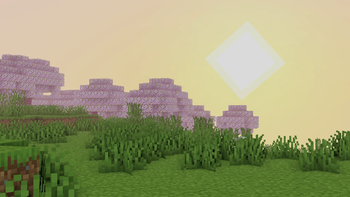
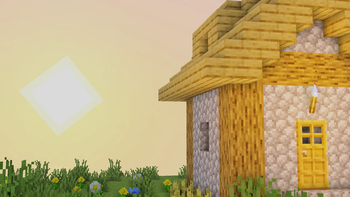
AxolotlShaders brings a bright, vibrant, and natural look to Minecraft while staying smooth and lightweight. Designed for players who want beautiful skies, clean lighting, and colorful visuals without losing FPS, this shader enhances the world with soft atmospheres, realistic sun glow, gentle fog.

With boosted vibrance, natural blue skies, and optimized performance, AxolotlShaders makes your world feel alive—perfect for survival and cinematic gameplay.

<details open=""> <summary>Features</summary>

Natural blue sky with smooth gradients and atmospheric scattering

Bright, realistic sunlight with improved glow

Enhanced fog and atmospheric depth

Increased color vibrance while maintaining natural tones

Improved water shading with reflections

Optimized lighting for day and night

FPS-friendly performance suitable for PvP and low-end PCs

Smooth ACES tonemapping to remove dull colors

Instant sky and sun rendering without dela

</details>

How to report BUGS!!

Our GlacierDevelopment Discord server is Live you can report bugs and Chat with other GlacierShaders users, report bugs, get help with issues, and join exciting giveaways — all in one place!


Discord

AxolotlShaders
MC 1.21, 1.21.8, 1.21.5, 1.21.4, 1.21.1, 1.21.6, 1.21.3, 1.21.7, Iris, 1.21.2, 1.21.9, 1.21.10, 1.21.11, 26.1, 26.1.1, 26.1.2
Release 2026-06-21 Get

Requirements & install

How to use this shader in Minecraft
Shader loader
Iris
Minecraft
1.21.7 – 26.1.2
Install folder
.minecraft/shaderpacks

Install with Iris

  1. Install Iris with the Iris installer (irisshaders.dev); it sets up Fabric and Sodium for you.
  2. Download the shader pack .zip (do not extract it).
  3. Put the .zip into .minecraft/shaderpacks.
  4. In game open Options → Video Settings → Shader Packs, select the pack and click Apply.
Browse more: Iris shaders OptiFine shaders Shaders for 26.1.2 All shaders

More from GamesofDev

Advertisement Remove ads with Premium →

You Might Also Like