Mineuniverse
Shaders
HighFramesPlus

HighFramesPlus

SHADER
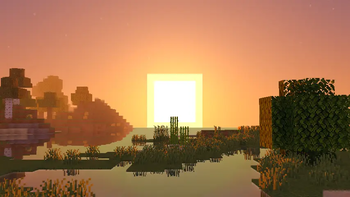
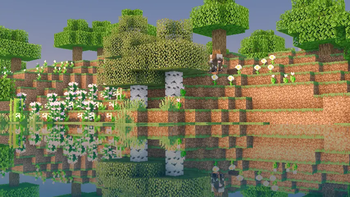
HighFrames+ is a lightweight Minecraft shader focused on delivering smooth gameplay with subtle visual enhancements like soft shadows, bloom, and animated water.
by GamesofDev
Download Claim this project
68,519 downloads
0 likes
Updated Oct 14, 2026
0 hypes
Fantasy Vanilla
Advertisement Remove ads with Premium →

ABOUT

HighFrames+ takes everything from HighFrames and pushes the visuals further while maintaining excellent performance. Designed for players who want a more cinematic Minecraft experience, it introduces enhanced reflective water, improved wave animations, refined lighting, and subtle cinematic effects without the heavy performance cost of high-end shaders.

donate

The shader features more realistic water reflections that respond naturally to the environment, smoother and more detailed wave movement, enhanced bloom, improved shadow quality, and balanced color grading for a cleaner look. HighFrames+ also includes an optional cinematic letterbox effect that adds a movie-like presentation while exploring your world.

Built for low-end and mid-range systems, HighFrames+ focuses on delivering noticeably better visuals while keeping frame rates high and gameplay smooth. It strikes the perfect balance between performance and visual quality, making Minecraft look more immersive without requiring powerful hardware.

Key Features

  • Enhanced reflective water
  • Improved water wave animations
  • Cinematic letterbox effect
  • Refined lighting and shadows
  • Soft bloom effects
  • Performance-focused optimization
  • Smooth visuals for low-end and mid-range PCs
  • Clean and immersive visual style
  • High FPS with improved graphical quality
HighFrames+ v1.0
MC 1.21, 1.20.2, 1.21.8, 1.20.5, 1.21.5, 1.21.4, 1.20.1, 1.20, 1.20.6, 1.21.1, 1.21.6, 1.21.3, 1.21.7, 1.20.4, 1.20.3, Iris, 1.21.2, 1.21.9, 1.21.10, 1.21.11, 26.1, 26.1.1
Release 2026-06-17 Get

Requirements & install

How to use this shader in Minecraft
Shader loader
Iris
Minecraft
1.21.6 – 26.1.1
Install folder
.minecraft/shaderpacks

Install with Iris

  1. Install Iris with the Iris installer (irisshaders.dev); it sets up Fabric and Sodium for you.
  2. Download the shader pack .zip (do not extract it).
  3. Put the .zip into .minecraft/shaderpacks.
  4. In game open Options → Video Settings → Shader Packs, select the pack and click Apply.
Browse more: Iris shaders OptiFine shaders Shaders for 26.1.1 All shaders

More from GamesofDev

Advertisement Remove ads with Premium →

You Might Also Like