Mineuniverse
Shaders
Eclipse Lite Cinematic

Eclipse Lite Cinematic

SHADER
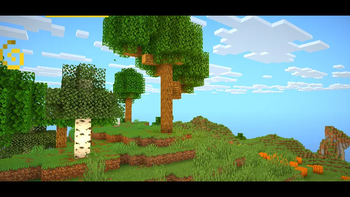
Cinematic version of a low-end shader for Minecraft "EclipseLite"
by GamesofDev
Download Claim this project
Add a badge to your pageLink to Eclipse Lite Cinematic from a README, website or forum post.
Preview: Badge

Badges update automatically and link to the shader page on MineUniverse.

4,132 downloads
0 likes
0 followers
Updated Oct 14, 2026
0 hypes
Follow0
Fantasy Vanilla
Advertisement Remove ads with Premium →

ABOUT

Eclipse Lite V2 is an ultra-lightweight Minecraft shader for low-end PCs and laptops. It keeps the vanilla look while adding subtle visual improvements and cinematic black bars for a movie-like experience — all with minimal FPS impact. .

donate

Features

Eclipse Lite is made for ultra-low-end devices. It has no waving effects and avoids all heavy features like bloom, motion blur, and depth of field to ensure high FPS. The water uses the default Minecraft style but is transparent for a cleaner, more aesthetic look. This shader is in BETA, so minor bugs may be present. It's perfect for players who can’t run shaders like Sildur’s Lite or Mellow but still want a subtle visual boost.

BUGS

Found a bug? You can report it by creating a ticket under the bug category in our Discord server. Your feedback helps us improve Eclipse Lite and fix issues faster. Every report means a lot to us and truly makes our day better!

Discord

EclipseLiteCinematic v1
MC 1.21, 1.20.2, 1.21.8, 1.20.5, 1.21.5, 1.21.4, 1.20.1, 1.20, 1.20.6, 1.21.1, 1.21.6, 1.21.3, 1.21.7, 1.20.4, 1.20.3, Iris, 1.21.2, 1.21.9, 26.1, 26.1.1, 26.1.2
Release 2026-06-08 Get

Requirements & install

How to use this shader in Minecraft
Shader loader
Iris
Minecraft
1.21.5 – 26.1.2
Install folder
.minecraft/shaderpacks

Install with Iris

  1. Install Iris with the Iris installer (irisshaders.dev); it sets up Fabric and Sodium for you.
  2. Download the shader pack .zip (do not extract it).
  3. Put the .zip into .minecraft/shaderpacks.
  4. In game open Options → Video Settings → Shader Packs, select the pack and click Apply.
Browse more: Iris shaders OptiFine shaders Shaders for 26.1.2 All shaders

More from GamesofDev

Advertisement Remove ads with Premium →

You Might Also Like