This article is about the RTX graphics enhancements in resource packs. For the vanilla implementation of physically based rendering, see Vibrant Visuals. For the joke mob added in Java Edition 23w13a_or_b, see Ray Tracing (mob).

Ray tracing for Windows brings a brand new experience to Minecraft! Experience creator-built worlds with realistic lighting, vibrant colors, naturally reflective water and emissive textures that light up.
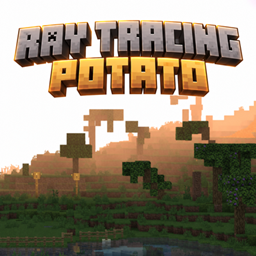
Ray Tracing[a] or RTX[b] is a graphics mode that improves the visual fidelity in Minecraft with physically based rendering and real-time lighting simulation using ray tracing. It enhances graphics of sunlight and moonlight with light rays, adds water effects, reflections on all blocks, and light-emissive textures. It can be enabled using client-side resource packs that define PBR texture sets. Minecraft has published several RTX-compatible worlds for free in the Marketplace, in collaboration with Nvidia.
Ray tracing only affects the graphical appearance of Minecraft and has no effect on gameplay. However, many emissive light sources and reflections together can decrease game performance, especially on lower-end devices.
Features

By default, torches, redstone torches, lanterns, soul lanterns, and end rods are strong emissive light sources, which create dynamic shadows using ambient occlusion and illuminate surrounding surfaces with their light color.

When a ray traced resource pack without PBR textures is applied to a world, not as a global resource, it applies all MERS block textures for Vibrant Visuals and ignores subsurface scattering. Metallic, rough, or emissive pixels are generally less intense than in designed ray tracing resource packs, but still noticable with the effects from ray tracing.
Directional lighting and shadows
Volumetric fog
For customization, see Fog definition.

Ray tracing supports volumetric fog, an additional fog layer which is affected by directional lighting, and can be customized per biome. Depending on the density, volumetric fog appears around directional lighting; the stronger the light the stronger the fog. The density can change with the altitude and fog is not applied above the build height limit. Media coefficients change the scattering and absorption of RGB light when it passes through air, clouds, or water, to tint the fog and directional lighting.
Fog can be applied to the sky, the sky during precipitation, water, lava, and lava with Fire Resistance. It is only visible with directional lighting, both sunlight and emissive textures. As light shines between objects, the shaded air does not have fog and the illuminated air does have fog, resulting in light rays. Light rays are also created by scattering from the sun, which has different colors and strengths depending on the time of day.
When enabling ray tracing without custom fog settings, it defaults to the biome settings defined for Vibrant Visuals.
Water effects

The water surface is completely transparent with RTX, but larger bodies of water accumulate more biome-colored fog. Although it is transparent, water can still have PBR textures allowing for reflections, but this is disabled by default. Light sources can illuminate the surface and the fog below the water with their color, and once sunlight hits an underwater surface, animated caustics appear.
Water surfaces also refract light from objects on the other side, but unlike refractions from transparent blocks, this is a slight distortion effect that bends objects behind it around the point of view. The top surface as seen from underwater projects Snell's window, a bright lens around which objects on the other side are distorted. The underwater surface always acts like a perfect mirror for close underwater objects, as such the environment above water is not visible inside shallow bodies.
Without directional lighting, underwater fog creates a dark green/blue atmosphere with all objects colored gray.
-
 An aquifer without any light sources.
 -
 Snell's window and the spherical distortion.
 -
 Light rays as seen underwater.
 -
 The refraction of underwater objects when floating just above the surface.
 -
 Perfect water reflections in the Hilltop Lifestyle map.
 -
 The mirror as seen from underwater
Applying
Ray tracing requires a resource pack with raytraced capability in its manifest.json file. When applied on a compatible device, this unlocks the "Ray Traced" option in the graphics mode dropdown in the video settings. It runs locally on the player's device, meaning that it can be enabled on any multiplayer world or server while other players could have it disabled. The resource pack may be enabled locally as a global resource pack, or for the entire world or server.
Ray tracing cannot be enabled in the regular settings but requires the "Allow In-Game Graphics Mode Switching" option to be enabled, to enable ray tracing in-game. It can also be enabled by setting graphics_mode to 3 in options.txt.
Some options related to ray tracing can be adjusted in the "Ray Traced Graphics Options" section below the graphics mode, which includes upscaling for GeForce RTX graphics cards with NVIDIA DLSS 2.0. Upscaling makes the game render the scene at lower resolution and upscaled to the native resolution to improve significantly on video performance.
The render distance for ray tracing is controlled by the "Ray Tracing Render Distance" slider instead of the regular render distance slider. This slider can be set between 8-24 chunks, but can be changed to any value chunks in options.txt.
System requirements
The ray tracing graphics mode is only available on the Windows version of Bedrock Edition, with additional minimum requirements:[1]
- OS: 64-bit Windows 10 or Windows 11
- GPU: DirectX hardware ray tracing capable GPU like NVIDIA GeForce RTX 20 Series, and AMD Radeon RX 6000 Series
- CPU: Intel Core i5 or equivalent
- RAM: 8GB
Official maps
The following maps are made officially in collaboration with Nvidia to promote ray tracing. They are available in the Marketplace for free, even on devices without support for ray tracing.
- Of Temples and Totems
- Color, Light and Shadow
- Aquatic Adventure
- Crystal Palace
- Imagination Island
- Neon District
- The Observer
- Hilltop Lifestyle
- Medieval
- The Dark Village
- Egg Hunt RTX
- Fins N' Flippers
- Portal Pioneers
- Colosseum
- Dungeon Dash
- The Isle of Whimsy
- Alien Encounter
- The Redstone Temple
- A Spirit's Journey
Videos
History
| August 19, 2019 | Ray tracing has been announced for Windows. | ||||||
|---|---|---|---|---|---|---|---|
| Bedrock Edition | |||||||
| RTX Beta | beta 1.15.0.8 | The Windows 10 version of the game now uses RenderDragon and supports ray tracing. | |||||
| beta 1.15.0.9 | Fixed several bugs related to RenderDragon and RTX. | ||||||
| 1.16.200 | beta 1.16.200.53 | RenderDragon now supports ray tracing outside RTX Beta. | |||||
| 1.21.80 Experiment | Preview 1.21.80.25 | Added vanilla volumetric fog settings to each biome in Vibrant Visuals, which is also applied with ray tracing. | |||||
| Added vanilla MER textures for blocks in Vibrant Visuals. These are applied with ray tracing only when an ray traced resource pack without custom textures is applied to a world, not in global resources. | |||||||
| 1.21.90 | With the release of Vibrant Visuals, no further changes are planned for ray tracing, but it will remain compatible with the newest versions.[2] | ||||||
| 26.30 | Preview 26.30.25 | Volumetric fog settings can now be key framed, allowing to change effects with the daylight cycle. | |||||
Issues
Issues relating to "Ray Tracing" or "RTX" are maintained on the bug tracker. Issues should be reported and viewed there.
Gallery
Textures
-

caustics.png, containing 50 frames of the water caustics animation. -

look_up_tables.png -

sky.png -

water_n.tga -

wibbly.png
Screenshots
-
 All RTX worlds in the Marketplace.
 -
 Fog and light rays underwater.
 -
 Light rays caused by objects blocking sunlight.
 -
 Scattering of different RGB lights in the air caused by volumetric fog can color it; in vanilla this makes mushroom fields purple.
 -
 The red colored fog at sunrise and sunset.
Mojang images
-
 Promotional banner for Minecraft with RTX.
 -
 A screenshot of RTX in an unreleased beta version.
 -
 Light rays falling into a ravine.
 -
 Ambient occlusion creates shadows in corners where light rays cannot escape.
 -
 Dynamic shadows created by directional lighting.
 -
 Reflections of emissive light sources.
 -
 Light refraction inside glass.
 -
 A comparison of RTX off vs on, with various emissive textures.
 -
 The "Colloseum RTX" map.
 -
 Various light reflections from emissive textures.
 -
 Comparison of RTX enabled and disabled with light falling into a building.
 -

-

-

-

-

-

-

-

-

-

See also
- RenderDragon, the rendering engine used to implement ray tracing.
- Shader, the previous system of graphics enhancement in Bedrock Edition using resource packs which is still used in Java Edition.
- Shader packs, similar but unofficial graphic enhancement mods for Java Edition.
- Super Duper Graphics Pack, a previously cancelled graphics update for Bedrock Edition.
Notes
- ↑ Refers to the graphics mode in-game
- ↑ Primarily used in promotions and marketing together with RTX graphic cards
References
- ↑ "Minimum Requirements for Ray Tracing in Minecraft: Bedrock Edition for Windows" – Minecraft Help Center.
- ↑ "Ray Tracing" – Minecraft.net.
External links
- "Hitchhiker’s guide to Minecraft with ray tracing on Windows 10" by Per Landin – Minecraft.net, December 10, 2020.
- "Getting Started with Ray Tracing" – Microsoft Learn.
- Ray tracing on Wikipedia