Mineuniverse
Resource Packs
Sword ImmortalEyesColourSet【copper】

Sword ImmortalEyesColourSet【copper】

RESOURCE PACK
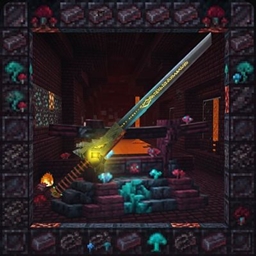
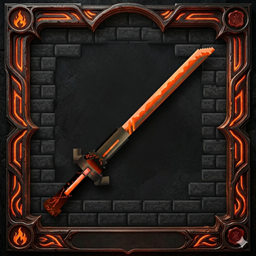
A masterpiece of low-poly artistry that pushes the boundaries of texture detail. This heavy claymore features a meticulously sculpted dragon-head guard and a dark-orange forged hilt.
by MochiLinesStudio
Download Claim this project
171 downloads
0 likes
0 followers
Updated Oct 14, 2026
0 hypes
Follow0
512x and Higher Modern
Advertisement Remove ads with Premium →

Immortal Eyes yellow version (Netherite Sword Replacement)

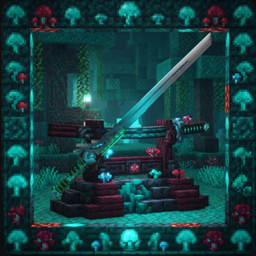
Transform your ultimate Netherite weapon into a legendary, glowing relic! Immortal Eyes is a custom resource pack/texture replacement that completely redefines the visual presence of the Netherite Sword in Minecraft.

Features

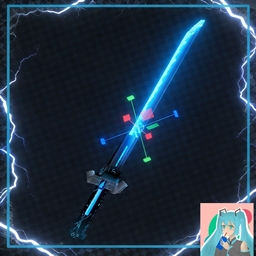
  • Custom 3D-Style Model & Textures: Replaces the standard Netherite Sword with a sleek, custom-designed blade featuring a dark, obsidian-like finish and glowing cyan accents.

  • Warped Fungus Aesthetic: The hilt is wrapped in textures inspired by the Nether's Warped stem, complete with vibrant toxic-green segments.

  • The Watchful Core: Features a striking, crystalline "eye" embedded in the hilt that radiates arcane energy and a soft, steady glow.

  • Immersive Atmosphere: Designed to blend seamlessly with custom Nether builds, magical modpacks, or darker resource packs.

Installation

  1. Download the resource pack zip file.

  2. Place the zip file into your Minecraft resourcepacks folder (.minecraft/resourcepacks).

  3. Launch Minecraft, go to Options > Resource Packs, and move Immortal Eyes to the active column.

  4. Equip a Netherite Sword in-game to see the new texture in action!


ImmortalEyes_MadeByMochiLineStudio1.21.11.zip
MC 1.21.11-snapshot, 1.21.11, 26.1-snapshot, 26.1, 26.1.1, 26.1.2, 26.2, 26.3-snapshot, 26.3
Release 2026-09-18 Get
ImmortalEyes_MadeByMochiLineStudio1.20..zip
MC 1.21.6-snapshot, 1.20.2-Snapshot, 1.20.5-Snapshot, 1.20.2, 1.21.8, 1.20.5, 1.20.1, 1.20.6, 1.21.6, 1.21.7, 1.20.4, 1.20.3-Snapshot, 1.20.3, 1.21.9-snapshot, 1.21.9, 1.21.10
Release 2026-09-18 Get
ImmortalEyes_MadeByMochiLineStudio1.1.9.zip
MC 1.16.3, 1.13.1, 1.16-Snapshot, 1.17.1, 1.21.2-Snapshot, 1.21, 1.15-Snapshot, 1.16.1, 1.18.1, 1.20.2-Snapshot, 1.20.5-Snapshot, 1.14.3, 1.15, 1.16, 1.13, 1.19-Snapshot
Release 2026-09-18 Get

Requirements & install

How to use this resource pack in Minecraft
Resolution
512x+
Minecraft
1.21.11 – 26.3
Install folder
.minecraft/resourcepacks

How to install resource packs

  1. Download the resource pack .zip file (do not extract it).
  2. In Minecraft open Options → Resource Packs → Open Pack Folder.
  3. Drop the .zip into the resourcepacks folder (.minecraft/resourcepacks).
  4. Move the pack to the Selected column and click Done.

512x packs need a strong GPU and at least 4 GB of RAM for Minecraft; a performance mod such as Sodium is strongly recommended.

Browse more: 16x resource packs 32x resource packs 64x resource packs 128x resource packs 256x resource packs 512x+ resource packs Resource Packs for 26.3 All resource packs

More from MochiLinesStudio

Advertisement Remove ads with Premium →

You Might Also Like