Mineuniverse
Resource Packs
Sword 3D model : FlameDragonOverlord

Sword 3D model : FlameDragonOverlord

RESOURCE PACK
Switch a better skin for netherite sword
by MochiLinesStudio
Download Claim this project
3,696 downloads
0 likes
0 followers
Updated Oct 14, 2026
0 hypes
Follow0
512x and Higher
Advertisement Remove ads with Premium →


例1


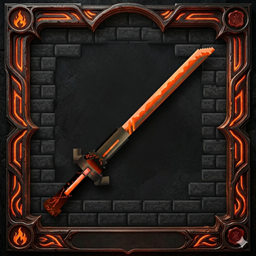
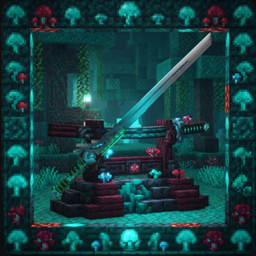
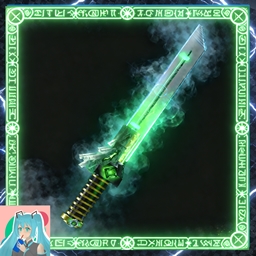
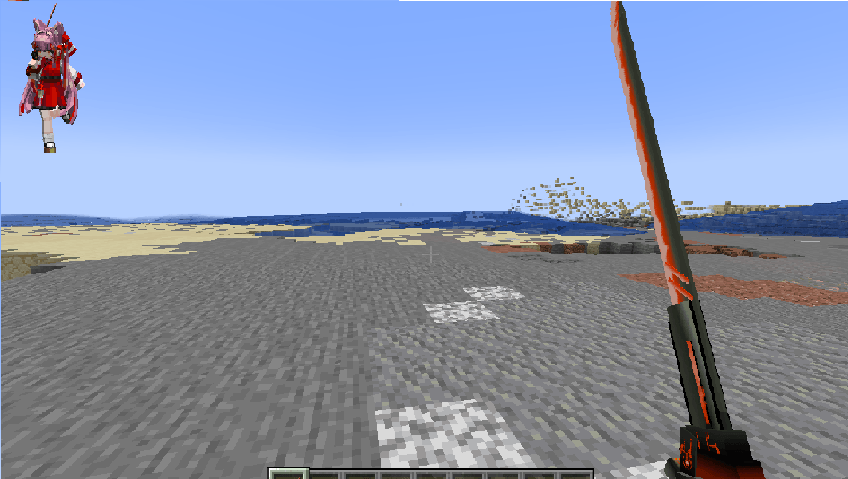
🔥 FlameDragonOverlord - Legendary Netherite Re-skin 🔥

Bring the fury of the dragon to your Minecraft world! This resource pack transforms the mundane Netherite Sword into the legendary FlameDragonOverlord, a masterpiece of orange-red hues and pixel-perfect craftsmanship.

✨ Key Features:

  • Exclusive Design: Specifically replaces the Netherite Sword only. Other tools remain vanilla.

  • 1:1 Pixel Accuracy: Retains the raw, sharp details of the original design by MochiLinesStudio.

  • Dynamic Aesthetic: Features a 45-degree tilted model for a more aggressive and realistic combat stance.

  • Vanilla Friendly: No mods (like OptiFine) required! Compatible with Minecraft 1.21.1+.

🗡️ Lore:

"The Sovereign of Ember and Drake. Forged in the heart of a dying star, this blade whispers the roar of a thousand dragons."

🛠️ Installation:

  1. Download the .zip file.

  2. Place it in your resourcepacks folder.

  3. In-game, go to Options > Resource Packs and move it to the top.

ZFlameDragonOverLord1.9.zip
MC 1.16.3, 1.13.1, 1.9.3, 1.17.1, 1.9.1, 1.21.2-Snapshot, 1.21, 1.16.1, 1.18.1, 1.20.2-Snapshot, 1.20.5-Snapshot, 1.14.3, 1.15, 1.16, 1.13, 1.21.1-Snapshot, 1.16.5, 1.10.2, 1.19.3
Release 2026-04-24 Get
ZFlameDragonOverLord1.21.6.zip
MC 1.21.6-snapshot, 1.21.8, 1.21.6, 1.21.7, 1.21.9-snapshot, 1.21.9, 1.21.10, 1.21.11-snapshot, 1.21.11
Release 2026-04-24 Get
ZFlameDragonOverLord1.21.11+.zip
MC 26.1, 26.1.1, 26.1.2
Release 2026-04-24 Get

Requirements & install

How to use this resource pack in Minecraft
Resolution
512x+
Minecraft
1.21.9-snapshot – 26.1.2
Install folder
.minecraft/resourcepacks

How to install resource packs

  1. Download the resource pack .zip file (do not extract it).
  2. In Minecraft open Options → Resource Packs → Open Pack Folder.
  3. Drop the .zip into the resourcepacks folder (.minecraft/resourcepacks).
  4. Move the pack to the Selected column and click Done.

512x packs need a strong GPU and at least 4 GB of RAM for Minecraft; a performance mod such as Sodium is strongly recommended.

Browse more: 16x resource packs 32x resource packs 64x resource packs 128x resource packs 256x resource packs 512x+ resource packs Resource Packs for 26.1.2 All resource packs

More from MochiLinesStudio

Advertisement Remove ads with Premium →

You Might Also Like