Badges update automatically and link to the resource pack page on MineUniverse.

Certainly. Here is the updated text tailored for the Animated Golden Apples resource pack, written in a professional, standard tone in English.
Welcome to Animated Golden Apples! This is a vanilla-friendly Resource Pack (NOT a Mod) designed to upgrade your Minecraft experience by giving the iconic Golden Apple a modern, premium, and dynamic look.
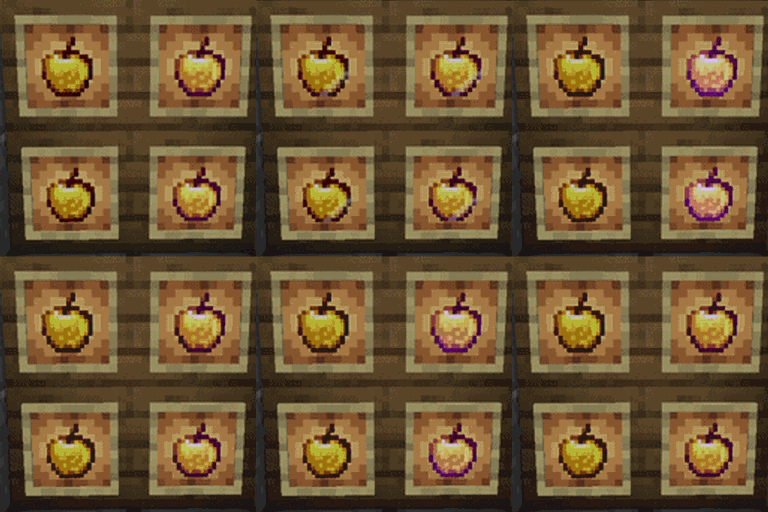
If you find the default Golden Apple texture a bit lackluster, this pack is perfect for you. I have carefully refined the color palette and infused it with smooth, magical animations that make the item feel truly legendary.
🎨 Refined Color Palette: The gold textures have been optimized for a richer, more vibrant appearance. The high-contrast shine makes the apple stand out in your inventory and hotbar.
🎬 Smooth Custom Animations: The Golden Apple now features fluid, breathing animations. You will see a soft, shimmering light effect flowing across the surface, giving it a high-quality, magical aesthetic.
🚀 100% Pure Resource Pack:
This is NOT a Mod. It requires no Forge or Fabric mod loaders to function.
100% compatible with Vanilla Minecraft, Multiplayer Servers, and Realms. No lag, no performance drops!
Download the latest .zip file from the Files tab.
Launch Minecraft, go to Options... -> Resource Packs....
Click Open Pack Folder.
Drag and drop the downloaded .zip file into the folder.
In the game, move Animated Golden Apples to the right-side (Selected) column and click Done!