Mineuniverse
Data Packs
Stacking Items

Stacking Items

DATA PACK
Allows many item types that don't stack to 64 to stack higher, without breaking the game balance too much
by aji56
Download Claim this project
441 downloads
0 likes
Updated Oct 14, 2026
0 hypes
Utility
Advertisement Remove ads with Premium →

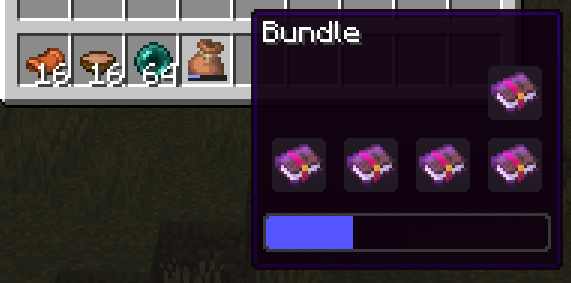
This datapack allows items that don't have durability and don't stack to 64 normally to stack higher than usual. Items that originally stacked to 16 can go up to 64, and items that originally couldn't stack can go up to 16. As a result, many items can be placed in bundles that couldn't before, such as boats, beds, and enchanted books. Totems of Undying and Bundles are not affected by this to preserve game balance and stability.

While this datapack does have a ticking function that sets relevant items in players' inventories to their new max stack sizes, it also updates any recipes, loot tables, and villager trades that output affected items to have the new max stack sizes set before they even hit your inventory, to make it as seamless as possible. For this reason, any other datapack you have that touches vanilla recipes, loot tables, or villager trades should be set as higher priority than this one. This includes my other datapack, Tool Progression.

In cases where a player is given an item that would be affected by this datapack though a mechanism that isn't a recipe, loot table, or villager trade (such as filling buckets, milking mooshrooms, etc.), the item won't stack initially but can be stacked after it touches the player's inventory.

If you notice any bugs or have constructive feedback, please let me know.

Installation:

  1. Go to the "More" tab when creating a new world and click "Data Packs"
  2. Click "Open Pack Folder" and it'll open an empty temporary folder
  3. Place the datapack zip file into the temporary folder, it should show up in the "Available" list in the game when you do
  4. Click the right pointing arrow on the image next to the datapack to move it to the "Selected" list
  5. Click done to return to the previous screen
  6. After clicking "Create World", you'll get a popup mentioning experimental features, click "Yes" to continue
stacking_items_v1.02_26.3.zip
MC 26.3
Release 2026-09-20 Get
stacking items_v1.01_26.3.zip
MC 26.3
Release 2026-09-18 Get
stacking_items_v1.01_26.2.zip
MC 26.2
Release 2026-07-28 Get
stacking_items_v1.0_26.2.zip
MC 26.2
Release 2026-06-26 Get

Requirements & install

How to use this data pack in Minecraft
Mods needed
None, works in vanilla
Minecraft
26.2 – 26.3
Install folder
saves/<world>/datapacks

How to install data packs

  1. Download the data pack .zip file (do not extract it).
  2. New world: click Data Packs on the world creation screen and drop the .zip in. Existing world: open .minecraft/saves/<world>/datapacks.
  3. Put the .zip into the datapacks folder of the world (servers: world/datapacks).
  4. Run /reload in game (or rejoin the world) and check it with /datapack list.
Browse more: Data Packs for 26.3 All data packs

More from aji56

Advertisement Remove ads with Premium →

You Might Also Like