This datapack aims to make enchanting easier to get into so you don't have to feel bad putting enchantments on weaker equipment or spend so much time building a mob grinder.
Goes well with my other datapacks, Tool Progression and Stacking Items.
Features:
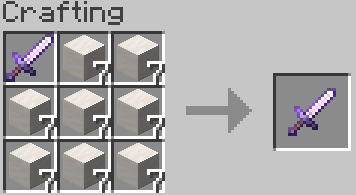
- Tool enchantment crafting: craft your tools with specified ingredients to add a level of an enchantment to it, respecting vanilla conflicts
- New enchantments: Experience Boost and Curse of Matter Conversion, which make experience much easier to come by
- Disenchanting: adds a command (/trigger disenchant) to disenchant the item in your main hand, moving one enchantment to a book in your off hand and costing levels equal to 3 times the level of the enchantment moved; doesn't work on cursed items
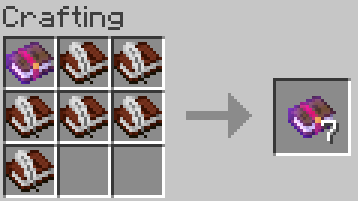
- Enchanted Book copying: allows you to craft any enchanted book with 1-8 books and quills, duplicating it
- Removes the anvil work penalty that increases how many levels you need each time you work an item, so you can simply repair with an anvil guilt-free
Experience Boost:
- Applicable to weapons and harvest tools
- Gives the user experience when the tool is used, and multiplies experience drops from mobs and blocks that already drop experience
- Max level: 5
- Mutually exclusive with Unbreaking and Mending (anvil repairing will be your friend since the work penalty is removed)
Curse of Matter Conversion:
- Applicable to weapons
- Causes mobs killed by the weapon to convert item drops into large amounts of experience
- Max level: 1
- Treasure, cannot be obtained from the enchanting table
- Curse, cannot be removed once applied and blocks disenchanting
Advancements have been included that document the datapack's features in game as well.
Please note: tool enchantment crafting and disenchanting do not work as they are with enchantments outside of vanilla or this datapack.
If you notice any bugs or have constructive feedback, please let me know.
Installation:
- Go to the "More" tab when creating a new world and click "Data Packs"
- Click "Open Pack Folder" and it'll open an empty temporary folder
- Place the datapack zip file into the temporary folder, it should show up in the "Available" list in the game when you do
- Click the right pointing arrow on the image next to the datapack to move it to the "Selected" list
- Click done to return to the previous screen
- After clicking "Create World", you'll get a popup mentioning experimental features, click "Yes" to continue