Mineuniverse
Shaders
Veyluma NovaMist

Veyluma NovaMist

SHADER
A unique cinematic Iris shader with matte terrain, cool realistic water, soft pearl-blue atmosphere, and optimized performance for mid-range PCs.
by laptoptop
Download Claim this project
Add a badge to your pageLink to Veyluma NovaMist from a README, website or forum post.
Preview: Badge

Badges update automatically and link to the shader page on MineUniverse.

2,437 downloads
0 likes
0 followers
Updated Oct 14, 2026
0 hypes
Follow0
Fantasy Realistic
Advertisement Remove ads with Premium →

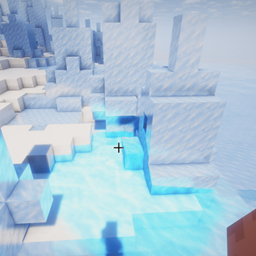
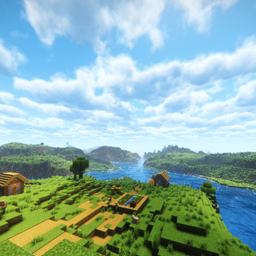
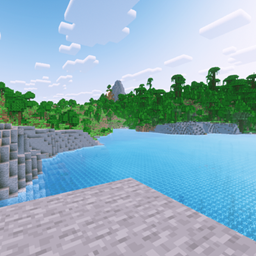
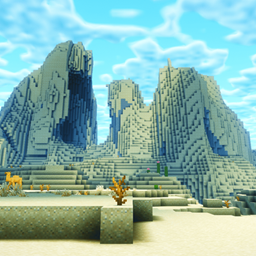
Veyluma NovaMist is a cinematic Iris shader built around a distinct “Luma Coast” look: cool realistic water, matte natural terrain, soft pearl-blue atmospheric depth, and warm sunlight without the oily over-reflective feel.

Designed for mid-range players, NovaMist focuses on making Minecraft feel fresh and screenshot-ready while keeping performance under control. It tones down excessive glare, reduces oversaturated colors, and gives rivers, oceans, skies, caves, and distant landscapes a cleaner cinematic mood.

Features:
- Cool blue realistic water with reduced yellow glare
- Matte terrain lighting for grass, dirt, stone, and natural blocks
- Pearl-blue distance fog and atmospheric depth
- Warm but controlled sunlight
- Lower saturation for a cleaner realistic look
- Optimized reflection, shadow, bloom, and post-processing settings
- Designed primarily for Iris

Recommended:
- Iris Shader Loader
- Sodium
- Minecraft 1.21.x / 1.26.x compatible Iris versions

Veyluma_NovaMist_26.2_v1.0.4
MC 1.21.2-Snapshot, 1.21, 1.21.6-snapshot, 1.21.1-Snapshot, 1.21.8, 1.21.5, 1.21.4, 1.21.5-Snapshot, 1.21.1, 1.21.6, 1.21.3, 1.21.7, 1.21-Snapshot, 1.21.4-Snapshot, Iris, 1.21.2
Release 2026-08-14 Get

Requirements & install

How to use this shader in Minecraft
Shader loader
Iris
Minecraft
1.21.4-Snapshot – 1.21.8
Install folder
.minecraft/shaderpacks

Install with Iris

  1. Install Iris with the Iris installer (irisshaders.dev); it sets up Fabric and Sodium for you.
  2. Download the shader pack .zip (do not extract it).
  3. Put the .zip into .minecraft/shaderpacks.
  4. In game open Options → Video Settings → Shader Packs, select the pack and click Apply.
Browse more: Iris shaders OptiFine shaders Shaders for 1.21.8 All shaders

More from laptoptop

Advertisement Remove ads with Premium →

You Might Also Like