Mineuniverse
Shaders
Dappled Shaders

Dappled Shaders

SHADER
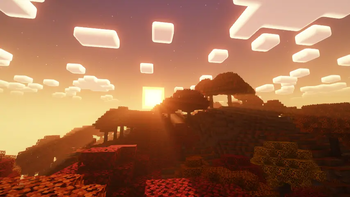
Dappled Shaders by Eptune is a re-colored, autumn-themed fork of Complementary Shaders.
by eptune
Download Claim this project
1,335 downloads
0 likes
Updated Oct 14, 2026
0 hypes
Fantasy Vanilla
Advertisement Remove ads with Premium →

Overview

ABOUT

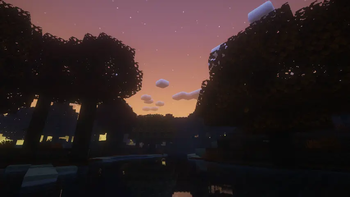
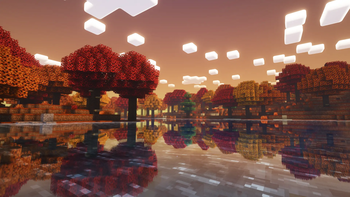
Dappled Shaders was built to match a warm, autumn forest aesthetic, based on the look of an autumn dappled forest biome. The changes are concentrated in the color and atmosphere layer of the shader pack: sky gradient colors, sun glare handling, fog tinting, and ambient light color. No new rendering features, lighting models, shadow techniques, or material systems were added. The goal was a visual re-tune of an existing shader, not a new shader engine.

Installation

  • Requires a mod loader that supports shader packs, such as Iris or OptiFine.
  • Drop the packed archive into your shaderpacks folder and select it in-game.

Changes Made

1. Sky dome gradient colors

File: shaders/lib/atmospherics/sky.glsl, function GetSky()

  • Replaced the default blue-to-cyan sky gradient (topColor, midColor, bottomColor) with an autumn gradient: a soft dusty mauve-grey zenith, a warm burnt-orange mid layer, and a warm gold near-horizon color.
  • Increased the overall sky brightness multiplier so the autumn palette does not read as too dark.
  • Applied the same gradient change to GetLowQualitySky(), the fallback function used at lower shader detail settings, so the look is consistent across all quality presets.

Read more changes in the README file.
DappledShaders_r1.0
MC 1.21.2-Snapshot, 1.21, 1.21.6-snapshot, 1.20.2-Snapshot, 1.20.5-Snapshot, 1.19-Snapshot, 1.21.1-Snapshot, 1.19.3, 1.20.2, 1.19.4, 1.21.8, 1.19.4-Snapshot, 1.20.5, 1.21.5, 1.21.4
Release 2026-09-25 Get

Requirements & install

How to use this shader in Minecraft
Shader loader
Iris or OptiFine
Minecraft
1.20.5 – 1.21.8
Install folder
.minecraft/shaderpacks

How to install shaders

  1. Install a shader loader for your Minecraft version: Iris (with Sodium) or OptiFine.
  2. Download the shader pack .zip file (do not extract it).
  3. Put the .zip into the shaderpacks folder (.minecraft/shaderpacks).
  4. In game open Options → Video Settings → Shader Packs, select the pack and apply it.
Browse more: Iris shaders OptiFine shaders Shaders for 1.21.8 All shaders

More from eptune

Advertisement Remove ads with Premium →

You Might Also Like