Badges update automatically and link to the resource pack page on MineUniverse.
Having grown up with the Super Mario Bros. franchise has given me a great love for the characters and critters from the games.
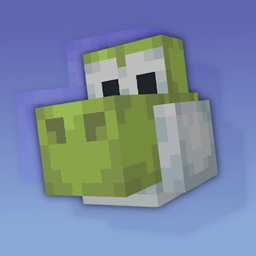
This pack has one simple goal, that being to turn the animals you know from Minecraft into those that you may know from Mario.
This pack comes complete with :
- CEM (Custom Entity Models)
- Goomba(s) filling in for Wolves
- Yoshi(s) filling in for Horses
- Complete with Horse Armor retextures
- Get any color you want via Leather Yoshi Armor
- Birdo(s) filling in for Donkeys
- Boshi from Super Mario RPG filling in for Mules
- Rex(s) from Super Mario World filling in for Skeleton Horses
- Plessie from Super Mario 3D World filling in for Zombie Horses
- Variant Skins for creatures with applicable variants
- EN_US lang file to change all references to original animals into those of the Mario Characters
- Custom Sounds to make your favorite characters look and sound just as you remember them.

CEM is required, meaning you either need Optifine or an alternative like these mods :
[ETF] Entity Texture Features - Allows for Variant Textures
[EMF] Entity Model Features - Allows for CEM without Optifine (and much more)
Similar to my Pikmine Pack, mobs from this resourcepack will have their pupils shift around as they observe the world around them, this was made possible thanks to help from Traben! (the creator of ETF and EMF)
This pack was made with these 2 mods in mind, but should work with Optifine as it uses something made to mimic Optifine's formatting

Feel free to use this pack for modpacks and videos (Just provide a link to the page)
YOU MAY NOT REUPLOAD THIS PACK!