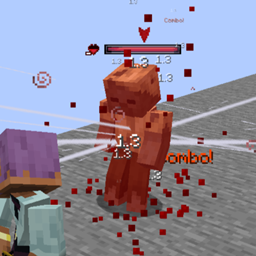
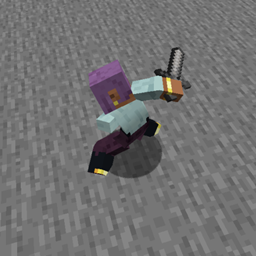
Extends Epic Fight datapacks with new systems like passive skills, datakey logic, charged attacks, shaders, and advanced customization… and more!
undefined
Add Passive Skills via JSON
Use Skill Datakeys (boolean, int, float + comparators)
Create Charged Attacks
Fix camera issues with Zoom & Use Method
Add Advanced Swing Trails
Use Models per Style
Extend Skill Builder via JSON
Execute ShaderFX via datapacks
Add Categories via JSON
Execute Overlays
Create Innate Skills (Simple, Holdables and Conditional)
Rework for Systems & Shader II v2.2 ✔️
Future Ideas
Time Innate Skills & Conditional Holdable Innate Skill (This one is winning for now!)
Camera Packet on Animations (1.20.1)
Skill Books (Dodge / Guard / General)
The information is valid only for version 2.2
https://github.com/Sleys-g/ExtendedDatapacks/wiki
Assign passive skills to a weapon category:
"passive_skill": "namespace:skill_id"
⚠ Important
Some passive weapon skills require an Innate Skill.
Incorrect combinations may cause crashes.
🔽 More Details (Advanced)
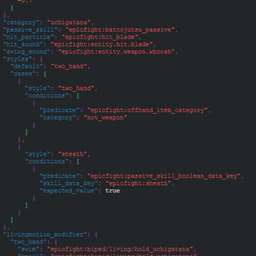
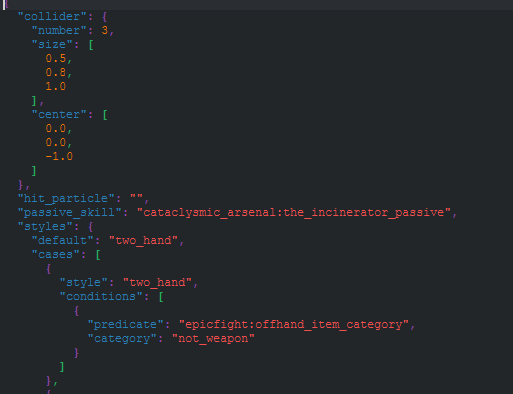
Image of how the passive skill looks implemented, keep in mind that this only applies to "Weapons Passive Skills" using others will have no effect.
Allows conditional logic using skill data.
Supported types
Basic example
"skill_data_key": "namespace:path",
"expected_value": true
Float example (requires tolerance)
"skill_data_key": "namespace:path",
"expected_value": 2.5,
"tolerance": 0.01
More details
In this case, let's look at an example of how the Skills Datakeys can be used to work together with the previous feature (Passive Skills)
In this case, we use the passive of the Uchigatana that allows a "Sheath" of the Katana, once this applies and the value of the passive is True, we change to the "Sheath" style
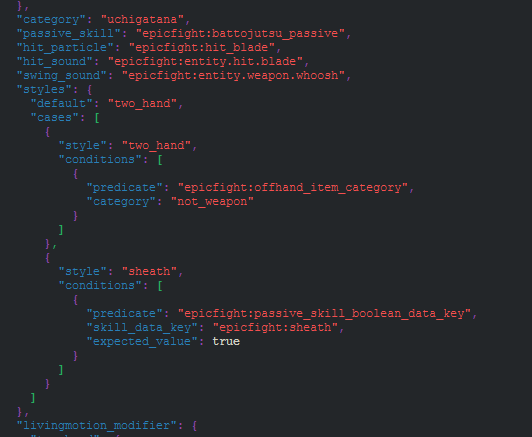
This supports the following list in predicates:
For Booleans, you need to add the Skill Datakey and the desired value:
"skill_data_key": "namespace:path",
"expected_value": true
For integers, you need to add the Skill Datakey and the desired value:
"skill_data_key": "namespace:path",
"expected_value": 5
For floats, you want to add the Skill Datakey, the desired value, and a tolerance:
"skill_data_key": "namespace:path",
"expected_value": 2.5,
"tolerance": 0.01
⚠ Make sure you use the correct values for each Key ⚠
Adds support for:
>, <, ==, !=, >=, <=Example
"skill_data_key": "modid:charge",
"comparison_type": ">",
"expected_value": 5
🧠 Internally works like:
X | Comparison | Value
8 > 5
🔽 More Details (Advanced)
Theoretical implementation example
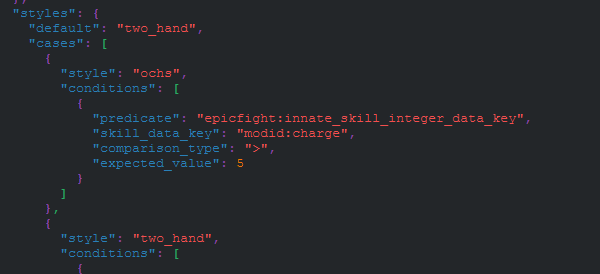
Here is a weapon that, when its Innate ability reaches more than "5" charges, will then change from Two Hand to Ochs, until the "Charges" are less than or equal to 5.
Just remember to add ""tolerance": 0.X" when working with floats....
💡 Good habits!
One thing to add is that, to better understand things, it's helpful to order the operations like this:
"skill_data_key": "modid:charge",
"comparison_type": ">",
"expected_value": 5
Because the comparison actually works like this:
SkillKey | Comparison Type | ExpectedValue.
X | Comparison Type | Constant.
8 > 5.
Hold a key to enter Charged Mode.
Effects
Behavior
Example combo
1AA → 2CAA → 3AA → CDA
🔽 More Details (Advanced)
When the player activates a charged attack, the system does not reset the combo sequence. This means the internal combo count continues naturally, allowing you to switch between normal and charged attacks without breaking the flow of combat.
For example, if your weapon has a sequence like this:
Normal Attacks: 1AA → 2AA → 3AA → DA → AS
Charged Attacks: 1CAA → 2CAA → 3CAA → CDA → CAS
You can chain both sets of animations depending on the combo's position. This allows for combinations like:
1AA → 2CAA → 3AA → 1CAA → CDA → AS
To remain in Charged Attack Mode, you must hold down the button. When you release it, after half a second, the system returns to normal mode.
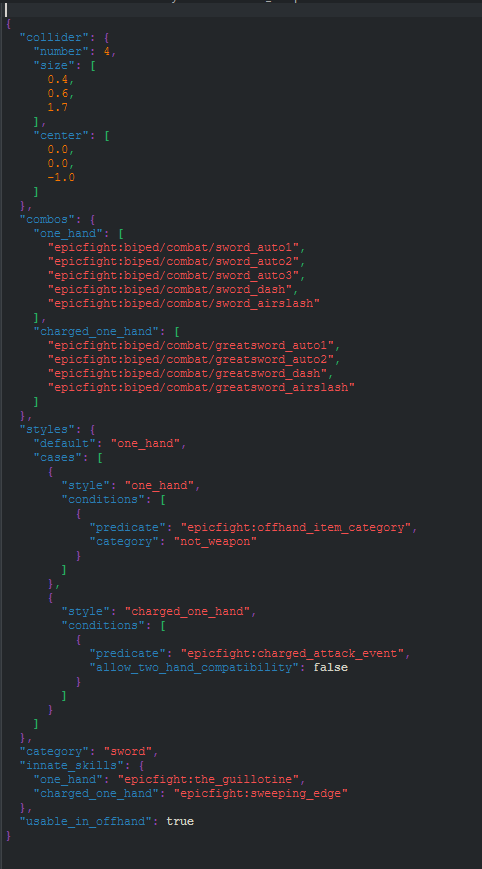
The "allow_two_hand_compatibility" entry means if you want it to go to the charged attack considering or not considering the Offhand item
⚠ The energy between Innate Skills is not conserved, in the example the Innate Skills are different to visually show the change from mode to charged mode.
Fixes camera issues when using items with no proper animation.
"zoom_in_type": "custom"Values
💡 You can also force right-click behavior using item tags.
🔽 More Details (Advanced)
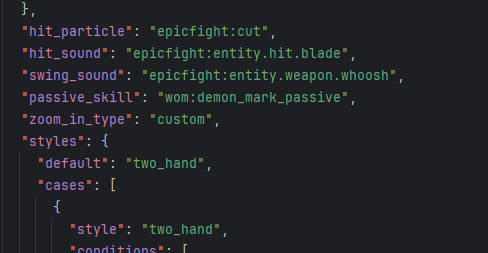
In this case, we are building an "Antitheus" item in a datapack. We have assigned the passive and the Innate Skill; however, when using the right click, the camera "bugs." We fix this by adding the line: "zoom_in_type": "custom"
But what if my item won't let me right-click? We can always force it!
Enforce the "Use Method" on any item that contains the required tag. This resolves several client/server use-item issues in EF when creating datapack items.
To do this, create the file in the following path: data/epicfight_edp/tags/items/force_use_method.json.
And add the items in the tag list.
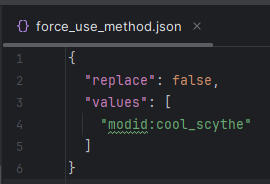
Now our weapon can use right-click, it can cast the Antitheus right-click ability and the camera won't glitch!
Add custom swing trail textures per weapon style.
📁 Path:
assets/<namespace>/item_skins_parameters/*.json✔️ Supports:
More details
In this case, I will give the example of a diamond sword, which, depending on whether it is One Hand or Two Hand, will have varying swing trails!
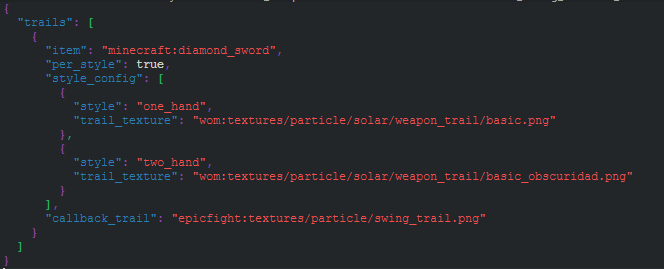
This is useful if you want to change your Item's model when you change Style, and by extension, also change its Swing Trail.
This function also applies an "Overwrite" to the original texture, even if it's attached to an animation. This ensures your Swing Trail won't be modified by animations and will instead use the texture you want.
This is only for configuring the texture; you also need to create the "item_skins" (assets/item_namespace/item_name.json) file for the item in question.
In the case of the previous example, the diamond sword, its Item Skin is this (assets/minecraft/item_skins/diamond_sword.json)
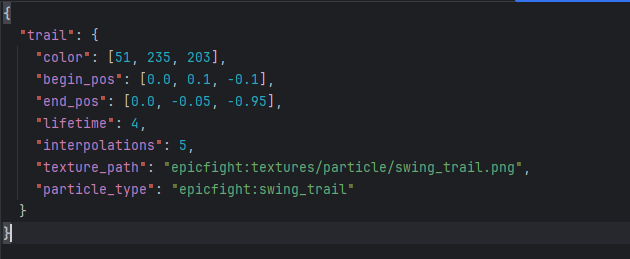
The Item Skin is where the color, begin pos, end pos, lifetime, interpolations, and particle type parameters were added. The "texture_path" will only be used if the Advanced Swing Trail textures fail along with their Callback Trail.
Assign different models depending on player style.
📁 Path:
assets/<namespace>/item_model_parameters/*.jsonSupports:
🔽 More Details (Advanced)
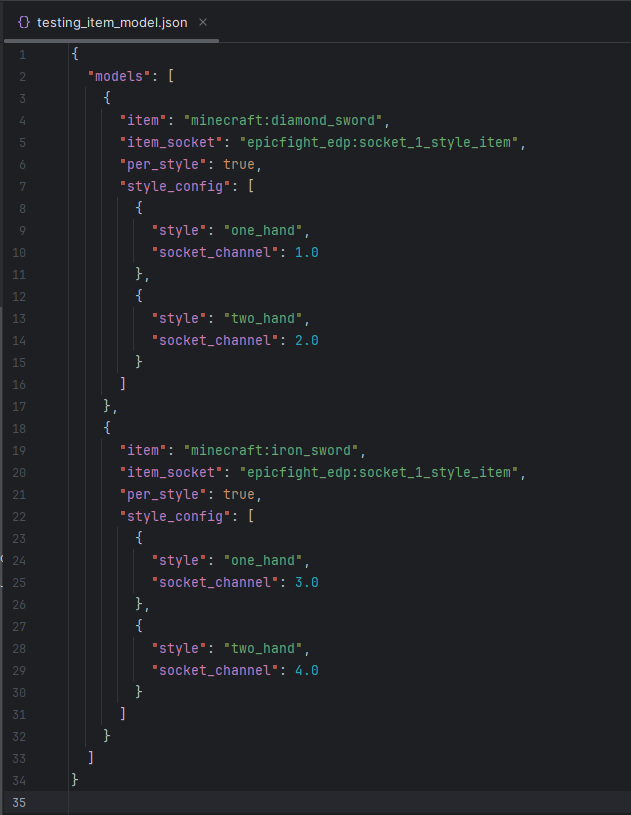
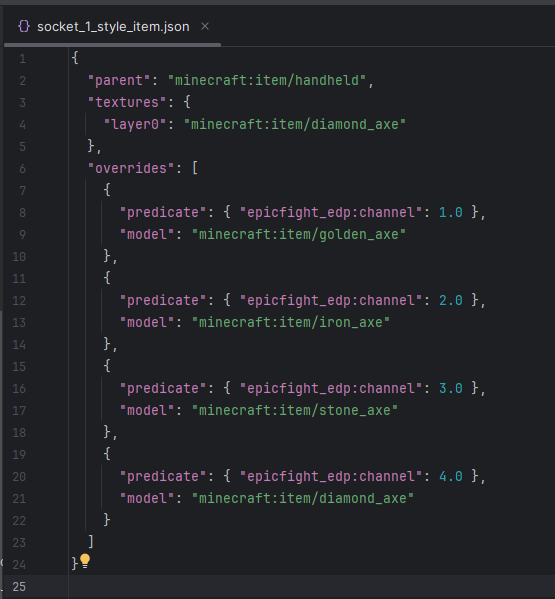
Once we have this, we need to build our "Item Model Socket" which will simply store all our model overrides inside; it is useful for loading models and assigning the desired texture to the channel, the number of addable channels is as many as you want; you don't need to put one in each socket.
Here's an example of what it would look like in-game, using the Swing Trails per Style system and the Model per Style system
Here's the resource pack that causes that effect: Google Drive - simply_sword_test.zip
📁 Path:
.minecraft/config/epicfight_edp/skill_builder/category_icon/*.jsonundefined
🔽 More Details (Advanced)
In some cases, a weapon category does not have a clear or defined icon in Epic Fight’s Skill system.
When this happens, opening the related Skill Book may cause an exception due to a missing icon.
(This issue occurred in older versions; it may or may not still happen, but this system exists as a preventive solution.)
How it works
Adding an icon is simple. You only need to define:
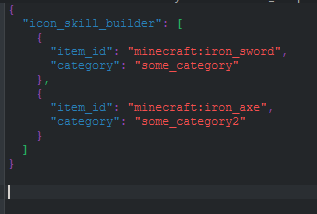
⚠ Override Behavior ⚠
This system allows overrides.
If multiple configurations define an icon for the same category, only one will be used.
📁 Path:
.minecraft/config/epicfight_edp/skill_builder/passive_skills/*.json⚠ No override support.
🔽 More Details (Advanced)
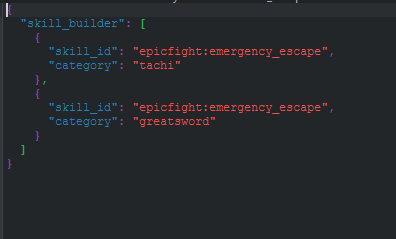
Parameters
⚠ Override Behavior ⚠
This system does NOT allow overrides.
A single category declaration can be used by multiple Passive Skills, but cannot be redefined.
📁 Path:
.minecraft/config/epicfight_edp/skill_builder/guard_skillsSupports:
More details
This system is more complex than the previous ones, as it requires defining:
Despite this, the configuration remains straightforward.
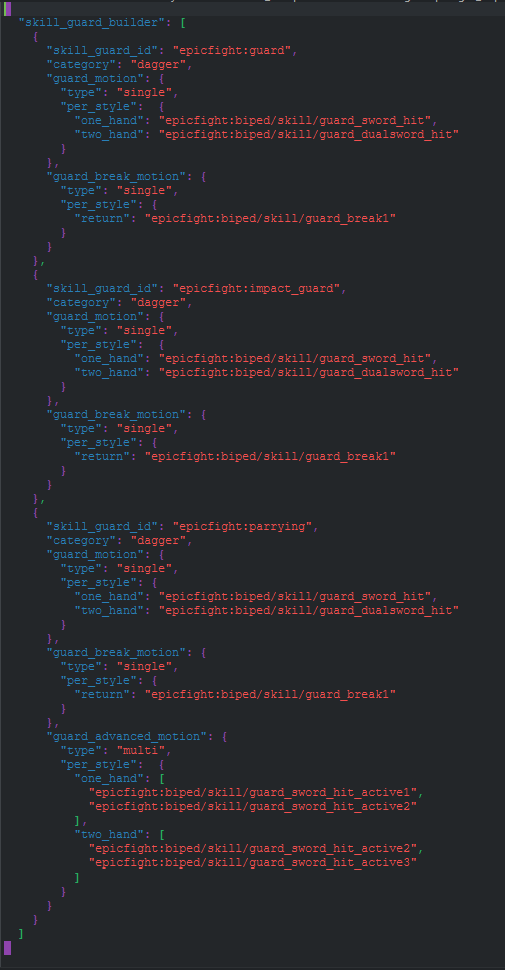
Core Parameters
Animation Parameters
Depending on the guard skill type:
Animation Sub-Configuration
Animation entries support additional parameters:
⚠ Override Behavior ⚠
This system does NOT allow overrides.
A single category declaration may be reused by multiple Guard Skills.
Execute shaders dynamically via datapacks.
📁 Path:
assets/<namespace>/shader_packet_parameters/*.json🔽 More Details (Advanced)
Parameter File Structure
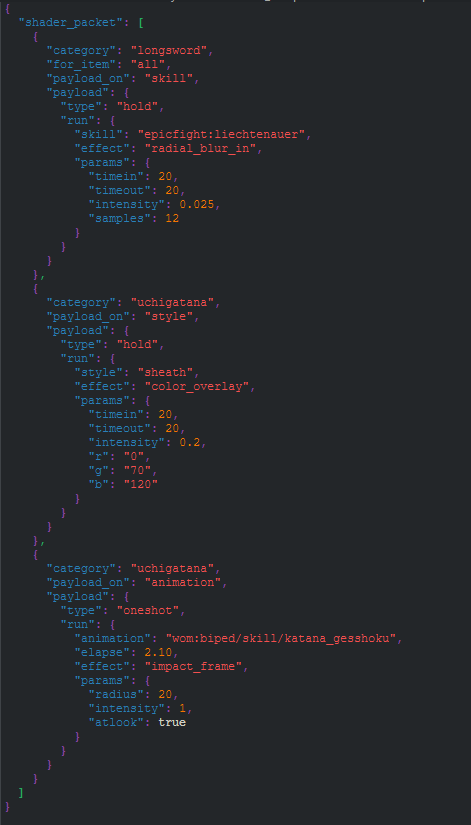
Each file defines how and when shaders will run. A typical file looks like:
Field Definitions:
| Field | Description |
|---|---|
| shader_packet | Name of the shader packet array |
| category | Target category for shader execution (required) |
| for_item | Target item. Accepts "all" or specific items. If omitted, defaults to "all". |
| payload_on | Execution trigger type. Valid values: Skill, Style, Animation. (Invalid combinations will crash the game.) |
| type | Execution mode based on payload_on. |
Execution Modes (Type)
Hold: Shader runs while the condition is true
Oneshot: Shader runs once at a specific elapsed time
Run, parameter Format
When payload_on = "Style"
skill: <skill_id>
effect: <ShaderFx type>
Valid effects for Style/Hold:
When payload_on = "Skill"
skill: <skill_id>
effect: <ShaderFx type>
Valid effects for Style/Hold:
Valid effects for Skill/Hold:
When payload_on = "Animation"
animation: <animation_id>
elapse: <time>
effect: <ShaderFx type>
Valid effects for Animation/Oneshot:
ShaderFx Parameter Reference
Impact Frame
| Parameter | Description |
|---|---|
| radius | Max radius (0–20). 0 disables the effect. |
| intensity | Effect strength |
| atlook | Triggers only if player is facing the caster |
Noise Overlay
| Parameter | Description |
|---|---|
| timeHold | Duration |
| size | Noise texture size |
| intensity | Effect strength |
| r, g, b | Color values |
Radial Blur (In / Out)
| Parameter | Description |
|---|---|
| timeIn | Smooth fade-in duration |
| timeHold | Duration at full strength |
| timeOut | Smooth fade-out duration |
| intensity | Blur intensity (non-scalar) |
| samples | Quality/performance trade-off |
Color Overlay
| Parameter | Description |
|---|---|
| timeIn | Smooth fade-in duration |
| timeHold | Duration at full intensity |
| timeOut | Smooth fade-out duration |
| intensity | Recolor strength |
| r, g, b | Target color |
⚠ Important Notes
Categories
It allows you to easily create new categories from JSON.
📁 Path:
.minecraft/config/epicfight_edp/weapon_builder/category/*.json
🔽 More Details (Advanced)
Depending on your preference, you can do the following:
And your file should look something like this:
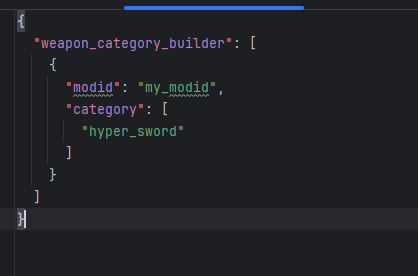
Important: If you register the category from the configuration folder, you must declare a modID.
If you do it using an In-Jar file, you don't need to specify the modID because the namespace where the file itself exists is considered the signer.
Overlays
You can add static overlays or animated overlays.
📁 Path:
assets/overlay_parameters/your_file.json
🔽 More Details (Advanced)
There you can create a file like this; in this example it's for both one-handed and two-handed modes.
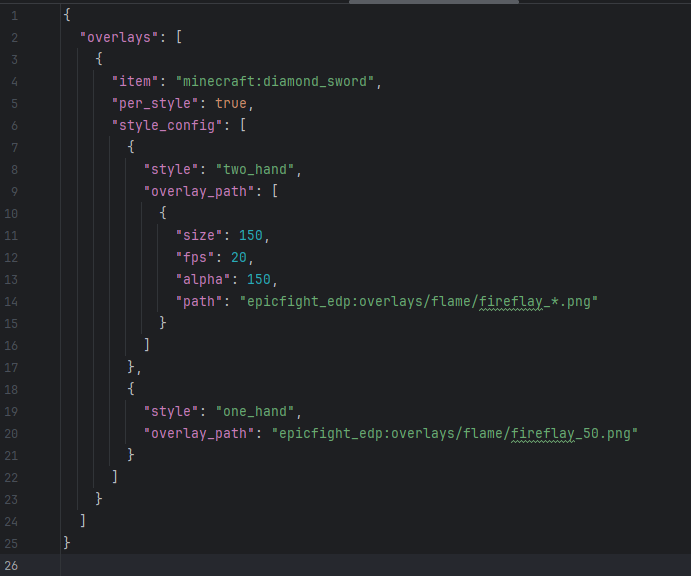
As you can see, if we want to use a simple overlay, that is, a single image, we simply pass it:
"overlay_path": "epicfight_edp:overlays/flame/fireflay_50.png"
In turn, you must always declare the item you want to write to. In the example, it was: "item": "minecraft:diamond_sword",
on the other hand: "per_style": true,
is just bureaucracy; it doesn't do anything currently. If in the future I want the overlay to be launched with different parameters, this will be useful.
The path assigned to the texture is not automatically located in "textures." The image shows: "epicfight_edp:overlays/flame/fireflay_50.png"
This means it is located in: assets/epicfight_edp/overlays/flame/fireflay_50.png
NOT IN: assets/epicfight_edp/textures/overlays/flame/fireflay_50.png
Important: The size MUST match the number of images available for animation. The FPS CANNOT EXCEED the level's evaluation threshold of 20 ticks (20 FPS).
The system counts from 1 -> Size, not from 0, and the asterisk (*) must correspond to the number in your image set. Additionally, the notation is straightforward: 0 -> 1 -> 10 -> 11 -> 100, etc.
IT IS NOT COMPATIBLE WITH 000 -> 001 -> 010 -> 11 -> 100...
Innate Skills
allowing the creation and customization of Innate Skills through JSON files.
📁 Path - Conig:
config/
└── epicfight_edp/
└── innate_skill_builder/
├── conditional_innate_skill/
├── holdable_innate_skill/
└── simple_innate_skill/
📁 Path - InJar:
data_driven/
└── <mod_id>/
└── innate_skill_builder/
├── conditional_innate_skill/
├── holdable_innate_skill/
└── simple_innate_skill/
🔽 More Details (Advanced)
They use a single animation and a single property set.
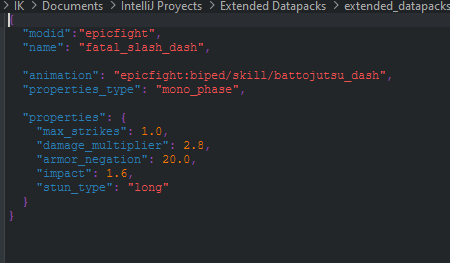
These fields are shared by most innate skill types.
| Field | Type | Description |
|---|---|---|
modid |
String | Mod namespace used to register the skill. |
name |
String | Internal skill identifier. |
animation |
String | Main animation used by the skill. |
properties_type |
String | Defines whether properties are mono_phase or multi_phase. |
properties |
Object | Contains the combat property definitions. |
The properties object controls the combat behavior of the skill.
| Property | Type | Description |
|---|---|---|
max_strikes |
Float | Maximum number of targets that can be hit. |
damage_multiplier |
Float | Damage multiplier applied by the skill. |
armor_negation |
Float | Percentage of armor ignored during damage calculation. |
impact |
Float | Determines the strength of hit reactions and stagger effects. |
stun_type |
String | Type of stun applied to targets. |
extra_damage |
Boolean | Enables additional damage effects when supported. |
Type of stun caused by hitting
| StunType |
|---|
| short |
long |
hold |
knockback |
neutralize |
fall |
| none |
Conditional skills dynamically select an animation based on the player's current state.
Supported conditions:
sprintingin_airkneelinguse_itemIf none of the conditions are met, the default animation defined in animation will be used.
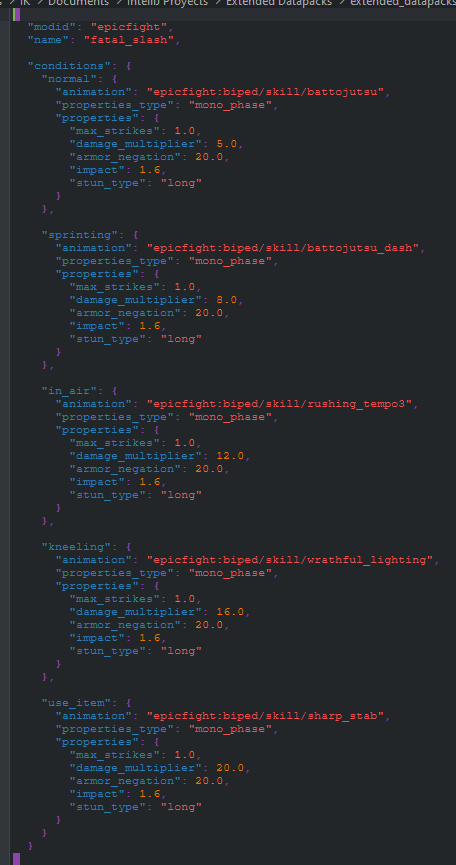
| Condition | Description |
|---|---|
sprinting |
Used when the player is sprinting. |
in_air |
Used when the player is not touching the ground. |
kneeling |
Used when the player is crouching/kneeling. |
use_item |
Used while actively using an item. |
Holdable skills introduce charge-based
Features:
This system lays the foundation for future hybrid skills such as Conditional Holdable Innates.
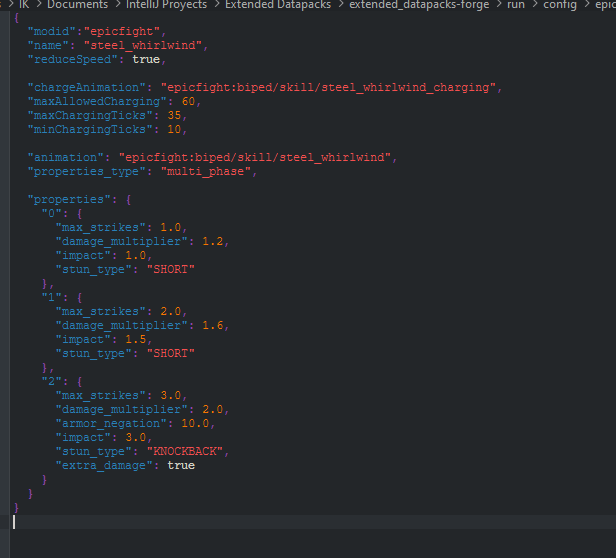
| Field | Type | Description |
|---|---|---|
chargeAnimation |
String | Animation played while charging. |
minChargingTicks |
Integer | Minimum charge duration before activation. |
maxChargingTicks |
Integer | Charge level cap used to determine the highest charge stage. |
maxAllowedCharging |
Integer | Maximum time the player can remain charging before cancellation. |
reduceSpeed |
Boolean | Slows player movement while charging. |
animation |
String | Final animation played when the skill is released. |
Execution Animations from Combat Evolution (Only 1.20.1)
You can register execution animations, either by item or by category, however you cannot type both at the same time or your package is considered invalid.
📁 Path - Conig:
config/epicfight_edp/third_party/combat_evolution/execution
📁 Path - InJar:
data_driven/<mod_id>/third_party/combat_evolution/execution
🔽 More Details (Advanced)
Registry for Categories
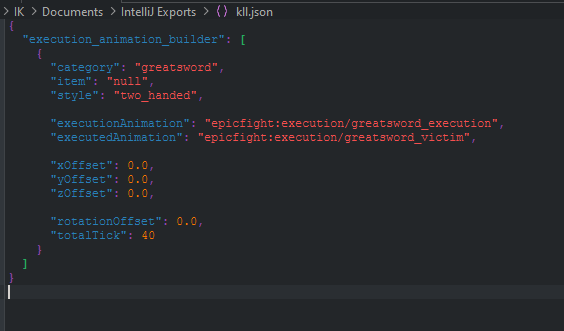
Registry for Item:
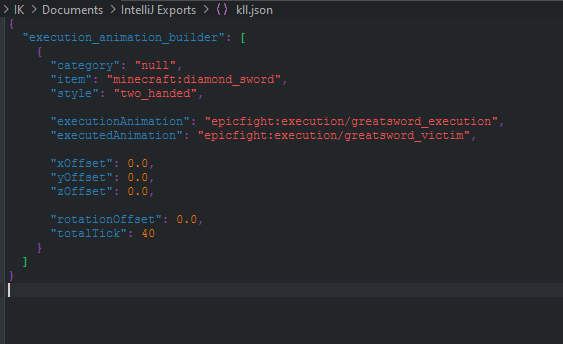
| Property | Type | Description |
|---|---|---|
category |
String | Weapon category that will receive the execution animation. Use "null" to ignore field |
item |
String | Specific item registry name (modid:item_name). Use "null" to ignore field |
style |
String | Combat style required for the execution. |
executionAnimation |
String | Animation played by the attacker during the execution sequence. |
executedAnimation |
String | Animation played by the target being executed. |
xOffset |
Float | Horizontal X position offset applied to the executed entity. |
yOffset |
Float | Vertical position offset applied to the executed entity. |
zOffset |
Float | Forward/backward Z position offset applied to the executed entity. |
rotationOffset |
Float | Additional rotation applied between the attacker and the executed target. |
totalTick |
Integer | Total duration of the execution sequence in ticks. |