Mineuniverse
Data Packs
Chest Minecart GUI

Chest Minecart GUI

DATA PACK
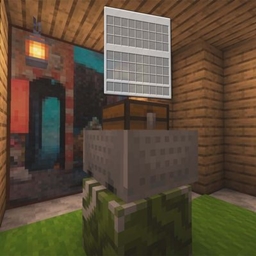
This data pack simplifies and accelerates the GUI configuration for transport minecarts; you only need to configure the storage settings and execute the generation function to quickly set up a GUI.
by WindWavesSea
Download Claim this project
28 downloads
0 likes
Updated Oct 14, 2026
0 hypes
Tech Utility
Advertisement Remove ads with Premium →

Introduction

This datapack makes configuring the Chest Minecart GUI simpler and more convenient. You only need to configure the storage and execute the generation function to quickly create a GUI.

Features

The following feature is supported:

  • Click an item to execute a command / switch menus

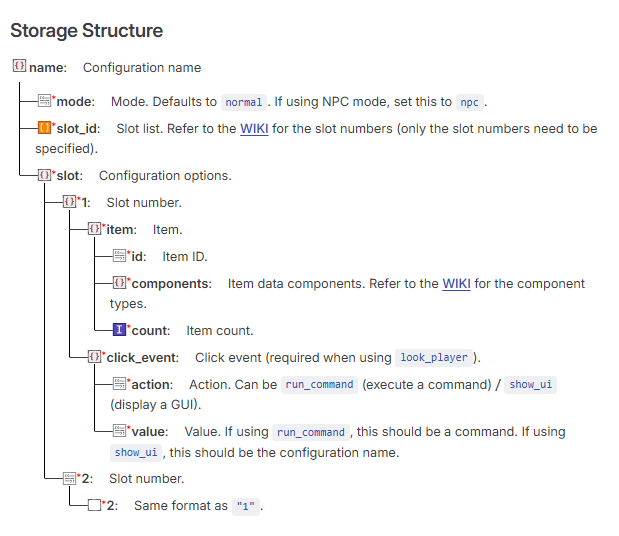
Storage Structure

Storage Structure

Example Storage

Default configuration

data merge storage windwaves_sea:chest_gui {\
config:{\
    "test":{\
        "mode":"npc",\
        "slot_id":["1"],\
        "slot":{\
                "1":{\
                    "item":{\
                        "id": "minecraft:diamond",\
                        "components":{},\
                        "count": 1 \
                    },\
                    "click_event":{\
                        "action":"show_ui", \
                        "value":"test1" \
                    }\
                }\
        }\
    }\
}\
}

Command Reference

Generate a Chest Minecart GUI

function chest_gui:command/summon {name:"name",x:1,y:1,z:1}

Generates a Chest Minecart GUI. The configuration must be written to storage first. name is the configuration name defined above (and used throughout the following commands). x, y, and z are coordinate values.

Remove a Chest Minecart GUI

function chest_gui:command/remove {name:"name"}

Delete a Configuration (Also Removes the Chest Minecart GUI)

function chest_gui:command/delete_setting {name:"name"}

Download

QQ Group: 117464315

Github: https://github.com/WindWavesSea/Chest-Minecart-GUI/

Modrinth: https://modrinth.com/datapack/chest-minecart-gui/

Credits

Thanks to NOX OBSCURA for providing the minecart opening detection concept.

Chest Minecart GUI V1.1.0.zip
MC 1.21, 1.21.8, 1.21.5, 1.21.4, 1.21.1, 1.21.6, 1.21.3, 1.21.7, 1.21.2, 1.21.9, 1.21.10, 1.21.11, 26.1, 26.1.1, 26.1.2, 26.2
Release 2026-08-26 Get
[DP]Chest Minecart GUI V1.0.0.zip
MC 1.21, 1.21.8, 1.21.5, 1.21.4, 1.21.1, 1.21.6, 1.21.3, 1.21.7, 1.21.2, 1.21.9, 1.21.10, 1.21.11, 26.1, 26.1.1, 26.1.2, 26.2
Release 2026-08-25 Get

Requirements & install

How to use this data pack in Minecraft
Mods needed
None, works in vanilla
Minecraft
1.21.8 – 26.2
Install folder
saves/<world>/datapacks

How to install data packs

  1. Download the data pack .zip file (do not extract it).
  2. New world: click Data Packs on the world creation screen and drop the .zip in. Existing world: open .minecraft/saves/<world>/datapacks.
  3. Put the .zip into the datapacks folder of the world (servers: world/datapacks).
  4. Run /reload in game (or rejoin the world) and check it with /datapack list.
Browse more: Data Packs for 26.2 All data packs

More from WindWavesSea

Advertisement Remove ads with Premium →

You Might Also Like