| Renewable | No |
|---|---|
| Stackable | Yes (64) |
| Tool | None |
| Blast resistance | 3,600,000 |
| Hardness | 1 |
| Luminous | No |
| Transparent | No |
| Flammable | No |
| Catches fire from lava |
No |
| Note block instrument | Default (Harp) |
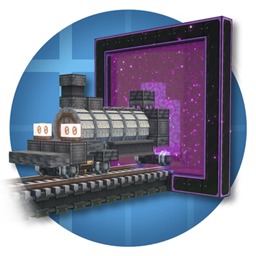
A teleport block was a block in MinecraftEdu.
Obtaining
The teleport block could be obtained via the Creative inventory, via the "give" section on the Teacher menu, using a console command or with a command block. Only teachers can see this block in their inventory.
Usage
When the teleport block is placed, it asks the player for the station. The block stores its direction when placed, making entities teleport to the station, in the direction of which the block was placed.
When right-clicked, a list of teleport locations is displayed. Teachers can adjust the teleports visibility for students by clicking the eye icon next to the station. Students can only access the stations that are visible. If only one station is made visible for teleport block, walking over the station teleports the player to that station. Walking over station causes players to teleport 3 blocks away the other teleport block so that players do not get stuck. Teachers can also access the teleport stations by opening the menu with B and selecting the "Teleports" tab.
Permissions
Teachers have full access to teleport blocks; they can use, break and set visibility for teleport blocks. Students can only use teleport blocks if there is build allow block below the teleport station.
Data values
The ID of this block is 3727.
| Name | Identifier | Translation key |
|---|---|---|
 Teleport Block Teleport Block | blockTeleport |
block |
Videos
History
| MinecraftEdu | |||||||
|---|---|---|---|---|---|---|---|
| 0.98 |  Added teleport blocks. Added teleport blocks. | ||||||
| 1.5.1 Build 11 | Teleport blocks now allow teleporting 2 blocks above to allow the placement of teleport blocks underground. | ||||||
External links
- "How to use Teleport Blocks and Stations" (archived) – MinecraftEdu wiki.