Mineuniverse
Shaders
TBS Fog Shader medium Quality

TBS Fog Shader medium Quality

SHADER
A shaderpack that gives a beautiful and saturated look to Minecraft while maintaining the vanilla look but with more vivid shadows and colors as well as improved fog.
by GreenDevStudio
Download Claim this project
Add a badge to your pageLink to TBS Fog Shader medium Quality from a README, website or forum post.
Preview: Badge

Badges update automatically and link to the shader page on MineUniverse.

4,126 downloads
0 likes
0 followers
Updated Oct 14, 2026
0 hypes
Follow0
Realistic Vanilla
Advertisement Remove ads with Premium →

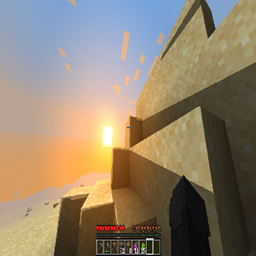
This shaderpack gives Minecraft Java Edition an attractive look while keeping the Vanilla style. The changes are quite small but add a nice charm to the game. The shader is also fully customizable — you can even disable shadows if your hardware doesn’t support them.


Features:

✨ Improved Vanilla Fog

✨ Dynamic Shadows

✨ Configurable Saturation


⚠️ Attention: This shader is in an experimental stage and unfortunately does not work for Iris users. At the moment, it only works with Optifine. There’s a medium chance of bugs, but feel free to share your opinion and feedback — it would truly help me a lot ❤️

tbs fog shader_alpha_1
MC 1.19.3, 1.20.2, 1.21, 1.20.5, 1.19.4, 1.19.2, 1.20.3, 1.20.1, 1.20, OptiFine, 1.20.6, 1.19.1, 1.20.4, 1.21.1, 1.19
Release 2025-10-04 Get

Requirements & install

How to use this shader in Minecraft
Shader loader
OptiFine
Minecraft
1.20.1 – 1.21.1
Install folder
.minecraft/shaderpacks

Install with OptiFine

  1. Install OptiFine for your Minecraft version (optifine.net) and start it once.
  2. Download the shader pack .zip (do not extract it).
  3. Put the .zip into .minecraft/shaderpacks.
  4. In game open Options → Video Settings → Shaders and select the pack.
Browse more: Iris shaders OptiFine shaders Shaders for 1.21.1 All shaders
Advertisement Remove ads with Premium →

You Might Also Like