Mineuniverse
Shaders
Phoxel PT

Phoxel PT

SHADER
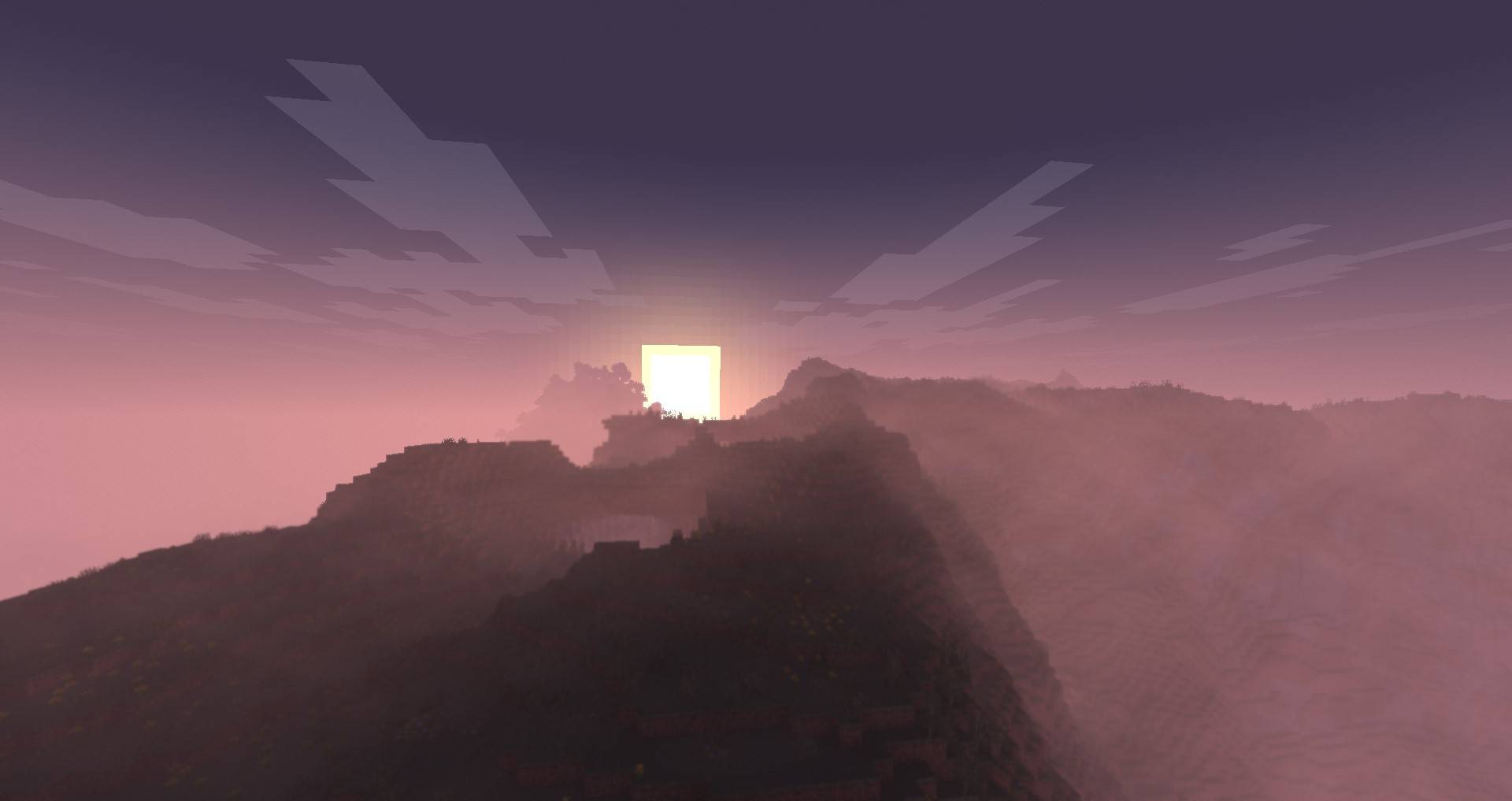
[WIP] Phoxel strives to capture some of the beauty of real life, mixed with the unique ambience and blocky beauty of the Minecraft we've all come to love
by Despatra
Download Claim this project
Add a badge to your pageLink to Phoxel PT from a README, website or forum post.
Preview: Badge

Badges update automatically and link to the shader page on MineUniverse.

119,881 downloads
0 likes
0 followers
Updated Oct 14, 2026
0 hypes
Follow0
Vanilla
Advertisement Remove ads with Premium →

Phoxel to capture some of the beauty of real life, mixed with the unique ambience and blocky beauty of the Minecraft we've all come to love


Please read!

This shader is still in beta, expect to encounter issues, because you will. When you do come across issues, let me know about it! I am actively working on improving and fixing up Phoxel, and your help will make it a lot easier

About Phoxel

Phoxel was started because of a lack of publicly available path tracing shaders for Minecraft, and was originally meant to be purely vanilla in it's style. But with the 0.6 re-release, Phoxel is starting to take on it's own visual style

Phoxel currently covers two shaders: Phoxel PT, and Phoxel Lite, some info will differ between the two. All new releases and features will come out on Phoxel PT before Phoxel Lite, but Phoxel Lite will have a few features before Phoxel PT, purely because some features are much easier to implement without path tracing

Phoxel PT

Phoxel PT is designed for screenshots, if you want to use Phoxel for gameplay, please check out Phoxel Lite (Not yet available)

Phoxel PT is the original, with the goal of eventually capturing Phoxel, with it's core philosophy, at it's absolute best. (with some render time of course :P)

Extra Info

Report issues, make suggestions, and see up coming updates for the project on Github. See events, ask questions, and do more in the Discord

Phoxel Beta 0.6 Rerelease Patch 1
MC Iris, 26.1, 26.1.1, 26.1.2
Beta 2026-05-11 Get
Phoxel Beta 0.6 Re-release
MC Iris, 26.1, 26.1.1, 26.1.2
Beta 2026-05-10 Get
Beta 0.6 Prerelease 1
MC 1.21.2-Snapshot, 1.21, 1.21.5, 1.21.1-Snapshot, 1.21.4, 1.21.5-Snapshot, 1.21-Snapshot, 1.21.3, 1.21.1, Iris, 1.21.4-Snapshot, 1.21.2
Beta 2025-05-10 Get
Beta 0.5 Release
MC 1.21.2-Snapshot, 1.21, 1.20.5, 1.20.5-Snapshot, 1.21.1-Snapshot, 1.20.6, 1.20.4, 1.21-Snapshot, 1.21.3, 1.21.1, Iris, 1.21.2
Beta 2024-10-30 Get
Beta 0.4 Patch 4
MC 1.21, 1.20.5, 1.20.5-Snapshot, 1.21.1-Snapshot, 1.20.6, 1.20.4, 1.21-Snapshot, 1.21.1, Iris
Beta 2024-08-13 Get
Beta 0.3.0
MC 1.21, 1.20.5, 1.20.5-Snapshot, 1.20.6, 1.20.4, 1.21-Snapshot, Iris
Beta 2024-06-02 Get

Requirements & install

How to use this shader in Minecraft
Shader loader
Iris
Minecraft
1.21.3 – 26.1.2
Install folder
.minecraft/shaderpacks

Install with Iris

  1. Install Iris with the Iris installer (irisshaders.dev); it sets up Fabric and Sodium for you.
  2. Download the shader pack .zip (do not extract it).
  3. Put the .zip into .minecraft/shaderpacks.
  4. In game open Options → Video Settings → Shader Packs, select the pack and click Apply.
Browse more: Iris shaders OptiFine shaders Shaders for 26.1.2 All shaders

More from Despatra

Advertisement Remove ads with Premium →

You Might Also Like