Mineuniverse
Shaders
Doruk's Shader Plus

Doruk's Shader Plus

SHADER
Doruk's Shader Plus is a Mellow based premium shader.
by Dorukkdev
Download Claim this project
397 downloads
0 likes
0 followers
Updated Oct 14, 2026
0 hypes
Follow0
Realistic
Advertisement Remove ads with Premium →

Doruk's Shader Plus

image

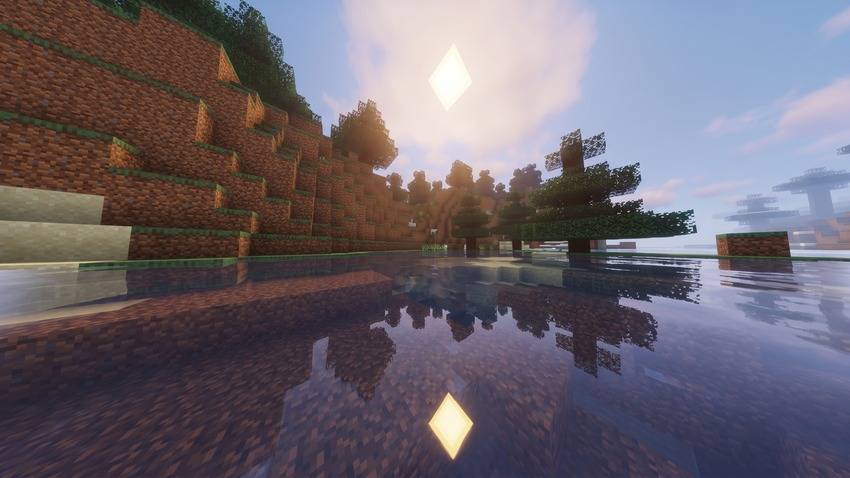
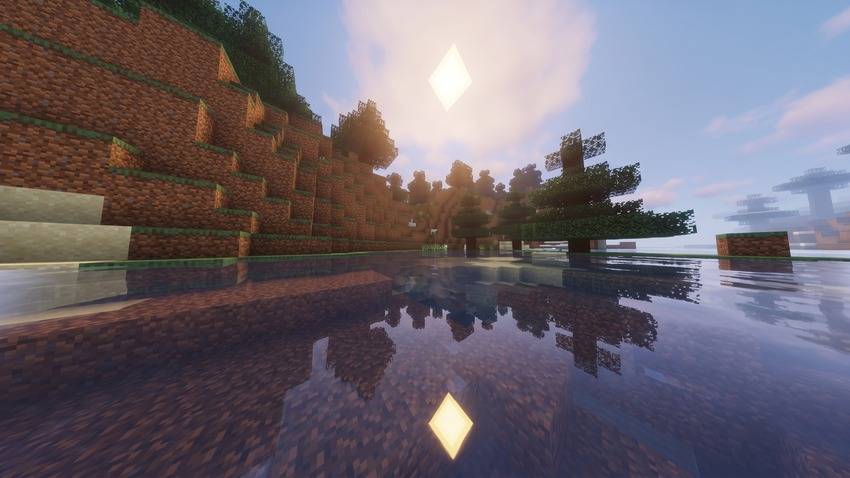
Doruk's Shader Plus is a vibrantly tuned and performance-optimized shaderpack designed to elevate Minecraft's visual experience while staying true to the vanilla aesthetic.

Built upon the popular Mellow Shader base by TheCMK, it features improved color balance, crisp reflections, polished atmospheric effects, and built-in modern mod integrations.


Features

  • Enhanced Lighting & Atmospherics: Warm sunlight casts, atmospheric sunsets, and balanced ambient night lighting.
  • Vibrant Water & Reflections: Smooth wave movement, clear underwater refraction, and optimized water surface reflections.
  • Distant Horizons & Voxy Ready: Direct compatibility with modern LOD rendering mods via native shader programs.
  • Full Dimension Coverage: Custom tailored sky, fog, and light tuning across the Overworld, Nether, The End, and modded dimensions.
  • Optimized Post-Processing: SMAA, TAA, CAS sharpening, SSAO, and balanced bloom designed for high visual clarity without heavy framerate drops.
  • Multi-Language Menus: In-game configuration support for English (en_US), French (fr_FR), and Chinese (zh_CN).

Installation & Requirements

  1. Install Iris Shaders (strongly recommended) or OptiFine matching your Minecraft version.
  2. Place the Doruk's Shader Plus ZIP file into your .minecraft/shaderpacks directory.
  3. Open Video Settings > Shader Packs and apply the shader.

Note: For optimal performance, running Iris + Sodium is highly recommended.


License & Credits

  • Based on the open-source Mellow Shader project created by TheCMK. Huge thanks to the original creator!
  • All modifications and enhancements are licensed under the MIT License. Full license terms are included inside the LICENSE file within the pack.

Doruk's Shader Plus 1.1.1.zip
MC 1.16.3, 1.13.1, 1.9.3, 1.17.1, 1.9.1, 1.21, 1.16.1, 1.18.1, 1.14.3, 1.15, 1.16, 1.13, 1.16.5, 1.10.2, 1.19.3, 1.20.2, 1.19.4, 1.21.8, 1.9.4, 1.9.2, 1.14.4, 1.14.1, 1.12.1
Release 2026-10-12 Get
Doruk's Shader Plus 1.0.0.zip
MC 1.17.1, 1.21, 1.18.1, 1.16.5, 1.19.3, 1.20.2, 1.19.4, 1.21.8, 1.17, 1.20.5, 1.21.5, 1.18, 1.21.4, 1.20.1, 1.20, OptiFine, 1.20.6, 1.21.1, 1.21.6, 1.21.3, 1.21.7, 1.19.1
Release 2026-09-27 Get

Requirements & install

How to use this shader in Minecraft
Shader loader
OptiFine
Minecraft
1.21 – 1.21.8
Install folder
.minecraft/shaderpacks

Install with OptiFine

  1. Install OptiFine for your Minecraft version (optifine.net) and start it once.
  2. Download the shader pack .zip (do not extract it).
  3. Put the .zip into .minecraft/shaderpacks.
  4. In game open Options → Video Settings → Shaders and select the pack.
Browse more: Iris shaders OptiFine shaders Shaders for 1.21.8 All shaders

More from Dorukkdev

Advertisement Remove ads with Premium →

You Might Also Like