Mineuniverse
Shaders
Complementary RU translation (Русификатор)

Complementary RU translation (Русификатор)

SHADER
Translation of the Complementary shader into Russian.
by slyFOX3517
Download Claim this project
Add a badge to your pageLink to Complementary RU translation (Русификатор) from a README, website or forum post.
Preview: Badge

Badges update automatically and link to the shader page on MineUniverse.

107,476 downloads
0 likes
0 followers
Updated Oct 14, 2026
0 hypes
Follow0
Vanilla
Advertisement Remove ads with Premium →

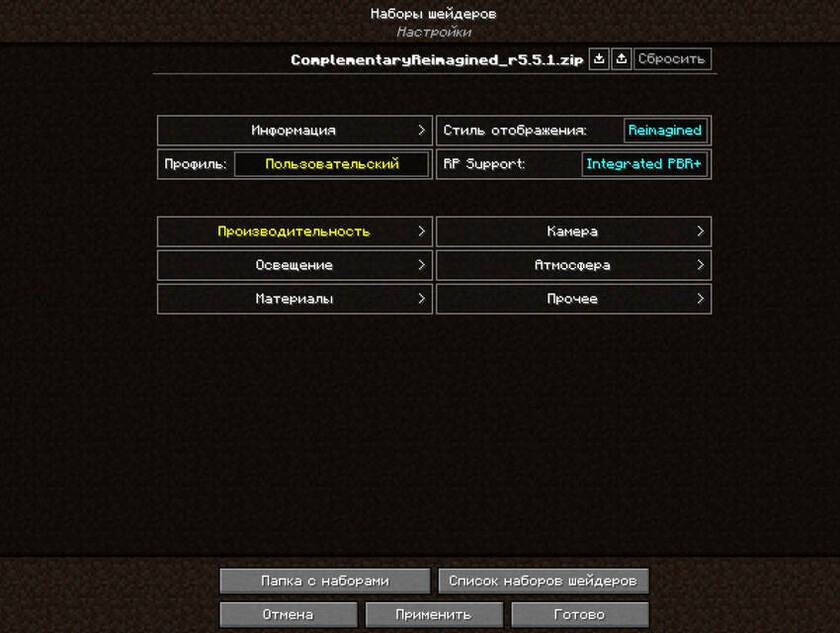
This is the russifier of the Complementary Shaders


- Join the Complementary Discord community.
- If you would like to support the development of Complementary, you can do so on Patreon.

Если вы хотите меня поддержать, киньте мне что-нибудь :3
https://steamcommunity.com/tradeoffer/new/?partner=1238856841&token=5W3IjmNo

Installation:

- Install the Complementary Reimagined shader 

- Open the zip archive containing the shader and follow the following path: shaders/lang

- Place the ru_RU.lang translation file in the same folder as the en_US.lang file.

- Enjoy the translation
 

Русификатор v2 ComplementaryReimagined_r5.6.1.zip
MC 1.16.3, 1.13.1, 1.17.1, 1.21, 1.16.1, 1.18.1, 1.14.3, 1.15, 1.16, 1.13, 1.16.5, 1.19.3, 1.20.2, 1.19.4, 1.21.8, 1.14.4, 1.14.1, 1.17, 1.20.5, 1.21.5, 1.18, 1.21.4, 1.20.1
Release 2026-02-01 Get
Русификатор ComplementaryReimagined_r5.6.1.zip
MC 1.16.3, 1.13.1, 1.17.1, 1.21, 1.16.1, 1.18.1, 1.14.3, 1.15, 1.16, 1.13, 1.16.5, 1.10.2, 1.19.3, 1.20.2, 1.19.4, 1.21.8, 1.14.4, 1.14.1, 1.12.1, 1.17, 1.12, 1.20.5, 1.21.5
Alpha 2026-01-31 Get
ComplementaryReimagined_r5.5.1-RU_translation.zip
MC 1.16.3, 1.13.1, 1.9.3, 1.17.1, 1.9.1, 1.21, 1.16.1, 1.18.1, 1.14.3, 1.15, 1.16, 1.13, 1.16.5, 1.10.2, 1.19.3, 1.20.2, 1.19.4, 1.21.8, 1.9.4, 1.9.2, 1.14.4, 1.14.1, 1.12.1
Release 2025-10-09 Get

Requirements & install

How to use this shader in Minecraft
Shader loader
Iris or OptiFine
Minecraft
1.19.4 – 1.21.8
Install folder
.minecraft/shaderpacks

How to install shaders

  1. Install a shader loader for your Minecraft version: Iris (with Sodium) or OptiFine.
  2. Download the shader pack .zip file (do not extract it).
  3. Put the .zip into the shaderpacks folder (.minecraft/shaderpacks).
  4. In game open Options → Video Settings → Shader Packs, select the pack and apply it.
Browse more: Iris shaders OptiFine shaders Shaders for 1.21.8 All shaders
Advertisement Remove ads with Premium →

You Might Also Like