Mineuniverse
Shaders
Cinematic Vanilla

Cinematic Vanilla

SHADER
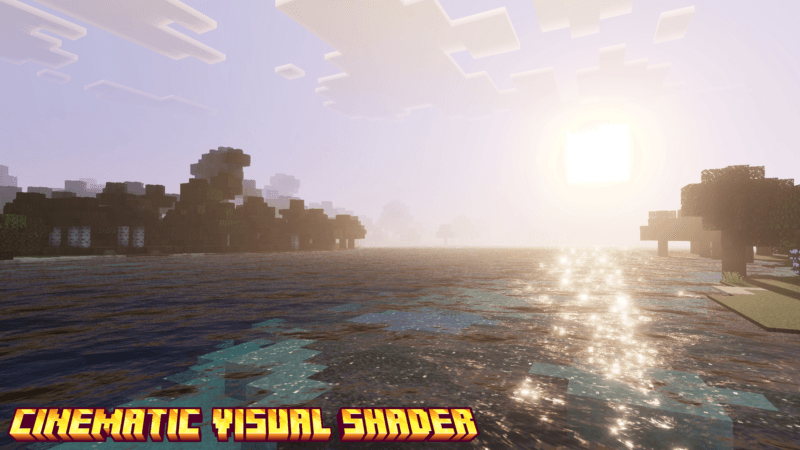
CinematicVanilla is a lightweight cinematic shader pack designed to enhance Minecraft visuals while maintaining smooth performance on low to mid-end PCs.
by Dark_PixelForge
Download Claim this project
Add a badge to your pageLink to Cinematic Vanilla from a README, website or forum post.
Preview: Badge

Badges update automatically and link to the shader page on MineUniverse.

4,692 downloads
0 likes
0 followers
Updated Oct 14, 2026
0 hypes
Follow0
Fantasy Realistic Vanilla
Advertisement Remove ads with Premium →

CinematicVanilla is a lightweight cinematic shader pack designed to enhance Minecraft visuals while maintaining smooth performance on low to mid-end PCs.


This version brings improved lighting, better water effects, enhanced shadows, and customizable settings for a more immersive gameplay experience without heavy FPS drops.


✨ Features:

- Dynamic lighting with improved day & night colors

- Enhanced water with reflections and smooth waves

- Softer shadows and cinematic fog

- Wind animations for grass and leaves

- Bloom and depth of field effects

- Realistic rain and wet surface visuals

- Multiple performance modes (LOW / MEDIUM / HIGH)

- Fully customizable shader settings


⚡ Performance Friendly:

Optimized for systems with 4GB–8GB RAM and older GPUs.


🎮 Compatibility:


- OptiFine

- Iris + Sodium


This shader is perfect for players who want a cinematic look without sacrificing performance.

Cinematic vanilla V6
MC 1.21, 1.20.2, 1.21.8, 1.20.5, 1.21.5, 1.21.4, 1.20.1, 1.20, OptiFine, 1.20.6, 1.21.1, 1.21.6, 1.21.3, 1.21.7, 1.20.4, 1.20.3, Iris, 1.21.2, 1.21.9, 1.21.10, 1.21.11, 26.1
Release 2026-10-10 Get
Cinematic Vanilla V5
MC 1.21, 1.20.2, 1.21.8, 1.20.5, 1.21.5, 1.21.4, 1.20.1, 1.20, OptiFine, 1.20.6, 1.21.1, 1.21.6, 1.21.3, 1.21.7, 1.20.4, 1.20.3, Iris, 1.21.2, 1.21.9, 1.21.10, 1.21.11
Release 2026-09-05 Get
Cinematic Vanilla V4
MC 1.21, 1.20.2, 1.21.8, 1.20.5, 1.21.5, 1.21.4, 1.20.1, 1.20, OptiFine, 1.20.6, 1.21.1, 1.21.6, 1.21.3, 1.21.7, 1.20.4, 1.20.3, Iris, 1.21.2, 1.21.9, 1.21.10, 1.21.11
Release 2026-08-02 Get
Cinematic Vanilla V3
MC 1.21, 1.20.2, 1.21.8, 1.20.5, 1.21.5, 1.21.4, 1.20.1, 1.20, OptiFine, 1.20.6, 1.21.1, 1.21.6, 1.21.3, 1.21.7, 1.20.4, 1.20.3, Iris, 1.21.2, 1.21.9, 1.21.10, 1.21.11
Release 2026-05-23 Get
Cinematic Vanilla
MC 1.21, Vanilla, 1.20.2, 1.21.8, 1.20.5, 1.21.5, 1.21.4, 1.20.1, 1.20, OptiFine, 1.20.6, 1.21.1, 1.21.6, 1.21.3, 1.21.7, 1.20.4, 1.20.3, 1.21.2, 1.21.9, 1.21.10, 1.21.11
Release 2026-04-25 Get

Requirements & install

How to use this shader in Minecraft
Shader loader
Iris OptiFine
Minecraft
1.21.5 – 26.1
Install folder
.minecraft/shaderpacks

How to install shaders

  1. Install a shader loader for your Minecraft version: Iris (with Sodium) or OptiFine.
  2. Download the shader pack .zip file (do not extract it).
  3. Put the .zip into the shaderpacks folder (.minecraft/shaderpacks).
  4. In game open Options → Video Settings → Shader Packs, select the pack and apply it.
Browse more: Iris shaders OptiFine shaders Shaders for 26.1 All shaders

More from Dark_PixelForge

Advertisement Remove ads with Premium →

You Might Also Like