Mineuniverse
Shaders
Basic RTX Shader

Basic RTX Shader

SHADER
A basic demo of raytracing in Minecraft using Iris
by DubbsPi
Download Claim this project
1,547 downloads
0 likes
Updated Oct 14, 2026
0 hypes
Vanilla
Advertisement Remove ads with Premium →

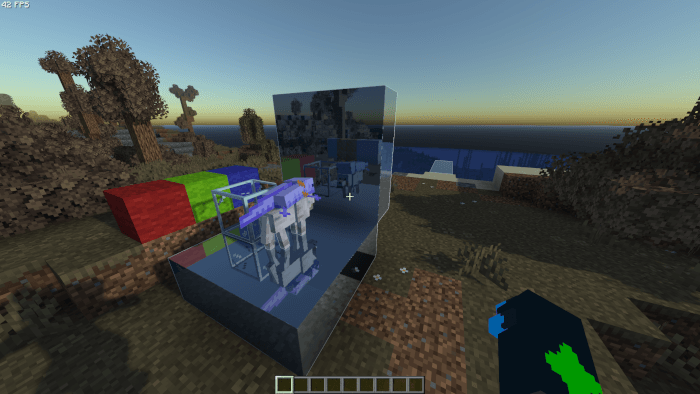
A big ol raytracing shader I've been working on for minecraft. Runs in iris and completely native (and naive) openGl. Performance is questionable and the main feature is raytracing reflections and handheld lighting. This is not made for gameplay in the slightest, just a tech demo and learning experience for me.

Just download the compressed release file and put the .zip file into the shaders/ folder in minecraft for iris to find and select the shader to run it. If you want to actually see any reflections, make sure to load up a labPBR supported pack (or even something like plain mirror) so then you can actually have the main reflection feature available.

rtx_shader.zip
MC 1.21, 1.21.8, 1.21.5, 1.21.4, 1.21.1, 1.21.6, 1.21.3, 1.21.7, Iris, 1.21.2, 1.21.9, 1.21.10, 1.21.11
Release 2026-08-12 Get

Requirements & install

How to use this shader in Minecraft
Shader loader
Iris
Minecraft
1.21.4 – 1.21.11
Install folder
.minecraft/shaderpacks

Install with Iris

  1. Install Iris with the Iris installer (irisshaders.dev); it sets up Fabric and Sodium for you.
  2. Download the shader pack .zip (do not extract it).
  3. Put the .zip into .minecraft/shaderpacks.
  4. In game open Options → Video Settings → Shader Packs, select the pack and click Apply.
Browse more: Iris shaders OptiFine shaders Shaders for 1.21.11 All shaders
Advertisement Remove ads with Premium →

You Might Also Like