Mineuniverse
Resource Packs
PvP Crosshair Pack

PvP Crosshair Pack

RESOURCE PACK
The only PvP crosshair you will ever need to improve aim.
by BoarTheSecond
Download Claim this project
Add a badge to your pageLink to PvP Crosshair Pack from a README, website or forum post.
Preview: Badge

Badges update automatically and link to the resource pack page on MineUniverse.

1,159 downloads
0 likes
0 followers
Updated Oct 14, 2026
0 hypes
Follow0
16x
Advertisement Remove ads with Premium →

Title: PvP Crosshair Pack

Description:
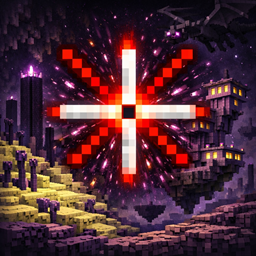
Take your Minecraft gameplay to the next level with the Neon X Crosshair Pack! This pack completely replaces the default crosshair with a clean, modern X design that is easy to see and stylish. Perfect for both PvP battles and survival adventures, it helps you aim precisely without cluttering your screen.

Designed for clarity and visibility, the bright neon colors make it easy to spot the center of your screen, even on dark or busy backgrounds. The minimalistic design ensures your view stays clear while adding a touch of flair to your HUD.

This pack is lightweight and easy to install, requiring only Minecraft’s built-in resource pack system—no mods or extra software needed. Ideal for players who want a small but impactful visual upgrade that enhances their gameplay immediately.

Features:

  • Bright, neon X crosshair for maximum visibility

  • Minimalistic design that doesn’t block your view

  • Works in both PvP and survival

  • Lightweight and easy to install

  • Fully compatible with Minecraft 1.20+

Perfect for:

  • PvP enthusiasts

  • Builders who want a clean HUD

  • Anyone looking for a small, stylish upgrade to Minecraft’s GUI

PvPCrosshairPack.zip
MC 1.17.1, 1.21.2-Snapshot, 1.21, 1.21.6-snapshot, 1.18.1, 1.20.2-Snapshot, 1.20.5-Snapshot, 1.19-Snapshot, 1.21.1-Snapshot, 1.19.3, 1.20.2, 1.19.4, 1.21.8, 1.19.4-Snapshot, 1.20.5
Release 2026-02-03 Get

Requirements & install

How to use this resource pack in Minecraft
Resolution
16x
Minecraft
1.20.2 – 1.21.8
Install folder
.minecraft/resourcepacks

How to install resource packs

  1. Download the resource pack .zip file (do not extract it).
  2. In Minecraft open Options → Resource Packs → Open Pack Folder.
  3. Drop the .zip into the resourcepacks folder (.minecraft/resourcepacks).
  4. Move the pack to the Selected column and click Done.
Browse more: 16x resource packs 32x resource packs 64x resource packs 128x resource packs 256x resource packs 512x+ resource packs Resource Packs for 1.21.8 All resource packs

More from BoarTheSecond

Advertisement Remove ads with Premium →

You Might Also Like