Mineuniverse
Resource Packs
Ore Highlight

Ore Highlight

RESOURCE PACK
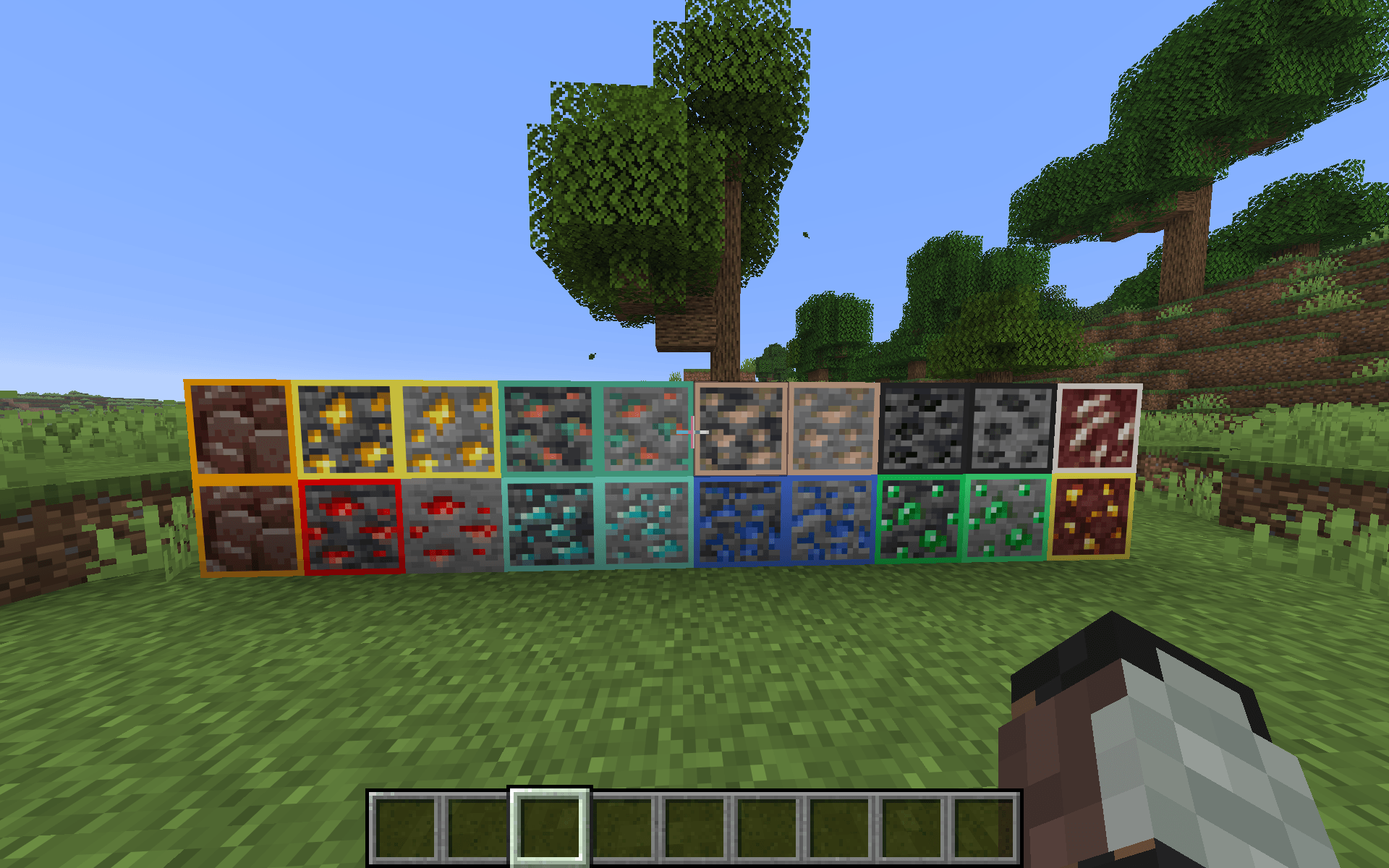
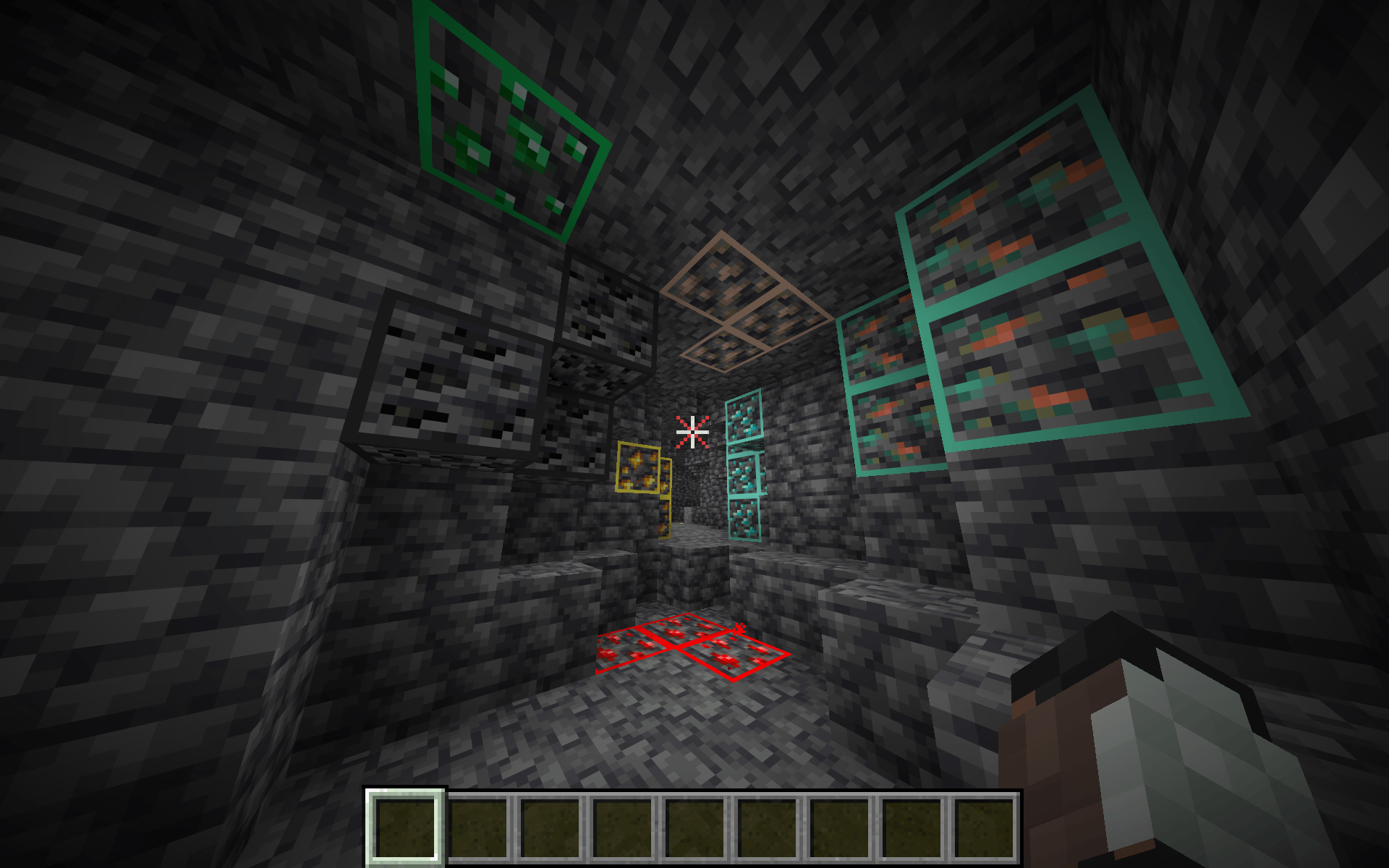
Makes ores INSTANTLY visible in caves! 10x faster! A Hundred downloads and I will do one for the Nether! Also FPS Boost!
by BoarTheSecond
Download Claim this project
14,684 downloads
0 likes
Updated Oct 14, 2026
0 hypes
16x
Advertisement Remove ads with Premium →

Support me on Ko-fi (even a dollar is ok!): https://ko-fi.com/savageboar2026

Join the discord server!: https://discord.gg/Qy5F2YAwSt

Want a cleaner HUD? Check out my PvP Crosshair Pack on my profile!
GOING TO RELEASE INFESTED BLOCK DETECTOR CHECK OUT MY PAGE!!

Highlighted Ores – Clean Vanilla Highlighted Ores is a lightweight Minecraft resource pack that makes ores easier to spot while staying true to the vanilla look. Each ore is outlined with a subtle highlight so it stands out clearly in caves, strip mines, and dark areas—without glowing, shaders, or distracting colors. 

Features 
-Clean, subtle outlines on ore blocks 
-Vanilla-friendly colors (no neon glow) 
-Improves visibility in survival gameplay -Works perfectly with shaders and texture packs 
-FPS-friendly (no models or animations) 

🔹 Why this pack? Perfect for players who want better ore visibility without breaking immersion or turning Minecraft into a PvP texture pack.

HO_final2.zip
MC 1.21.2-Snapshot, 1.21, 1.21.6-snapshot, 1.18.1, 1.20.2-Snapshot, 1.20.5-Snapshot, 1.19-Snapshot, 1.21.1-Snapshot, 1.19.3, 1.20.2, 1.19.4, 1.21.8, 1.19.4-Snapshot, 1.20.5, 1.21.5
Release 2026-09-21 Get
HO_final.zip
MC 1.21.2-Snapshot, 1.21, 1.21.6-snapshot, 1.18.1, 1.20.2-Snapshot, 1.20.5-Snapshot, 1.19-Snapshot, 1.21.1-Snapshot, 1.19.3, 1.20.2, 1.19.4, 1.21.8, 1.19.4-Snapshot, 1.20.5, 1.21.5
Release 2026-02-02 Get
HO_final.zip
MC 1.21.2-Snapshot, 1.21, 1.21.6-snapshot, 1.18.1, 1.20.2-Snapshot, 1.20.5-Snapshot, 1.19-Snapshot, 1.21.1-Snapshot, 1.19.3, 1.20.2, 1.19.4, 1.21.8, 1.19.4-Snapshot, 1.20.5, 1.21.5
Release 2026-02-02 Get
HO.zip
MC 1.21.2-Snapshot, 1.21, 1.21.6-snapshot, 1.18.1, 1.20.2-Snapshot, 1.20.5-Snapshot, 1.19-Snapshot, 1.21.1-Snapshot, 1.19.3, 1.20.2, 1.19.4, 1.21.8, 1.19.4-Snapshot, 1.20.5, 1.21.5
Release 2026-02-01 Get
HO.zip
MC 1.21.2-Snapshot, 1.21, 1.21.6-snapshot, 1.18.1, 1.20.2-Snapshot, 1.20.5-Snapshot, 1.19-Snapshot, 1.21.1-Snapshot, 1.19.3, 1.20.2, 1.19.4, 1.21.8, 1.19.4-Snapshot, 1.20.5, 1.21.5
Release 2026-02-01 Get
Archive.zip
MC 1.21.2-Snapshot, 1.21, 1.21.6-snapshot, 1.21.1-Snapshot, 1.21.8, 1.21.5, 1.21.4, 1.21.5-Snapshot, 1.21.1, 1.21.6, 1.21.3, 1.21.7, 1.21-Snapshot, 1.21.4-Snapshot, 1.21.2, 1.21.9
Release 2026-01-30 Get

Requirements & install

How to use this resource pack in Minecraft
Resolution
16x
Minecraft
1.21.4 – 1.21.9
Install folder
.minecraft/resourcepacks

How to install resource packs

  1. Download the resource pack .zip file (do not extract it).
  2. In Minecraft open Options → Resource Packs → Open Pack Folder.
  3. Drop the .zip into the resourcepacks folder (.minecraft/resourcepacks).
  4. Move the pack to the Selected column and click Done.
Browse more: 16x resource packs 32x resource packs 64x resource packs 128x resource packs 256x resource packs 512x+ resource packs Resource Packs for 1.21.9 All resource packs

More from BoarTheSecond

Advertisement Remove ads with Premium →

You Might Also Like