Mineuniverse
Resource Packs
Kawii World Animals

Kawii World Animals

RESOURCE PACK
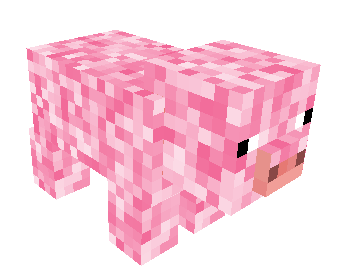
Kawii World Animals great for those who want some cute animals!
by RadientPrincess
Download Claim this project
1,861 downloads
0 likes
0 followers
Updated Oct 14, 2026
0 hypes
Follow0
64x Animated Miscellaneous Modern Traditional
Advertisement Remove ads with Premium →

Make Your Kawaii World Come Alive with Adorable Animal Companions!

Imagine exploring a world brimming with cuteness! In Kawaii World, you can befriend a delightful bunch of cuddly companions who will add a whole new dimension to your roleplaying adventures.

Here's a glimpse of the charming creatures waiting to meet you:

  • Purrfect Feline Friends: Playful kittens, majestic cats, or perhaps a mischievous group of mischievous meow-narchs await your cuddles and adventures.
  • Wagging Tails and Woofy Companions: Loyal dogs of all shapes and sizes are ready to join your side as your furry best friend in the world of Kawaii.
  • Neigh-tastic Adventures: Explore the world on the back of a trusty steed, or discover a whole herd of friendly horses to care for and befriend.

But that's not all! The world of Kawaii might also have:

  • Forest Friends: Play hide-and-seek with a fluffy fox or befriend a family of adorable deer.
  • Prancing Ponies: Discover a majestic unicorn or a whole stable of colorful ponies to add a touch of magic to your adventures.
  • Cuddle Critters: Maybe you'll encounter a cuddly panda or a group of playful otters!

With so many adorable animal companions to discover, Kawaii World is the perfect place to create heartwarming stories and unforgettable adventures. Who will you befriend first?


Kawii World Animals .zip
MC 1.7.6, 1.16-Snapshot, 1.17.1, 1.9.1, 1.5.3, 1.16.3, 1.13.1, 1.9.3, 1.8.7, 1.7.4, 1.7.7, 1.19.3, 1.20.2, 1.15-Snapshot, 1.7.5, 1.4.6, 1.6.1, 1.0, 1.16.1, 1.18.1, 1.19.4-Snapshot
Release 2024-04-04 Get

Requirements & install

How to use this resource pack in Minecraft
Resolution
64x
Minecraft
1.16-Snapshot – 1.20.2
Install folder
.minecraft/resourcepacks

How to install resource packs

  1. Download the resource pack .zip file (do not extract it).
  2. In Minecraft open Options → Resource Packs → Open Pack Folder.
  3. Drop the .zip into the resourcepacks folder (.minecraft/resourcepacks).
  4. Move the pack to the Selected column and click Done.
Browse more: 16x resource packs 32x resource packs 64x resource packs 128x resource packs 256x resource packs 512x+ resource packs Resource Packs for 1.20.2 All resource packs

More from RadientPrincess

Advertisement Remove ads with Premium →

You Might Also Like