Mineuniverse
Resource Packs
Animated Hotbar RGB

Animated Hotbar RGB

RESOURCE PACK
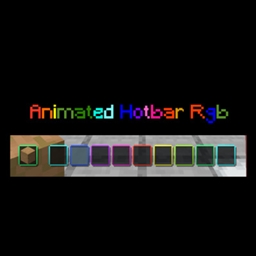
A sleek resource pack that adds dynamic, color-cycling neon animations to your hotbar.
by Tonlocalbytes
Download Claim this project
159,128 downloads
0 likes
0 followers
Updated Oct 14, 2026
0 hypes
Follow0
16x Animated
Advertisement Remove ads with Premium →

Overview

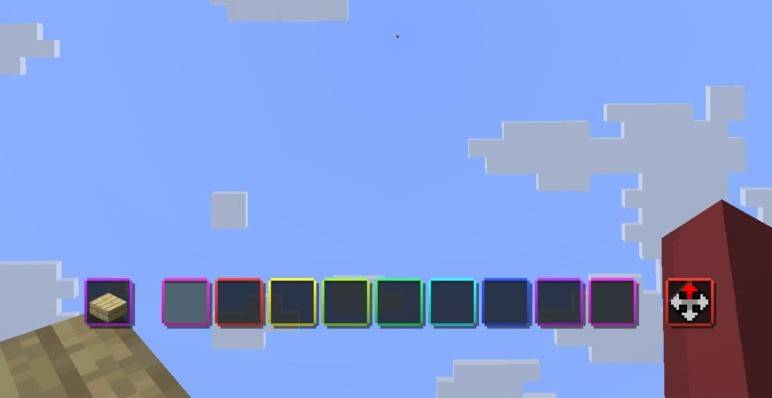
Transform your Minecraft UI with a sleek, vibrant, and smoothly animated RGB effect! Animated Hotbar RGB adds a dynamic color-cycling border to every single slot of your hotbar, giving your game a modern "gamer" aesthetic that perfectly matches your RGB setup.
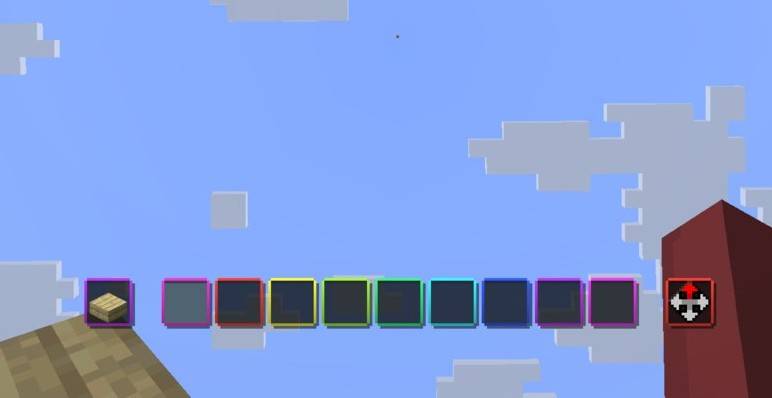
Screenshot

Animated Hotbar RGB

Features

  • ✨ Fluid Animation: High-quality color transitions for a smooth visual experience.
  • 🌈 Vibrant RGB: Each hotbar slot features its own independent animated border.
  • 🚀 Performance Friendly: Optimized textures and code to ensure zero impact on your FPS.
  • 🎨 Sleek Design: Enhances the default UI without being distracting during intense gameplay.

Compatibility

This resource pack is designed to be highly compatible with various versions of Minecraft:

  • Version Range: Optimized for Minecraft 1.21 and newer versions.

How to Install

    1. Download the Animated Hotbar RGB .zip file.

    2. Open Minecraft and navigate to Options > Resource Packs.

    3. Click Open Pack Folder.

    4. Drag and drop the downloaded .zip file into the folder.

    5. Select the pack in the "Available" column to move it to "Selected".

    6. Click Done and enjoy your new RGB hotbar!

 

Animated Hotbar RGB 1.1
MC 26.1, 26.1.1, 26.1.2, 26.2, 26.3
Release 2026-03-25 Get
Animated Hotbar RGB 1.0
MC 1.21, 1.21.8, 1.21.5, 1.21.4, 1.21.1, 1.21.6, 1.21.3, 1.21.7, 1.21.2, 1.21.9, 1.21.10, 1.21.11
Release 2025-12-27 Get

Requirements & install

How to use this resource pack in Minecraft
Resolution
16x
Minecraft
1.21.9 – 26.3
Install folder
.minecraft/resourcepacks

How to install resource packs

  1. Download the resource pack .zip file (do not extract it).
  2. In Minecraft open Options → Resource Packs → Open Pack Folder.
  3. Drop the .zip into the resourcepacks folder (.minecraft/resourcepacks).
  4. Move the pack to the Selected column and click Done.
Browse more: 16x resource packs 32x resource packs 64x resource packs 128x resource packs 256x resource packs 512x+ resource packs Resource Packs for 26.3 All resource packs

More from Tonlocalbytes

Advertisement Remove ads with Premium →

You Might Also Like