Badges update automatically and link to the resource pack page on MineUniverse.
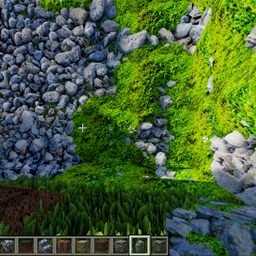
At the current time, this resource pack is a tech demo. It is only the cobblestone texture. It requires a compatible shader, or shader edit, to have seamless ctm pom, otherwise it will have the usual seams.
Here is the first shader to support the technique:
please use version 1.2 of the shader, or the newer versions of the demo won't work,
and follow Instructions on the Shader page.
https://legacy.curseforge.com/minecraft/customization/ctmpomfix-shader-chocapic13-shaders-edit
For details on which shaders use CTMPOMFIX for seamless Connected Textures with POM, or for info on making this work in the shader of your choice, come to my discord server. I do not have the capacity to quickly check messages or answer questions in more than one place. I will be able to respond faster there.
If you want the full resource pack, or have any other questions, come to my discord server for updates as it's a work in progress.
It will eventually be here, but it will take a while.
Is you would like to support me, or the development of any of my projects, check out my Patreon.
NOTE ON VERSIONS:
-The 256x is the first version used in the demo video, it is a flatter texture that isn't as natural looking but maybe more suitable for building.
-The other versions are a deeper, more natural looking texture, but they absolutely need something like the block borders 32x file for the edges.
-the 32x borders will work with any version, they are bad art but were a proof of concept and the feature works. I have since designed much better borders.
-i recommend trying the 128x, if you can't get that to work on your machine try the 64x. 32 works but I don't think it has the wow factor.
-This texture is not well designed. As such it shows both the strengths and weaknesses of CTMPOMFIX. It is easily possible to get even better results with some creative effort, but I think this makes it a good tech demo.
Discord: https://discord.gg/S6F4r6K5yU