Mineuniverse
Shaders
CRT-Monitor Shader

CRT-Monitor Shader

SHADER
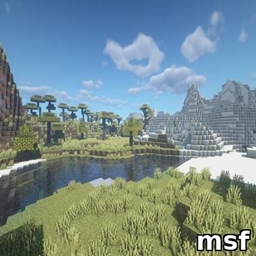
A shader that simulates retro CRT monitors with curved distortion, scanlines, flicker, and glow. Perfect for terminals, arcades, and sci-fi builds in Minecraft.
by Bartus131313
Download Claim this project
Add a badge to your pageLink to CRT-Monitor Shader from a README, website or forum post.
Preview: Badge

Badges update automatically and link to the shader page on MineUniverse.

107,781 downloads
0 likes
0 followers
Updated Oct 14, 2026
0 hypes
Follow0
Fantasy
Advertisement Remove ads with Premium →

CRT-Monitor Shader

Add a touch of vintage tech to your Minecraft world with the CRT-Monitor Shader – a visual enhancement designed to replicate the look and feel of classic CRT displays.

Featuring:

  • Curved screen distortion for that authentic old-school display vibe
  • Scanlines and subtle flicker, just like vintage TVs and monitors
  • Phosphor glow that brings retro screens to life
  • Perfect for labs, terminals, arcades, and sci-fi builds

Whether you're recreating a retro computer lab or building a high-tech base with analog flavor, this shader brings your screens to life with a nostalgic, immersive touch.

Compatibility

  • OptiFine: Fully compatible with all OptiFine shader versions (MC 1.7.10 → latest).
  • Iris: Fully compatible with Iris/Sodium on Minecraft 1.16.5 and newer.
  • Uses GLSL 1.20, so it works on all systems supported by OptiFine and Iris.
CRT-Monitor v1.0.3
MC 1.17.1, 1.21, 1.18.1, 1.16.5, 1.19.3, 1.20.2, 1.19.4, 1.21.8, 1.17, 1.20.5, 1.21.5, 1.18, 1.21.4, 1.20.1, 1.20, OptiFine, 1.20.6, 1.21.1, 1.21.6, 1.21.3, 1.21.7, 1.19.1
Release 2025-11-30 Get
CRT-Monitor v1.0.2
MC 1.21, 1.21.5, 1.21.4, OptiFine, 1.21.1, 1.21.3, 1.21.2
Release 2025-04-22 Get
CRT-Monitor v1.0.1
MC 1.21, 1.21.5, 1.21.4, OptiFine, 1.21.3, 1.21.1, 1.21.2
Release 2025-04-20 Get
CRT-Monitor v1.0.0
MC 1.21, 1.21.5, 1.21.4, OptiFine, 1.21.3, 1.21.1, 1.21.2
Release 2025-04-19 Get

Requirements & install

How to use this shader in Minecraft
Shader loader
OptiFine
Minecraft
1.21.1 – 1.21.8
Install folder
.minecraft/shaderpacks

Install with OptiFine

  1. Install OptiFine for your Minecraft version (optifine.net) and start it once.
  2. Download the shader pack .zip (do not extract it).
  3. Put the .zip into .minecraft/shaderpacks.
  4. In game open Options → Video Settings → Shaders and select the pack.
Browse more: Iris shaders OptiFine shaders Shaders for 1.21.8 All shaders

More from Bartus131313

Advertisement Remove ads with Premium →

You Might Also Like