Mineuniverse
Shaders
msf

msf

SHADER
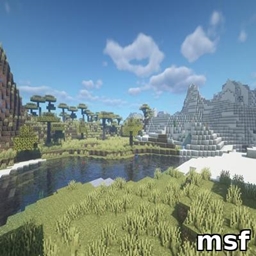
Lightweight Minecraft shader creating a smooth blue iris glow with subtle pulsing, prettier and more performance-friendly than BSL.
by bobbydeveloper
Download Claim this project
91,417 downloads
0 likes
Updated Oct 14, 2026
0 hypes
Fantasy Realistic Vanilla
Advertisement Remove ads with Premium →

MSF – Lightweight & Beautiful Iris Glow Shader for Minecraft

MSF is a lightweight shader pack for Minecraft that adds a beautiful, smooth blue iris glow effect centered on the screen. Featuring subtle pulsing and soft lighting, this shader enhances visual immersion without sacrificing performance. It is optimized to run smoothly on most hardware, making it an excellent alternative to heavier shaders like BSL.

Features:

  • Smooth blue iris glow effect focused at screen center

  • Gentle pulsing animation for dynamic visuals

  • Soft glow lighting for natural appearance

  • Optimized for high FPS and low resource usage

  • Compatible with OptiFine and Fabric shader loaders

  • Easy to install and customize

Installation:

  1. Place the MSF.zip file into your Minecraft shaderpacks folder.

  2. Launch Minecraft with OptiFine or Fabric shader support.

  3. Select "MSF" from the shaders menu.

Requirements:

  • Minecraft version 1.14 or higher

  • OptiFine or Fabric with shader support installed

Notes:

  • This shader focuses on minimalism and performance; it does not include complex lighting or shadows.

  • For best experience, use with lightweight resource packs.

Byby_BedrockStyle_NonRT.zip
MC 1.19.3, 1.20.2, 1.21.2-Snapshot, 1.21, 1.21.6-snapshot, 1.19.4-Snapshot, 1.20.5, 1.21.5, 1.20.2-Snapshot, 1.20.5-Snapshot, 1.19.4, 1.21.8, 1.19-Snapshot, 1.21.1-Snapshot, 1.21.4
Release 2025-08-13 Get

Requirements & install

How to use this shader in Minecraft
Shader loader
Iris or OptiFine
Minecraft
1.20.5 – 1.21.8
Install folder
.minecraft/shaderpacks

How to install shaders

  1. Install a shader loader for your Minecraft version: Iris (with Sodium) or OptiFine.
  2. Download the shader pack .zip file (do not extract it).
  3. Put the .zip into the shaderpacks folder (.minecraft/shaderpacks).
  4. In game open Options → Video Settings → Shader Packs, select the pack and apply it.
Browse more: Iris shaders OptiFine shaders Shaders for 1.21.8 All shaders

More from bobbydeveloper

Advertisement Remove ads with Premium →

You Might Also Like