Mineuniverse
Data Packs
Tab Info

Tab Info

DATA PACK
Shows useful player stats like deaths, kills, playtime, position, and current dimension to everyone through a compact, configurable readout in the player list.
by nwrenger
Download Claim this project
1,017 downloads
0 likes
Updated Oct 14, 2026
0 hypes
Miscellaneous Tech Utility
Advertisement Remove ads with Premium →

Tab Info

➜ The mod version of this data pack can be found here

Shows useful player stats like deaths, kills, playtime, position, and current dimension to everyone through a compact, configurable readout in the player list.

The readout rotates every 2 seconds, works in multiplayer and singleplayer, and is fully server-side, so players do not need to install anything.

Perfect for PvP servers, local worlds with friends, and more.

preview

Installation

After adding the data pack/mod to your world or server, you should be able to open the about panel, which is fully controllable with the mouse:

/function tab_info:about
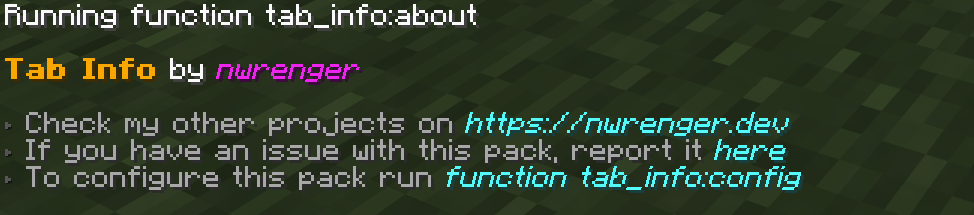
about_panel

Configuration

Open the configuration panel by the following command:

/function tab_info:config
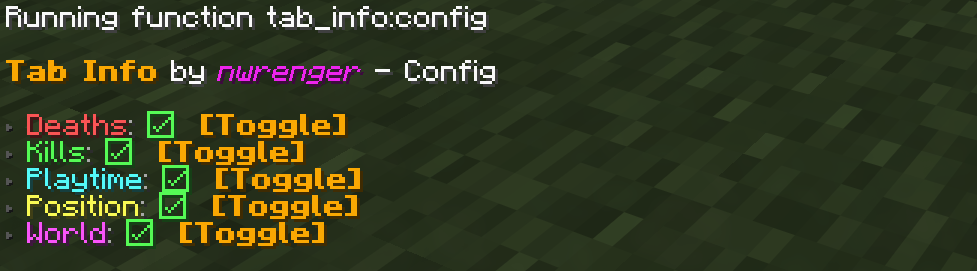
config_panel

From here, you can toggle each info entry on or off. If every entry is disabled, Tab Info is hidden from the player list.

Uninstallation

To remove the vacant entry inside the player list after disabling/removing the data pack/mod, run the following command:

/scoreboard objectives setdisplay list

Contributing & Issues

I warmly welcome:

  • Bug reports
  • Feature requests
  • Pull requests

Please open issues or PRs on GitHub.

License

This project is licensed under the LGPLv3 License. See LICENSE for details.

Tab Info 0.3.0
MC 1.21.2-Snapshot, 1.21, 1.21.6-snapshot, 1.21.1-Snapshot, 1.21.8, 1.21.5, 1.21.4, 1.21.5-Snapshot, 1.21.1, 1.21.6, 1.21.3, 1.21.7, 1.21-Snapshot, 1.21.4-Snapshot, 1.21.2
Release 2026-09-16 Get

Requirements & install

How to use this data pack in Minecraft
Mods needed
None, works in vanilla
Minecraft
1.21.4-Snapshot – 1.21.8
Install folder
saves/<world>/datapacks

How to install data packs

  1. Download the data pack .zip file (do not extract it).
  2. New world: click Data Packs on the world creation screen and drop the .zip in. Existing world: open .minecraft/saves/<world>/datapacks.
  3. Put the .zip into the datapacks folder of the world (servers: world/datapacks).
  4. Run /reload in game (or rejoin the world) and check it with /datapack list.
Browse more: Data Packs for 1.21.8 All data packs

More from nwrenger

Advertisement Remove ads with Premium →

You Might Also Like