Mineuniverse
Data Packs
Space's Sponge Crafting Recipe

Space's Sponge Crafting Recipe

DATA PACK
Adds a vanilla-friendly, ocean-themed crafting recipe for the uncraftable Sponge block.
by StaticLabs
Download Claim this project
Add a badge to your pageLink to Space's Sponge Crafting Recipe from a README, website or forum post.
Preview: Badge

Badges update automatically and link to the data pack page on MineUniverse.

1,069 downloads
0 likes
0 followers
Updated Oct 14, 2026
0 hypes
Follow0
Utility
Advertisement Remove ads with Premium →

🌊 Craftable Sponge is a simple, lightweight datapack that finally gives the elusive Sponge a sensible crafting recipe, making it easier to acquire for large-scale water draining projects.

The new recipe is balanced to reflect the rarity and ocean-based origin of the Sponge:
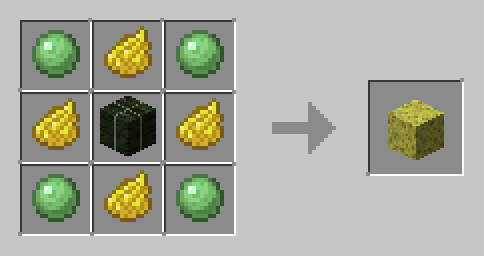
crafting

Required Ingredients:

  • 4 * Yellow Dye
  • 4 * Slimeball
  • 1 * Dried Kelp Block

Why You Need This:

  • Vanilla-Friendly: The recipe feels like it could be part of the base game.
  • Utility: Makes acquiring Sponges more consistent for terraforming and building.
  • Lightweight: Zero lag and extremely easy to install.

No more tedious Ocean Monument raids just for a few sponges! Start building your underwater base today!

sponge-1.13-1.20.zip
MC 1.17.1, 1.16.3, 1.13.1, 1.19.3, 1.20.2, 1.16.1, 1.18.1, 1.20.5, 1.14.4, 1.14.1, 1.17, 1.14.3, 1.15, 1.16, 1.13, 1.19.4, 1.16.5, 1.18.2, 1.19.2, 1.20.3, 1.15.2, 1.14, 1.20.1
Release 2025-11-03 Get
sponge-1.21.zip
MC 1.21, 1.21.8, 1.21.5, 1.21.4, 1.21.1, 1.21.6, 1.21.3, 1.21.7, 1.21.2, 1.21.9, 1.21.10, 1.21.11, 26.1, 26.1.1, 26.1.2
Release 2025-11-03 Get

Requirements & install

How to use this data pack in Minecraft
Mods needed
None, works in vanilla
Minecraft
1.21.7 – 26.1.2
Install folder
saves/<world>/datapacks

How to install data packs

  1. Download the data pack .zip file (do not extract it).
  2. New world: click Data Packs on the world creation screen and drop the .zip in. Existing world: open .minecraft/saves/<world>/datapacks.
  3. Put the .zip into the datapacks folder of the world (servers: world/datapacks).
  4. Run /reload in game (or rejoin the world) and check it with /datapack list.
Browse more: Data Packs for 26.1.2 All data packs

More from StaticLabs

Advertisement Remove ads with Premium →

You Might Also Like