Mineuniverse
Data Packs
Dragon Reborn

Dragon Reborn

DATA PACK
Bring the beast back to life by crafting a Dragon Spawn Egg using the original Dragon Egg and a few high-tier materials.
by StaticLabs
Download Claim this project
92 downloads
0 likes
Updated Oct 14, 2026
0 hypes
Utility
Advertisement Remove ads with Premium →

Dragon Rebirth: Craftable Spawn Eggs

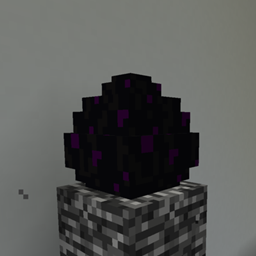
Have you ever defeated the Ender Dragon, claimed the egg as a trophy, and then felt... well, a bit bored? Dragon Rebirth changes the endgame loop by allowing you to transform that singular, decorative Dragon Egg into a functional Ender Dragon Spawn Egg.

Whether you want to set up an automated dragon-slaying arena, move the fight to the Overworld (at your own risk!), or simply collect every spawn egg in the game, this datapack makes it possible without creative mode.

Features

  • Survival Friendly: No commands required. Just use a standard Crafting Table.
  • Balanced Recipe: Re-spawning the dragon should feel like a feat. The recipe requires rare endgame materials to ensure it doesn't break the progression of your world.
  • Vanilla Feel: No new blocks or items added; it simply unlocks a recipe for an existing vanilla item.

How to Craft

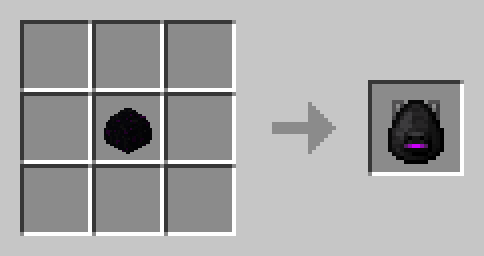
To create the Spawn Egg, place the Dragon Egg in the center of the crafting grid and surround it with End Crystals and Nether Stars (or your preferred high-tier material).

Warning: Spawning the Ender Dragon in the Overworld or Nether can be extremely destructive to your builds. Use with caution!

Installation

  • Download the .zip file.
  • Drop it into the datapacks folder of your world save.
  • Use /reload in-game, and you're ready to craft!
datapack.zip
MC 1.21.2-Snapshot, 1.21, 1.21.6-snapshot, 1.21.1-Snapshot, 1.21.8, 1.21.5, 1.21.4, 1.21.5-Snapshot, 1.21.1, 1.21.6, 1.21.3, 1.21.7, 1.21-Snapshot, 1.21.4-Snapshot, 1.21.2
Release 2026-04-02 Get

Requirements & install

How to use this data pack in Minecraft
Mods needed
None, works in vanilla
Minecraft
1.21.4-Snapshot – 1.21.8
Install folder
saves/<world>/datapacks

How to install data packs

  1. Download the data pack .zip file (do not extract it).
  2. New world: click Data Packs on the world creation screen and drop the .zip in. Existing world: open .minecraft/saves/<world>/datapacks.
  3. Put the .zip into the datapacks folder of the world (servers: world/datapacks).
  4. Run /reload in game (or rejoin the world) and check it with /datapack list.
Browse more: Data Packs for 1.21.8 All data packs

More from StaticLabs

Advertisement Remove ads with Premium →

You Might Also Like