
Mineuniverse
Data Packs
Oldschool Netherite

Oldschool Netherite

DATA PACK
Smelt Netherite directly from Ancient Debris. Instead of using the Smithing Table, Craft Netherite Equipment like any other Equipment.
by fishbowlforever
Download Claim this project
584 downloads
0 likes
Updated Oct 14, 2026
0 hypes
Miscellaneous Utility
Advertisement Remove ads with Premium →

Image Displaying the Logo of Oldschool Netherite Data Pack

<center>image of discord invite link badge image of modrinth download badge</center>


Ancient Debris and Netherite Scrap now smelt directly into Netherite Ingots.
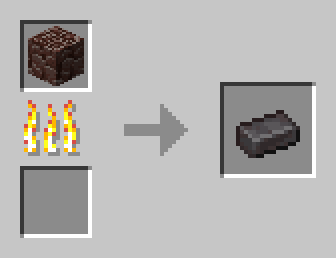
An Image displaying how to smelt Netherite Ingots directly from Ancient Debris

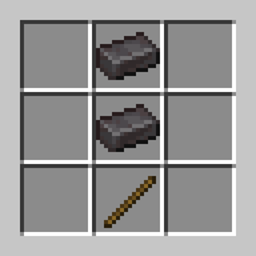
You can craft Netherite Armor and Tools like Iron, Gold and Diamond Equipment.
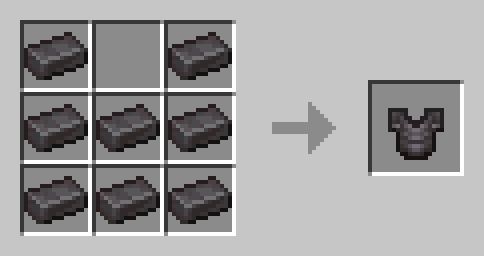
Netherite Chestplate Crafting Recipe

Upgrading in the Smithing Table does not work anymore. The Netherite Upgrade Template cannot be found anymore and Netherite Ingots appear as loot in their place. You can recycle those you have left from before installing into Diamonds.
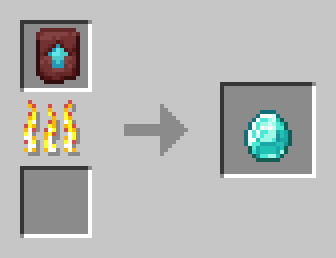
Image showing Recycling Process of Netherite Upgrade Template

🛠️ Installation

Datapack Installation Guide

Copy the .zip archive into the ".minecraft/saves/yourworldname/datapacks" folder, where yourworldname is the name of your world.

Mod installation Guide

Copy the .jar archive into the folder your Mod Loader of choice provides.

⚙️ Compatibility

This might result in unexpected behavior when mixed with other Datapacks that modify Bastion Remnant loot, but only an insanely small amount of Datapacks acutally does this! [To fix, delete the "data/minecraft/loot_tables" folder inside this data pack.]

❗Issues & Suggestions

Please report issues immediately on my Discord.

v1.3b for 1.21.2/3
MC 1.21.3, 1.21.2
Release 2024-11-03 Get
v1.3 for 1.21
MC 1.21, 1.21.1
Release 2024-10-09 Get

Requirements & install

How to use this data pack in Minecraft
Mods needed
None, works in vanilla
Minecraft
1.21 – 1.21.3
Install folder
saves/<world>/datapacks

How to install data packs

  1. Download the data pack .zip file (do not extract it).
  2. New world: click Data Packs on the world creation screen and drop the .zip in. Existing world: open .minecraft/saves/<world>/datapacks.
  3. Put the .zip into the datapacks folder of the world (servers: world/datapacks).
  4. Run /reload in game (or rejoin the world) and check it with /datapack list.
Browse more: Data Packs for 1.21.3 All data packs

More from fishbowlforever

Advertisement Remove ads with Premium →

You Might Also Like