💀 OP Mob Drops Datapack (Minecraft 1.19.2)
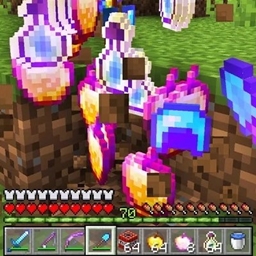
Tired of boring mob drops? This datapack makes every mob drop insane OP loot — balanced perfectly between fun and chaos 😎
⚙️ Features
🧱 Passive Mobs: Cows, Sheep, Pigs, Chickens, and more drop valuable resources like Iron, Emeralds, Obsidian, Golden Apples, XP Bottles, and food. Perfect for early survival boosts!
⚔️ Hostile Mobs: Zombies, Skeletons, Creepers, Spiders, Witches, etc. can drop random enchanted Diamond Armor & Tools, making every fight rewarding.
🔥 Special & Mini-Bosses: Piglin Brute, Ravager, Evoker, Guardian, Elder Guardian, Iron Golem — each has a unique themed loot table like Totems, Tridents, Prismarine, or Iron Blocks.
👑 Bosses: Warden,Dragon & wither Try The mod to know yourself😄 (easter_eggs)
🧩 Gameplay
Normal mobs → 2–3 random drops from 7–8 item pools Special mobs → fixed OP-themed drops Boss mobs → guaranteed legendary drops
🪓 Installation
Download the .zip Place it in your world’s datapacks folder Run /reload in-game Defeat mobs and enjoy your new god-tier loot!
💡 Details
🧱 Version: Minecraft 1.19 - 1.19.3
🧩 Type: Datapack (no Forge/Fabric required)
🧰 Works in Singleplayer & Multiplayer
💾 Fully survival-friendly