Mineuniverse
Data Packs
Ores Drop Op loot datapack

Ores Drop Op loot datapack

DATA PACK
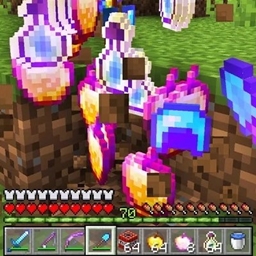
this datapack changes the loot table of ores and drop op items based on the rarity of ore
by Modular_Boy_Ansh
Download Claim this project
1,678 downloads
0 likes
0 followers
Updated Oct 14, 2026
0 hypes
Follow0
Magic Miscellaneous
Advertisement Remove ads with Premium →

💎 About:
Every ore in Minecraft drops custom OP items!
From Coal to Ancient Debris, each ore has unique themed loot — gear, potions, totems, even memes.

🧱 List of Ore Themes:

🪨 Coal – Starter OP loot

⚙️ Iron – Diamond gear & XP

💰 Gold – God loot + beacon

💎 Diamond – Full OP drops

🔮 Lapis – Potions

⚡ Redstone – Explosive tech

🪙 Copper – Builder’s gear

💚 Emerald – Villager treasure

🔥 Quartz – Nether energy

💀 Ancient Debris – Endgame god-tier

💡 Version: 1.19.2
⚙️ Pack format: 10
📦 Compatibility: Works in singleplayer + multiplayer
🎯 Made by: Modular Boy Ansh

🧨 How to install:
1️⃣ Download the ZIP
2️⃣ Put it in world/datapacks/
3️⃣ Run /reload
4️⃣ Start mining ores and get OP loot!


Ores Drop Op loot datapack
MC 1.19.3, 1.19.1, 1.19.2, 1.19
Release 2025-11-11 Get

Requirements & install

How to use this data pack in Minecraft
Mods needed
None, works in vanilla
Minecraft
1.19 – 1.19.3
Install folder
saves/<world>/datapacks

How to install data packs

  1. Download the data pack .zip file (do not extract it).
  2. New world: click Data Packs on the world creation screen and drop the .zip in. Existing world: open .minecraft/saves/<world>/datapacks.
  3. Put the .zip into the datapacks folder of the world (servers: world/datapacks).
  4. Run /reload in game (or rejoin the world) and check it with /datapack list.
Browse more: Data Packs for 1.19.3 All data packs

More from Modular_Boy_Ansh

Advertisement Remove ads with Premium →

You Might Also Like