Mineuniverse
Data Packs
Gravel Tweaks [Data Pack]

Gravel Tweaks [Data Pack]

DATA PACK
Adds the ability to allow you to pack and unpack gravel and also improves crafting
by auuruum
Download Claim this project
310 downloads
0 likes
0 followers
Updated Oct 14, 2026
0 hypes
Follow0
Miscellaneous Utility
Advertisement Remove ads with Premium →

Gravel Tweaks - Unleash the Potential of Gravel!

Dive into a world of crafting innovation with the Gravel Tweaks datapack for Minecraft! Tired of gravel being just another block in your adventures? This datapack breathes new life into gravel by introducing exciting crafting recipes that will revolutionize your gameplay.
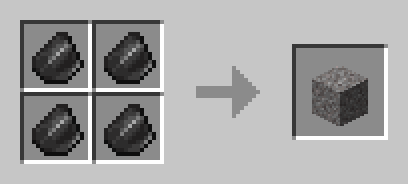
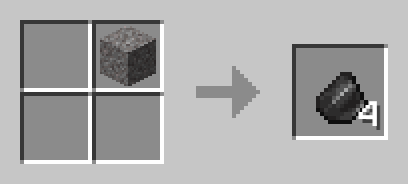
Crafting Recipes:

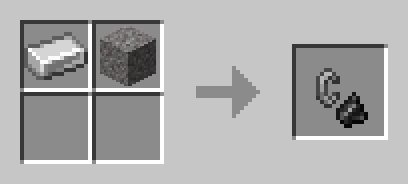
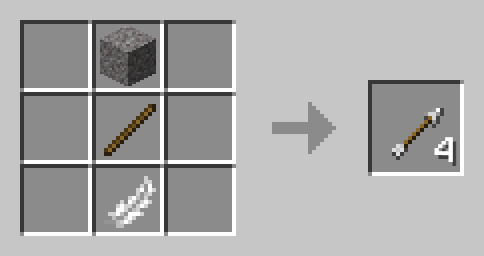
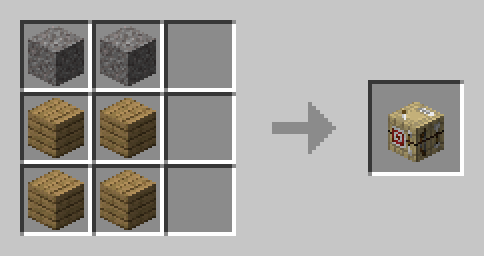
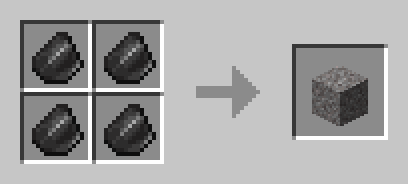
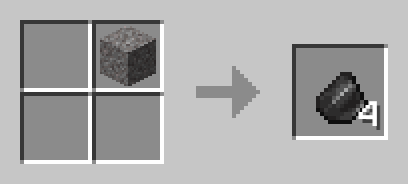
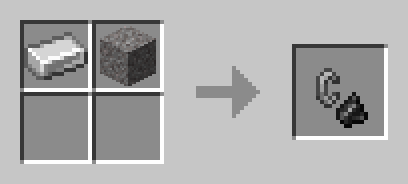
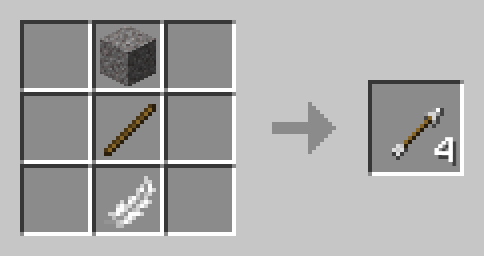
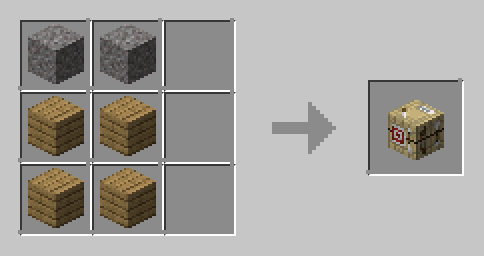
Gravel pack Gravel unpack Flint and steel Arrow Fletching table

How to Install:

  1. Download the Gravel Tweaks datapack.
  2. Place the downloaded file in the "datapacks" folder of your Minecraft world.

Unleash Your Creativity:

Gravel Tweaks opens up a world of possibilities, turning gravel into a valuable resource for your crafting endeavors. Explore the enhanced crafting experience, experiment with new recipes, and watch as your gameplay reaches new heights.

Revitalize your Minecraft experience with Gravel Tweaks – where gravel becomes the cornerstone of your crafting journey!

Gravel Tweaks (1.21.2-26.1.x)
MC 1.21.2-Snapshot, 1.21.6-snapshot, 1.21.8, 1.21.5, 1.21.4, 1.21.5-Snapshot, 1.21.6, 1.21.3, 1.21.7, 1.21.4-Snapshot, 1.21.2, 1.21.9-snapshot, 1.21.9, 1.21.10, 1.21.11-snapshot
Release 2025-12-04 Get
Gravel Tweaks (1.13x-1.20x)
MC 1.16.3, 1.13.1, 1.16-Snapshot, 1.17.1, 1.15-Snapshot, 1.16.1, 1.18.1, 1.20.2-Snapshot, 1.20.5-Snapshot, 1.14.3, 1.15, 1.16, 1.13, 1.19-Snapshot, 1.16.5, 1.19.3, 1.20.2, 1.19.4
Release 2025-11-28 Get
Gravel Tweaks (1.21-1.21.1)
MC 1.21.2-Snapshot, 1.21, 1.21.1-Snapshot, 1.21.1, 1.21-Snapshot
Release 2025-11-24 Get

Requirements & install

How to use this data pack in Minecraft
Mods needed
None, works in vanilla
Minecraft
1.21.6-snapshot – 1.21.11-snapshot
Install folder
saves/<world>/datapacks

How to install data packs

  1. Download the data pack .zip file (do not extract it).
  2. New world: click Data Packs on the world creation screen and drop the .zip in. Existing world: open .minecraft/saves/<world>/datapacks.
  3. Put the .zip into the datapacks folder of the world (servers: world/datapacks).
  4. Run /reload in game (or rejoin the world) and check it with /datapack list.
Browse more: Data Packs for 1.21.11-snapshot All data packs

More from auuruum

Advertisement Remove ads with Premium →

You Might Also Like