Mineuniverse
Data Packs
Dye Tweaks [Data Pack]

Dye Tweaks [Data Pack]

DATA PACK
Adds the ability to duplicate dyes efficiently
by auuruum
Download Claim this project
940 downloads
0 likes
Updated Oct 14, 2026
0 hypes
Miscellaneous Utility
Advertisement Remove ads with Premium →

Dye Tweaks Data Pack

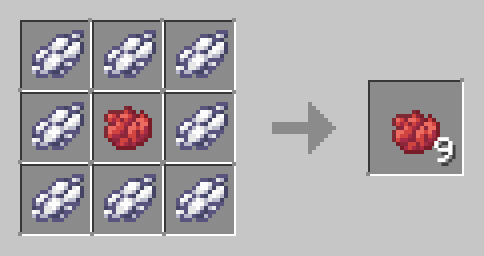
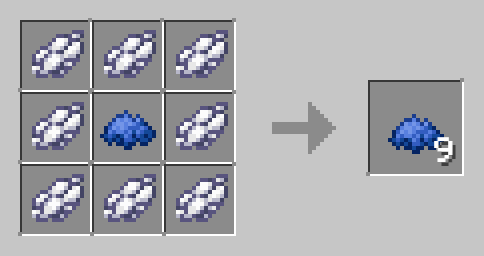
Enhance your Minecraft dye crafting with the Dye Tweaks data pack! This pack allows you to efficiently craft dyes by combining different dye colors using simple recipes.
Features:

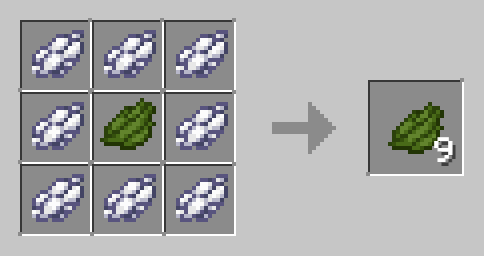
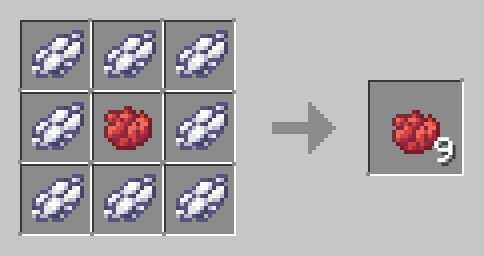
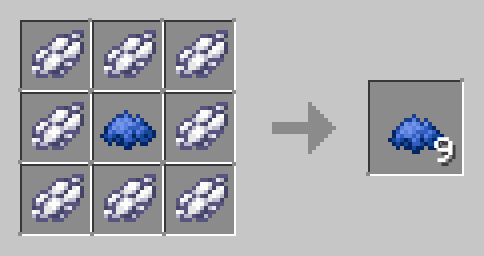
  • Efficient Dye Crafting: Convert white dye and any other dye into more of that dye efficiently.
  • Universal Recipes: Works with all dyes in Minecraft, making dye crafting versatile and straightforward.

Red dye Blue dye

How to Use:

  1. Download the Dye Tweaks Data Pack.
  2. Place the file in the "datapacks" folder of your Minecraft world save.
  3. Launch Minecraft and open your world.
  4. Use the /reload command to activate the data pack.
  5. Start crafting and enjoy more efficient dye production for all your building and decoration needs!

Compatibility:

  • No additional dependencies required.

Simplify Your Gameplay:

Streamline your dye crafting process with Dye Tweaks. Perfect for builders and decorators, this data pack ensures you have the dyes you need, when you need them.

Download Dye Tweaks now and color your Minecraft world with ease!

Dye Tweaks (1.21.2-26.1.x)
MC 1.21.2-Snapshot, 1.21.6-snapshot, 1.21.8, 1.21.5, 1.21.4, 1.21.5-Snapshot, 1.21.6, 1.21.3, 1.21.7, 1.21.4-Snapshot, 1.21.2, 1.21.9, 1.21.10, 1.21.11, 26.1, 26.1.1, 26.1.2, 26.2
Release 2024-12-23 Get
Dye Tweaks (1.21-1.21.1)
MC 1.21, 1.21.1-Snapshot, 1.21-Snapshot, 1.21.1
Release 2024-07-03 Get
Dye Tweaks(1.13x-1.20x)
MC 1.16-Snapshot, 1.17.1, 1.16.3, 1.13.1, 1.19.3, 1.20.2, 1.15-Snapshot, 1.16.1, 1.18.1, 1.19.4-Snapshot, 1.20.5, 1.14.4, 1.14.1, 1.17, 1.20.2-Snapshot, 1.20.5-Snapshot, 1.14.3, 1.15
Release 2024-06-08 Get

Requirements & install

How to use this data pack in Minecraft
Mods needed
None, works in vanilla
Minecraft
1.21.8 – 26.2
Install folder
saves/<world>/datapacks

How to install data packs

  1. Download the data pack .zip file (do not extract it).
  2. New world: click Data Packs on the world creation screen and drop the .zip in. Existing world: open .minecraft/saves/<world>/datapacks.
  3. Put the .zip into the datapacks folder of the world (servers: world/datapacks).
  4. Run /reload in game (or rejoin the world) and check it with /datapack list.
Browse more: Data Packs for 26.2 All data packs

More from auuruum

Advertisement Remove ads with Premium →

You Might Also Like