Mineuniverse
Data Packs
Mushroom Tweak [Data Pack]

Mushroom Tweak [Data Pack]

DATA PACK
Adds the ability to craft mushrooms using bone meal and existing mushrooms
by auuruum
Download Claim this project
695 downloads
0 likes
Updated Oct 14, 2026
0 hypes
Miscellaneous Utility
Advertisement Remove ads with Premium →

Mushroom Tweaks Data Pack

Enhance your Minecraft experience with Mushroom Tweaks, a datapack designed to make collecting mushrooms easier and more efficient! No more tedious mushroom hunts - now you can craft mushrooms with a simple combination of items.

Crafting Recipe Examples:

Bone Meal + Brown Mushroom = 1 Brown Mushroom Bone Meal + Red Mushroom = 3 Red Mushrooms

Crafting Recipes:

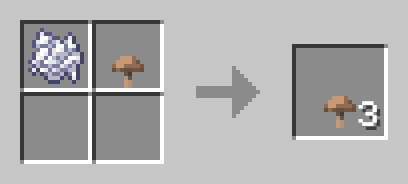
Brown Mushroom Crafting:

To craft a Brown Mushroom, use the following shapeless recipe:
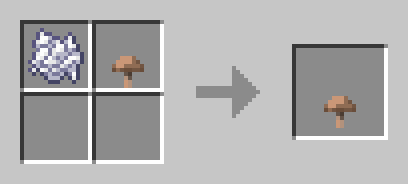
  • 1 Bone Meal
  • 1 Brown Mushroom

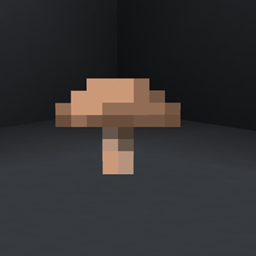
Brown mushroom

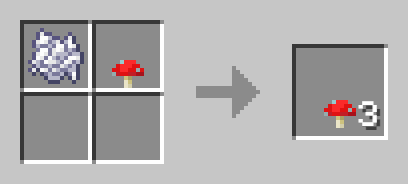
Red Mushroom Crafting:

To craft 3 Red Mushrooms, use the following shapeless recipe:
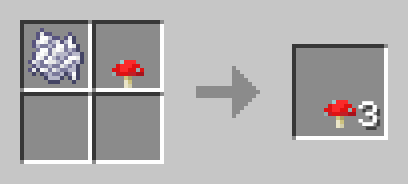
  • 1 Bone Meal
  • 1 Red Mushroom

Red mushroom

How to Use:

  1. Download the Mushroom Tweaks Datapack.
  2. Place the downloaded file into the "datapacks" folder in your Minecraft world save.
  3. Launch Minecraft and open your world.
  4. Use the /reload command to activate the data pack.
  5. Start crafting and enjoy easier access to mushrooms for your building and potion brewing needs!

Compatibility:

  • No additional dependencies required.

Simplify Your Gameplay:

Immerse yourself in a world where mushrooms are just a craft away. Whether you're a builder decorating with mushrooms or a brewer needing mushrooms for potions, Mushroom Tweaks adds a convenient touch to your Minecraft experience. Craft, build, and let your creativity flourish!

Download Mushroom Tweaks now and experience the convenience of crafted mushrooms in Minecraft!

Mushroom tweaks (1.21.2-26.1.x)
MC 1.21.2-Snapshot, 1.21.6-snapshot, 1.21.8, 1.21.5, 1.21.4, 1.21.5-Snapshot, 1.21.6, 1.21.3, 1.21.7, 1.21.4-Snapshot, 1.21.2, 1.21.9, 1.21.10, 1.21.11, 26.1, 26.1.1, 26.1.2, 26.2
Release 2024-12-23 Get
Mushroom tweaks (1.21-1.21.1)
MC 1.21, 1.21.1-Snapshot, 1.21-Snapshot, 1.21.1
Release 2024-07-03 Get
Mushroom tweaks (1.13x-1.20x)
MC 1.16-Snapshot, 1.17.1, 1.16.3, 1.13.1, 1.19.3, 1.20.2, 1.15-Snapshot, 1.16.1, 1.18.1, 1.19.4-Snapshot, 1.20.5, 1.14.4, 1.14.1, 1.17, 1.20.2-Snapshot, 1.20.5-Snapshot, 1.14.3, 1.15
Release 2024-06-08 Get

Requirements & install

How to use this data pack in Minecraft
Mods needed
None, works in vanilla
Minecraft
1.21.8 – 26.2
Install folder
saves/<world>/datapacks

How to install data packs

  1. Download the data pack .zip file (do not extract it).
  2. New world: click Data Packs on the world creation screen and drop the .zip in. Existing world: open .minecraft/saves/<world>/datapacks.
  3. Put the .zip into the datapacks folder of the world (servers: world/datapacks).
  4. Run /reload in game (or rejoin the world) and check it with /datapack list.
Browse more: Data Packs for 26.2 All data packs

More from auuruum

Advertisement Remove ads with Premium →

You Might Also Like