Mineuniverse
Data Packs
Flower Tweaks [Data Pack]

Flower Tweaks [Data Pack]

DATA PACK
Adds the ability to craft and crossbread for flowers and grass
by auuruum
Download Claim this project
2,044 downloads
0 likes
Updated Oct 14, 2026
0 hypes
Miscellaneous Utility
Advertisement Remove ads with Premium →

Flower Tweaks Datapack

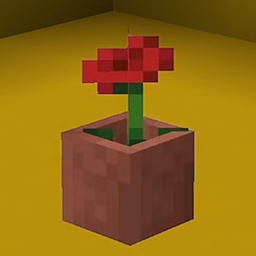
Enhance your Minecraft experience with Flower Tweaks, a datapack designed to transform the way you interact with flora in the game! No more tedious flower hunts - now you can craft your favorite blossoms with a simple combination of items.


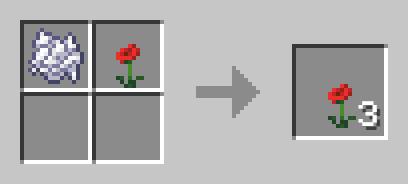
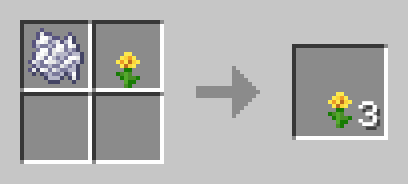
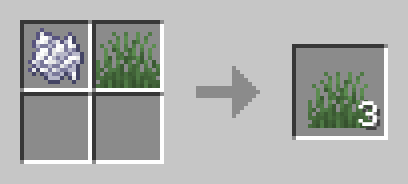
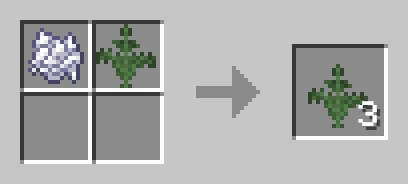
Crafting Recipe Example: Bonemeal + Flower = 3 Flowers


How to Use:
1. Download the Flower Tweaks Datapack.
2. Place the downloaded file into the "datapacks" folder in your Minecraft world save.
3. Start crafting and watch your Minecraft landscapes bloom with vibrant colors!


Compatibility:
- No additional dependencies required.


Explore a World of Color:
Immerse yourself in a world where flowers are just a craft away. Whether you're a seasoned builder or a casual player, Flower Tweaks adds a delightful touch to your Minecraft adventures. Craft, decorate, and let your creativity flourish!

Download Flower Tweaks now and experience the beauty of crafted blooms in Minecraft!

Flower Tweaks (1.21.2-26.1.x)
MC 1.21.2-Snapshot, 1.21.6-snapshot, 1.21.8, 1.21.5, 1.21.4, 1.21.5-Snapshot, 1.21.6, 1.21.3, 1.21.7, 1.21.4-Snapshot, 1.21.2, 1.21.9, 1.21.10, 1.21.11, 26.1, 26.1.1, 26.1.2, 26.2
Release 2024-12-22 Get
Flower Tweaks (1.13)
MC 1.13.1, 1.13, 1.13-Snapshot, 1.13.2
Release 2024-12-22 Get
Flower Tweaks (1.21-1.21)
MC 1.21, 1.21.1-Snapshot, 1.21-Snapshot, 1.21.1
Release 2024-07-03 Get
Flower Tweaks (1.20-1.20.2)
MC 1.20.2, 1.20.2-Snapshot, 1.20.1, 1.20, 1.20-Snapshot
Release 2024-04-28 Get
Flower Tweaks (1.20.3-1.20.6)
MC 1.20.5, 1.20.5-Snapshot, 1.20.3-Snapshot, 1.20.3, 1.20.6, 1.20.4
Release 2024-03-06 Get

Requirements & install

How to use this data pack in Minecraft
Mods needed
None, works in vanilla
Minecraft
1.21.8 – 26.2
Install folder
saves/<world>/datapacks

How to install data packs

  1. Download the data pack .zip file (do not extract it).
  2. New world: click Data Packs on the world creation screen and drop the .zip in. Existing world: open .minecraft/saves/<world>/datapacks.
  3. Put the .zip into the datapacks folder of the world (servers: world/datapacks).
  4. Run /reload in game (or rejoin the world) and check it with /datapack list.
Browse more: Data Packs for 26.2 All data packs

More from auuruum

Advertisement Remove ads with Premium →

You Might Also Like