Badges update automatically and link to the data pack page on MineUniverse.
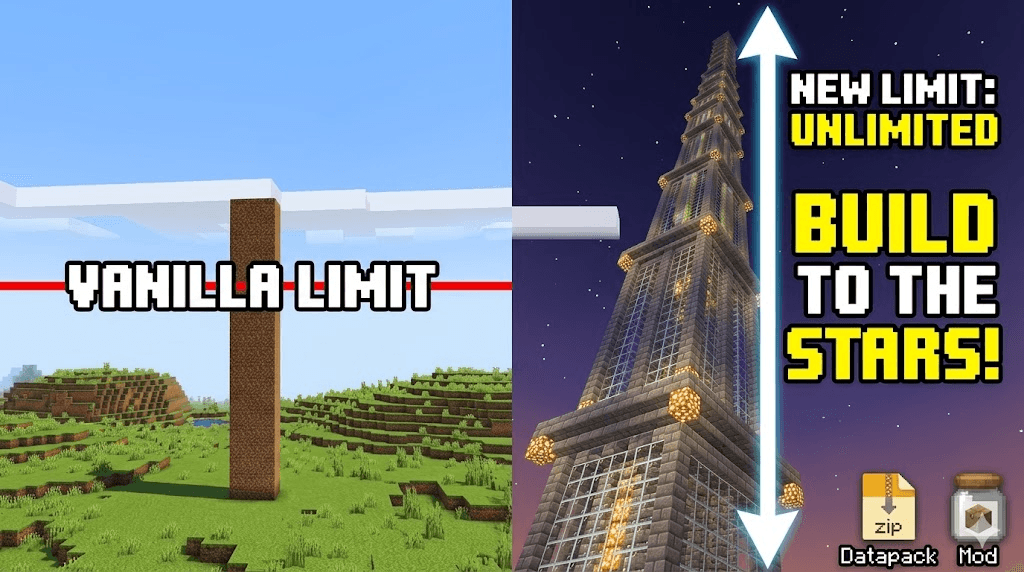
Extended Build Limit is designed for builders, terraformers, and modpack creators who find the standard Minecraft world height too restrictive. Whether you are building a space elevator reaching into the clouds or a sprawling subterranean empire in the deep dark, this project removes the invisible walls holding you back.
To ensure maximum compatibility for every type of player, Extended Build Limit is distributed in two formats:
As a Mod: Drop the .jar into your mods folder for a seamless, automated setup. Supports Fabric, Quilt, and NeoForge.
As a Datapack: Perfect for vanilla servers or players who prefer not to use mod loaders. Simply add the .zip to your world’s datapacks folder.
Massive Verticality: Extends the building range far beyond the standard $Y = -64$ to $Y = 320$.
Seamless Integration: Fully compatible with major world-generation mods like Terralith, Tectonic, and Nullscape.
Vanilla Friendly: Does not add new blocks or items, ensuring your world remains "vanilla-plus" and safe for future updates.
Server-Side Optimized: Optimized to maintain high TPS (Ticks Per Second) even with the increased chunk data.
Download the version corresponding to your loader (Fabric/Quilt/NeoForge).
Place the file in your .minecraft/mods folder.
Launch the game and create a new world (or backup an existing one).
Download the .zip version of the project.
In the Minecraft World Selection screen, click Edit > Open World Folder.
Place the zip file into the datapacks folder.
Run /reload in-game or restart the world.
⚠️ A Note on Performance: Increasing the build limit increases the amount of data per chunk. While this project is optimized, players on lower-end hardware may need to adjust their render distance for the best experience.