Mineuniverse
Data Packs
Craftable Bedrock

Craftable Bedrock

DATA PACK
Makes bedrock craftable, for permanent builds. Be careful where you place it!
by StaticLabs
Download Claim this project
Add a badge to your pageLink to Craftable Bedrock from a README, website or forum post.
Preview: Badge

Badges update automatically and link to the data pack page on MineUniverse.

2,003 downloads
0 likes
0 followers
Updated Oct 14, 2026
0 hypes
Follow0
Utility
Advertisement Remove ads with Premium →

Craftable Bedrock Datapack

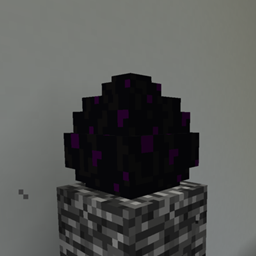
Tired of bedrock being an unmovable, uncraftable barrier in your Minecraft world? This datapack changes everything! With this datapack, you can now craft bedrock using a simple yet substantial recipe: 9 blocks of obsidian.
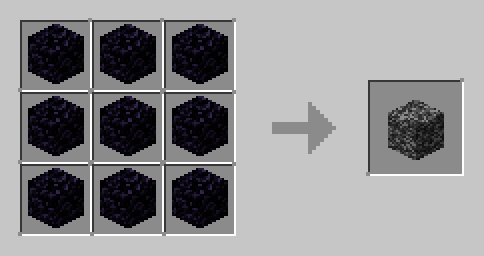
Imagine the possibilities! Build truly indestructible bases, create unbreachable vaults, or design challenges with ultimate barriers. No longer confined by the limitations of vanilla gameplay, your creativity can now reach new, unbreakable heights.

Download the "Unbreakable Creations" datapack today and start building the ultimate, unbreakable structures in your Minecraft world!

Note: Minecraft might say that the datapack is incompartable with the minecraft version. However this is not true. It can be used safely in minecraft 1.13.x to 1.21.x without any problems

1.13.zip
MC 1.13.1, 1.13, 1.13.2
Release 2025-07-30 Get
1.14.zip
MC 1.14.4, 1.14.1, 1.14.3, 1.14, 1.14.2
Release 2025-07-30 Get
1.15.zip
MC 1.15, 1.15.2, 1.15.1
Release 2025-07-30 Get
1.16.zip
MC 1.16.3, 1.16.1, 1.16, 1.16.5, 1.16.4, 1.16.2
Release 2025-07-30 Get
1.17.zip
MC 1.17.1, 1.17
Release 2025-07-30 Get
1.18.zip
MC 1.18.1, 1.18.2, 1.18
Release 2025-07-30 Get
1.19.zip
MC 1.19.3, 1.19.4, 1.19.2, 1.19.1, 1.19
Release 2025-07-30 Get
1.20.zip
MC 1.20.2, 1.20.5, 1.20.3, 1.20.1, 1.20, 1.20.6, 1.20.4
Release 2025-07-30 Get
1.21.zip
MC 1.21, 1.21.8, 1.21.5, 1.21.4, 1.21.1, 1.21.6, 1.21.3, 1.21.7, 1.21.2, 1.21.9-snapshot, 1.21.9, 1.21.10, 1.21.11, 26.1, 26.1.1, 26.1.2
Release 2025-07-30 Get

Requirements & install

How to use this data pack in Minecraft
Mods needed
None, works in vanilla
Minecraft
1.21.8 – 26.1.2
Install folder
saves/<world>/datapacks

How to install data packs

  1. Download the data pack .zip file (do not extract it).
  2. New world: click Data Packs on the world creation screen and drop the .zip in. Existing world: open .minecraft/saves/<world>/datapacks.
  3. Put the .zip into the datapacks folder of the world (servers: world/datapacks).
  4. Run /reload in game (or rejoin the world) and check it with /datapack list.
Browse more: Data Packs for 26.1.2 All data packs

More from StaticLabs

Advertisement Remove ads with Premium →

You Might Also Like